Welcome to the Onshape forum! Ask questions and join in the discussions about everything Onshape.
First time visiting? Here are some places to start:- Looking for a certain topic? Check out the categories filter or use Search (upper right).
- Need support? Ask a question to our Community Support category.
- Please submit support tickets for bugs but you can request improvements in the Product Feedback category.
- Be respectful, on topic and if you see a problem, Flag it.
If you would like to contact our Community Manager personally, feel free to send a private message or an email.
Moving a part to a different part of the plane

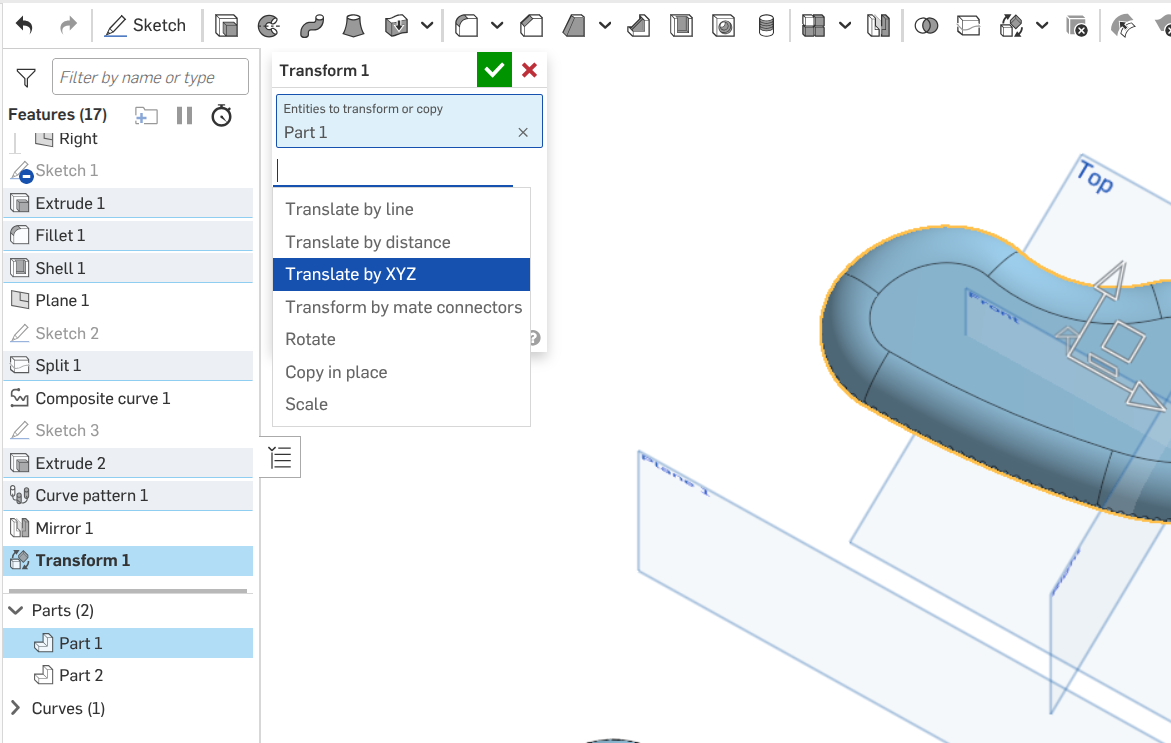
How do I select an entire part to move it out of the way… I created a part (on the top plane), created a mirror of the part, then wanted to enlarge the original part, but it now overlaps the mirrored part.. I just want to move part 1 over to allow the enlargement. I see that a "triad" is supposed to show up but none does when I select the part.
Answers
-
Change your sketch dimensions. What are you using for the mirror line? Check the relationship between that and your part.
Engineering textbook: https://hwh.stephenteacher.com/txtbook.html1 -
To get the 'Triad' you'll need to use the 'Transform' tool/feature in 'Translate by XYZ' mode [see below]
Unemployed Onshaper- Operating on European time - More of me here ➤➤ https://linktr.ee/Liam.G0

