Welcome to the Onshape forum! Ask questions and join in the discussions about everything Onshape.
First time visiting? Here are some places to start:- Looking for a certain topic? Check out the categories filter or use Search (upper right).
- Need support? Ask a question to our Community Support category.
- Please submit support tickets for bugs but you can request improvements in the Product Feedback category.
- Be respectful, on topic and if you see a problem, Flag it.
If you would like to contact our Community Manager personally, feel free to send a private message or an email.
Dynamic Suppression of features based expression if a certain Configuration is active

I like to suppress feature based on the configuration, is there a way to do this in the dynamic suppression expression to check which configuration is active or some other way. I can make a variable and set it but this would be simpler.
Best Answer
-
Yes, and there are more ways to do this but here is a starting point for you:
https://cad.onshape.com/documents/a3700d230eeefbe266f4830b/w/b0ecc9fe904f82db35bd955f/e/67bd2110e7791….And here is a guide for How to use logical operators 📌
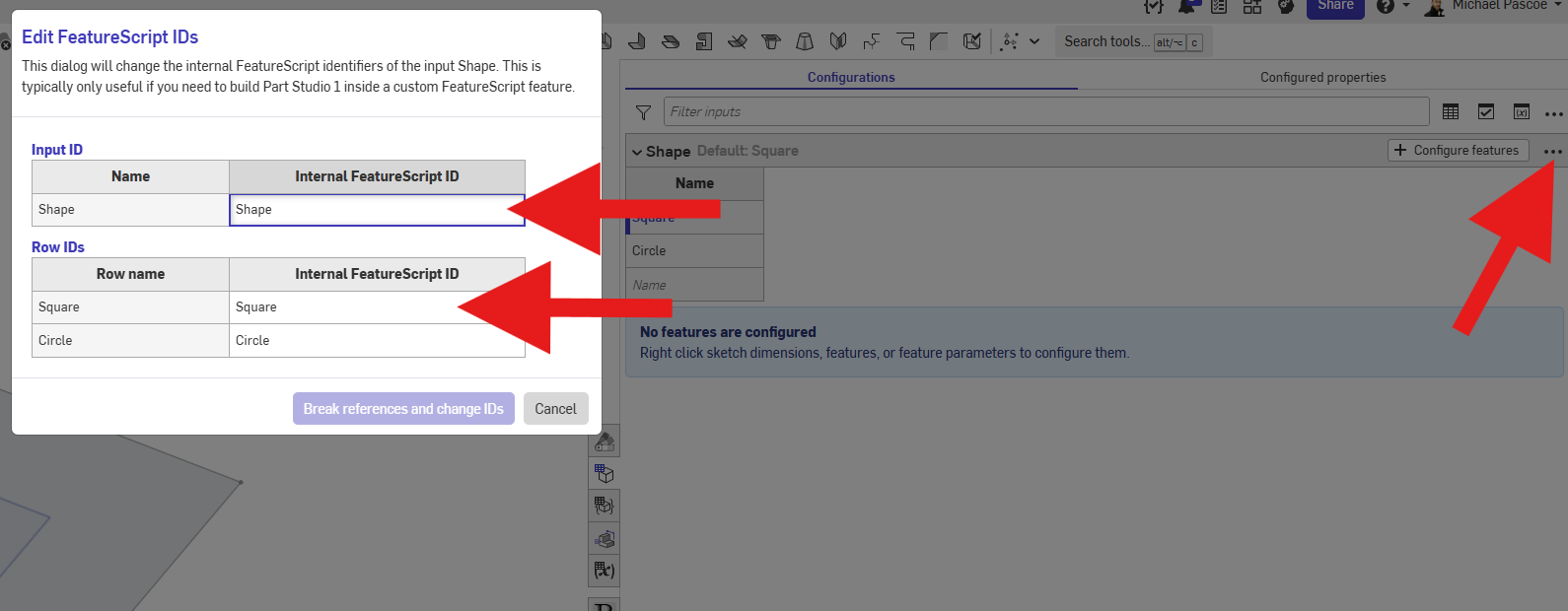
- Set the configuration's feature id's to something you can actually type like "Shape":
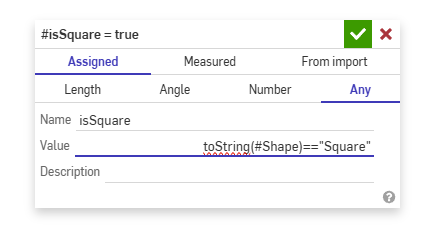
- Create a variable "isSquare" or whatever you want to describe and use operators
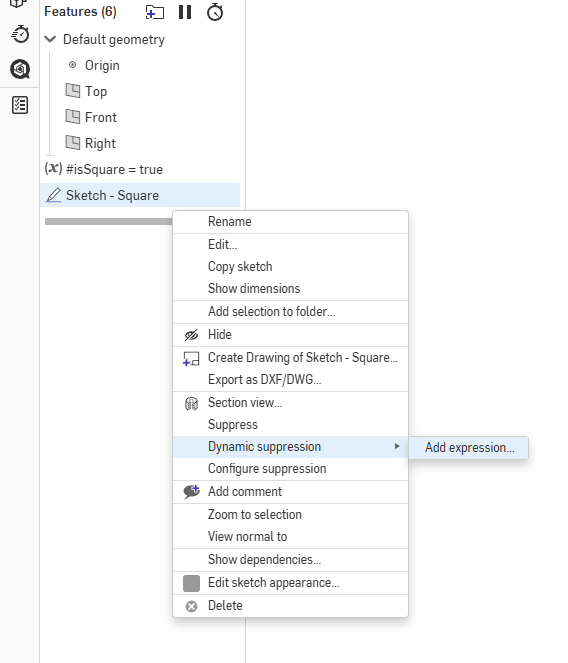
- Right click the feature and add the dynamic suppression expression to it, here is where you can insert your "isSquare" variable.
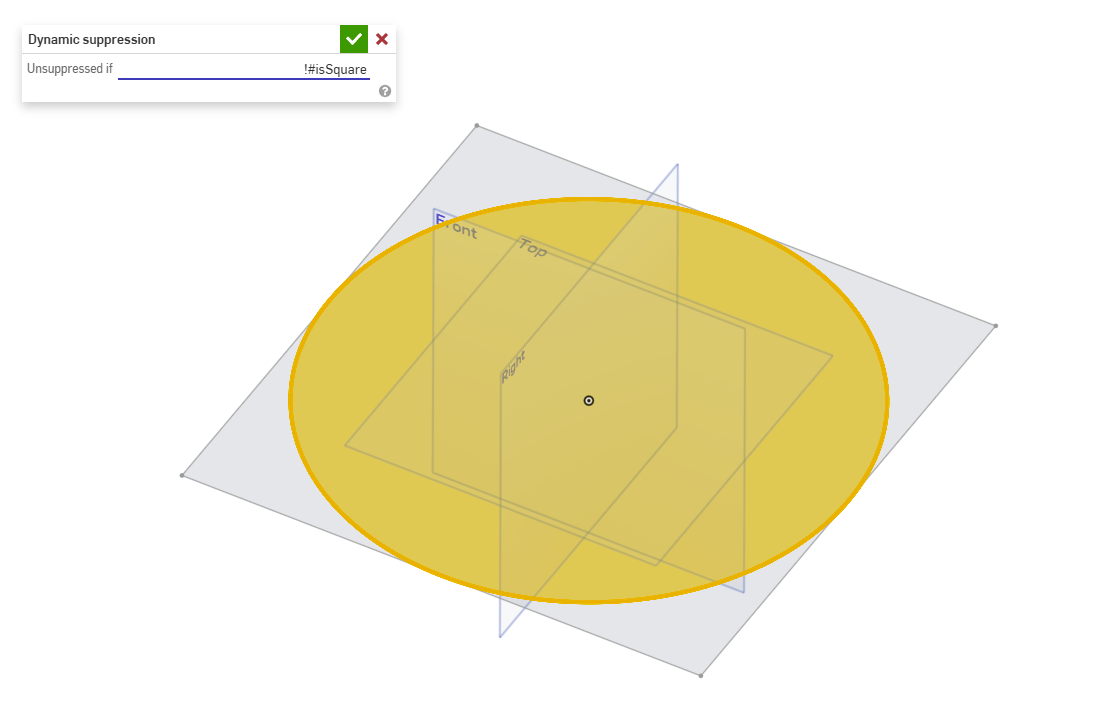
- Do the same thing for your "circle sketch" except insert !#isSquare which will reverse the true false value.
Note: you can control selections and queries with this kind of logic too, but query variable doesn't support it yet so you will have to use something like Query Finder feature to easily turn them into variables that you can modify.
RENDERCAD
rendercad.ai - Photorealistic product rendering.
▚▞▚▞▚▞▚▞▚
________________________________________________________________________1

Answers
-
Yes, and there are more ways to do this but here is a starting point for you:
https://cad.onshape.com/documents/a3700d230eeefbe266f4830b/w/b0ecc9fe904f82db35bd955f/e/67bd2110e7791….And here is a guide for How to use logical operators 📌
- Set the configuration's feature id's to something you can actually type like "Shape":
- Create a variable "isSquare" or whatever you want to describe and use operators
- Right click the feature and add the dynamic suppression expression to it, here is where you can insert your "isSquare" variable.
- Do the same thing for your "circle sketch" except insert !#isSquare which will reverse the true false value.
Note: you can control selections and queries with this kind of logic too, but query variable doesn't support it yet so you will have to use something like Query Finder feature to easily turn them into variables that you can modify.
RENDERCAD
rendercad.ai - Photorealistic product rendering.
▚▞▚▞▚▞▚▞▚
________________________________________________________________________1 -
There are cases when what Michael is suggesting is necessary, but for most common cases, you can just configure suppression with the relevant config input and then convert one or more of the cells to an expression by right-clicking in the configuration table.
Ilya Baran \ VP, Architecture and FeatureScript \ Onshape Inc1 -
oops, i read too far into it 😁
thought you were wanting to control those features via multiple configurations rather than one configuration.
RENDERCAD
rendercad.ai - Photorealistic product rendering.
▚▞▚▞▚▞▚▞▚
________________________________________________________________________0 -
This still requires a variable to be created. I was hoping for a way to do it without a variable by directly accessing the configuration name at the dynamic configuration expression maybe something like: ([config]=="Default?True:False)
0 -
Don't suppose there's a way to skip creating the variable and directly access the configuration ID? toString([current_configuration])=="Default"
0 -
You can skip creating the variable and directly insert the equation into the dynamic suppression, but this will make redundant work for yourself so its best practice to create a variable first.
Also this method is not needed at all if you only have 1 configuration list like @ilya_baran mentioned. Simply right click the feature and "configure with [name of your configuration]. This will let you turn the feature on or off for different values of the list.
RENDERCAD
rendercad.ai - Photorealistic product rendering.
▚▞▚▞▚▞▚▞▚
________________________________________________________________________0

