Welcome to the Onshape forum! Ask questions and join in the discussions about everything Onshape.
First time visiting? Here are some places to start:- Looking for a certain topic? Check out the categories filter or use Search (upper right).
- Need support? Ask a question to our Community Support category.
- Please submit support tickets for bugs but you can request improvements in the Product Feedback category.
- Be respectful, on topic and if you see a problem, Flag it.
If you would like to contact our Community Manager personally, feel free to send a private message or an email.
Having trouble embossing text
 steve_nicholson
Member Posts: 4 ✭
steve_nicholson
Member Posts: 4 ✭
In this document: https://cad.onshape.com/documents/7d56489440e818e2151cff6b/w/f6d15c91dedc536a400745fe/e/634b8976ea2ed00957004a8d I'm trying to emboss text into the design. I'm getting the error "Boolean operation failed to return a valid part."
I've done this successfully in this nearly-identical document:. https://cad.onshape.com/documents/235c7bd416a26b6523d81221/w/327c39f03cfe9e6e85b0e6d7/e/6da6c986213e2d482ec6dc79?renderMode=0&uiState=69e6d2ba307af23352c3bfda).
Here are the things I've confirmed between the two documents:
• Both "Template" sketches are on the Front plane.
• Both "Extrude Template" extrusions extrude "Faces of Template" back from the Front plane.
• Both "Text" sketches are on the Front plane.
• Both "Extrude Text" extrusions extrude "Faces of Text", are set to Solid/Remove, and extend in the same direction as the "Extrude Template" extrusions.
I can't figure out what the difference is that makes one work and the other not work.
Best Answer
-
nick_papageorge_dayjob
Member, csevp Posts: 1,245 PRO
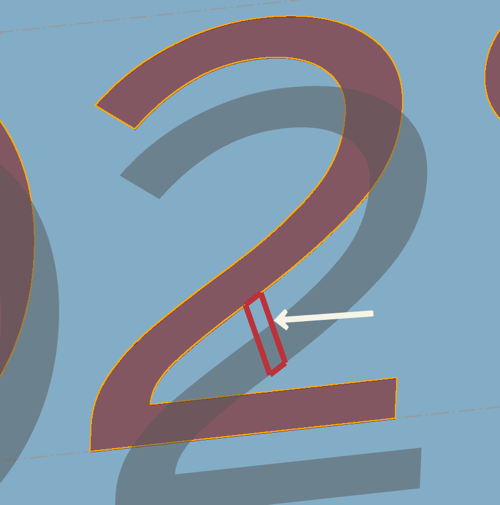
This was tough to figure out. It's the number "2". If you replace it with another number it works fine, or if you change the font it works fine. If you add back the number 2 it fails. I believe this is a bug with the font and the number 2. @NeilCooke would you pleease look at this and see if its a bug? The font is Didact Gothic.
 1
1
Answers
This was tough to figure out. It's the number "2". If you replace it with another number it works fine, or if you change the font it works fine. If you add back the number 2 it fails. I believe this is a bug with the font and the number 2. @NeilCooke would you pleease look at this and see if its a bug? The font is Didact Gothic.
Thanks! I never would have figured that out.