Welcome to the Onshape forum! Ask questions and join in the discussions about everything Onshape.
First time visiting? Here are some places to start:- Looking for a certain topic? Check out the categories filter or use Search (upper right).
- Need support? Ask a question to our Community Support category.
- Please submit support tickets for bugs but you can request improvements in the Product Feedback category.
- Be respectful, on topic and if you see a problem, Flag it.
If you would like to contact our Community Manager personally, feel free to send a private message or an email.
How to Revolve, can't select the axis

Learning Onshare on Android phone. I can extrude, easy. But I can't figure how to revolve. On front plane normal, I sketch a line and rectangle, then select the rectangle as region to revolve, and then click on the line as an axis but the message says another region selected and then asks to select axis again. I'm baffled.
Best Answer

Answers
-
Should work. Please post a link to your document. - Scotty
0 -
If you tap hold you should get a cross hair that you can zero in on the line vs region
0 -
Robert Scott Jr,
I don't know how to make the link, but on the public list it shows up as 'k - Copy' document right now. It is just a vertical line and a rectangle on the front plane.
MDesign,
I tap held and moved the crosshair over the line, clicked, but the result again was "Select axis". Onshape doesn't recognize the line.
0 -
I don't know how to make the link, but on the public list it shows up as 'k - Copy' document right now. It is just a vertical line and a rectangle on the front plane.
0 -
I tap held and moved the crosshair over the line, clicked, but the result again was "Select axis". Onshape doesn't recognize the line as an axis.
0 -
I'm guessing your line may not be a line then. Not sure without seeing the document. tap the 3 dot menu top right then the share icon on the left. then click copy link and paste it into a message
0 -
Dave, click "share" near the top right of the page, then "link sharing" near the bottom left of the window, then " copy to clipboard" and post it here.
I was surprised when I searched the public documents, that there are countless documents named " k-copy".
0 -
Thanks, I see the 'copy link'.
0 -
This is the link to "k" document.
All my A through L documents have stalled at "select the axis", I keep trying different things but no progress.
0 -
About 5 hours ago, I did find the link copy, and pasted it here in a comment, but now I don't see the comment. I will try again in a minute.
Jim, yeah, when I searched for k-Copy, I didn't think I'd see others. All my documents are a, b, c, d… since I'm new and just trying to figure out the basics.
0 -
Hey David. You got this resolved? I made a copy of your document, selected the rectangle as the face to revolve and the separate vertical line for the axis and the revolve was successful. - Scotty
0 -
I get a "no permission" error with that link.
On the posting delay, that happens when you're new here. I guess once the moderators trust you they remove the delay. Was happening to me until few weeks ago.
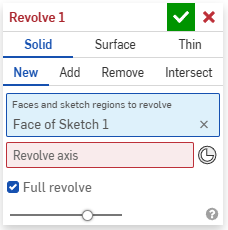
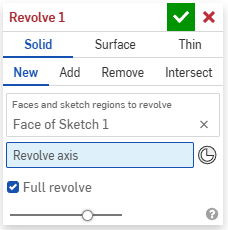
Is it possible you have the rectangle and the line in the same field in the Revolve window? I've done that many times with things like Revolve, Split, etc. If you hover your mouse over the word "Revolve" in that window you get a clue to where the error is.
Also, if you're trying to do this on a phone browser it can be damn near impossible to select things sometimes.
https://cad.onshape.com/documents/045e1e897c957d52a09c87ce/w/51754e080c76609b5890fe24/e/22379371600fb7e762e201b9?renderMode=0&uiState=69f09f9dc1e77a4c470ceafa
0 -
0
-
-
I think a phone makes learning OS extra hard, for using it on a phone is already a challenge for experienced users. Try learning at least the basics on a real PC until you figured out how the tools are supposed to work, then transition to a mobile device. Just my 2 cents.
1 -
It absolutely is harder on a phone or tablet. I cringe when I need to do it. But it's very cool and convenient that you can do it.
1 -
@MDesign That's true. I sometimes use it to view models in meetings, in case I can't remember certrain key measurements, or to make a minor change, prefereably to a variable, at the meeting, then send them the link to the updated design right away from my phone. That oozes professionalism and efficiency. ;0)
Taking on site measurements is another useful application for the phone, though I'd usully prepare a rough document up front and only enter the exact mesaurements as they are taken.
I'd never attempt to create a design from scratch on my phone, though. A tablet might be an option, but I love my large screen for doing actual design work.
1 -
The only thing I use the phone for is to show off the cool thing I'm working on :-) Otherwise it is absolutely maddening.
0 -
Thank you all for your attentive assistance.
I missed one tiny step, and spent hours lost.
Eric's picture showed me my error. I needed to click the axis box before clicking the vertical line.
It's so obvious now. I did complete the revolve operation, no problem at all.
I have done many of the exercises and will continue to learn. I do have access to a computer occasionally, and then can simultaneously read a lesson and do the exercise, which is very useful.
Thanks again.
DD
0



