Welcome to the Onshape forum! Ask questions and join in the discussions about everything Onshape.
First time visiting? Here are some places to start:- Looking for a certain topic? Check out the categories filter or use Search (upper right).
- Need support? Ask a question to our Community Support category.
- Please submit support tickets for bugs but you can request improvements in the Product Feedback category.
- Be respectful, on topic and if you see a problem, Flag it.
If you would like to contact our Community Manager personally, feel free to send a private message or an email.
"Use" command in a sketch does not update after upstream changes

I have a part studio that has a body that is a composite of multiple bodies (all defined from the start in Onshape in this feature tree). After the Boolean, I select a face that spans across what used to be multiple bodies and start a sketch. I click the "use" command to convert the edge bounds of that face to a sketch, and save the sketch. That works as expected. But, If I then go back and change the bodies in the Boolean higher up in the feature tree, the reference in the "use" command breaks. The sketch still looks like the previous face, and is still fully defined to any edges that did not change, but any edges that did change are now undefined and throwing an error.
Is there a way to have the use command update to the current state of the face it was referencing? I attempted to write a featurescript to handle this case without luck, so am hoping there is a native workaround, as that would be more preferred and theoretically more robust. If there isn't a workaround I'll post a new question with my attempt at a feature script.
Thank you!
Best Answer
-
I see what you're trying to do now. I'm not an expert on the subject, but maybe I can shine some light on what's happening. I created two simple examples that I hope are more hlepful. I'm posting some gifs and will come back and explain them later because I'm out of time. The way I see the scenarios, they're pretty equivalent to what you're doing.
But the simplest explanation is that:- When you change the boolean scope (switching from a square to a circle), you're breaking the link between the edges you selected previously.
- Inside a sketch, USE takes the face and extract the edges from the face to create the sketch lines. But now those sketch lines can't point back to their source.
- I would use Query Variables to try to fix this, but as far as I know, you can't summon query variables inside of a sketch, especially not for the Use command.
- Faces are more stable than edges. So when you extrude from face, you're still selecting the same face (has the same ID).
- Faces can break too, but you're happening to select a cap entity, which is a pretty stable reference.
Example 1:
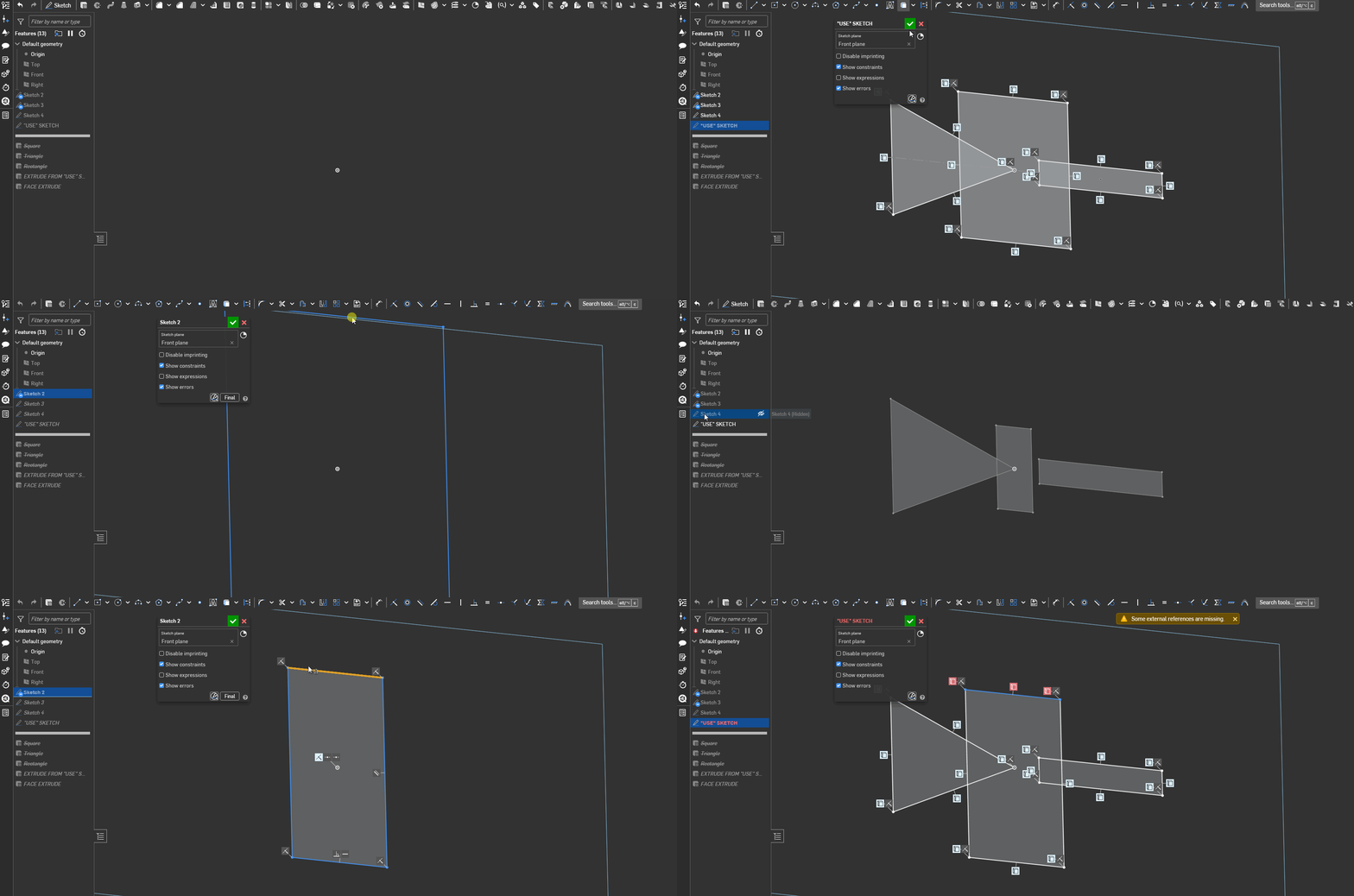
Example 2: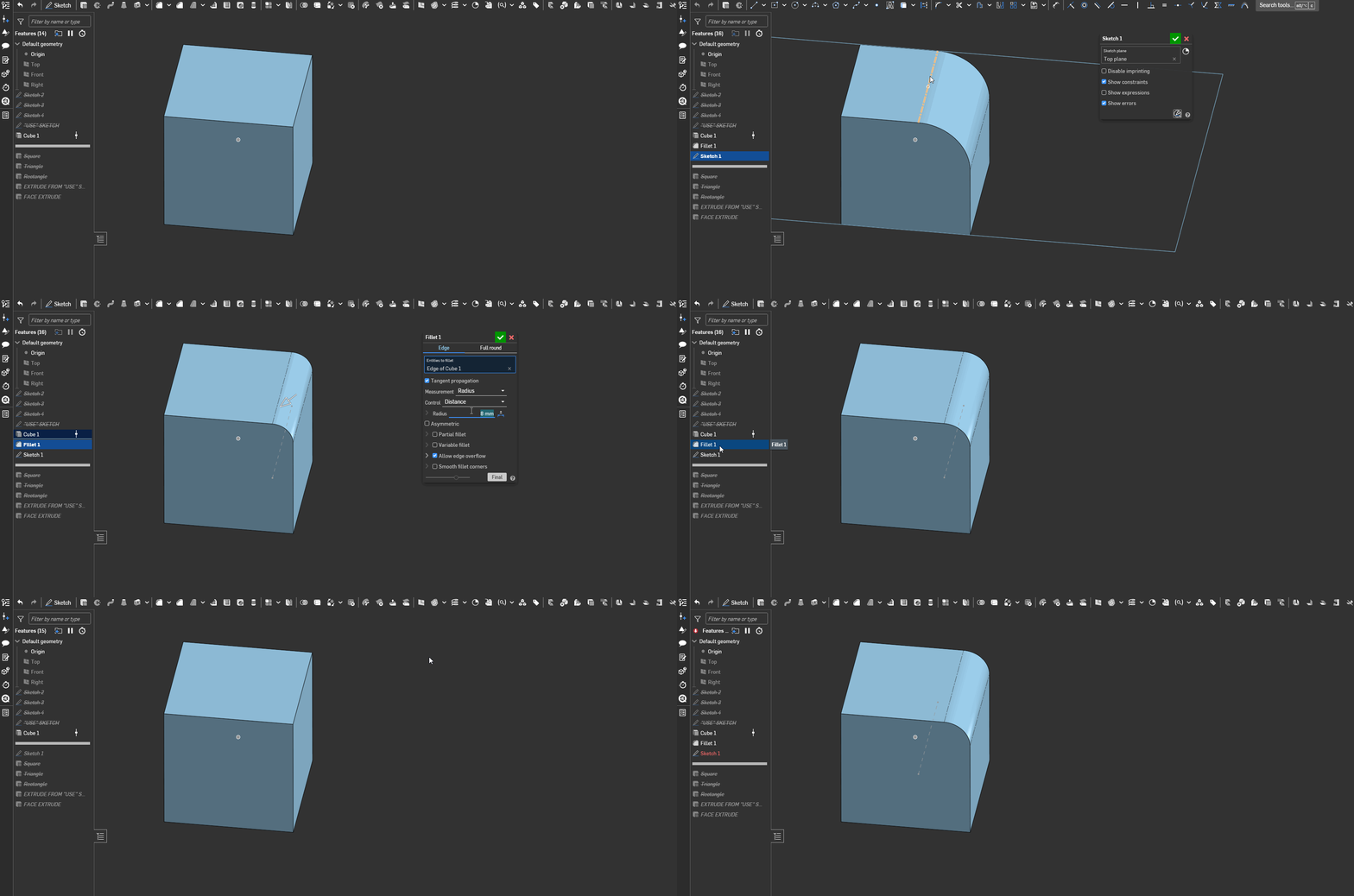
The good thing is that you already found a solution to your problem.
Ramon Yip | glassboard.com
0

Answers
-
If the face you used as a reference disappears because you changed it or removed it (that includes boolean), then the Use feature will always fail. You need to find a way to keep your source reference stable. Reference a sketch or a plane instead of a face that you modify.
Ramon Yip | glassboard.com
0 -
@ry_gb thank you for the reply. This makes sense, but what I still don't understand is that any unchanged edges of the face I selected are still locked and do not throw errors. This implies the internal reference of that face is still recorded properly, so why isn't there a way to "update" or rerun the use command on the updated face?
I ask because I work with a lot of complex geometry and find myself using the use command in sketches all the time, and run into this issue often, enough so that I might write a feature script feature to combat this.
Thank you!
0 -
Do you have a link to the file you're working on? That would help diagnose your current problem.
Ramon Yip | glassboard.com
0 -
I run into this issue a lot, so instead of sharing a more complex file, I created a public document to showcase just this issue, and I will leave it in it's error state.
The basic idea of this file: I have 4 bodies that all overlap. A circle, a triangle, a rectangle and a square. I boolean the Triangle, square and rectangle together, then start a sketch on the resulting face, and use the "use command" to grab all of the outer edges of that face. I call that the "USE SKETCH", and then extrude the sketch called "EXTRUDE FROM USE SKETCH". This works perfectly if I do this in this order. But now, if I go back to the boolean and instead of the square, I pick the circle, the result is a single body with a face on the same plane, but the outline of that body is different. Now "USE SKETCH" fails, still referencing the edges of square having not updated to circle.
Oddly enough, if I skip the sketch stage and just use the face generated as the input to an extrude directly, the resulting extrude does update with the boolean (FACE EXTRUDE in my example doc). Why does the direct extrude from a face work, but the sketch fail?
0 -
I see what you're trying to do now. I'm not an expert on the subject, but maybe I can shine some light on what's happening. I created two simple examples that I hope are more hlepful. I'm posting some gifs and will come back and explain them later because I'm out of time. The way I see the scenarios, they're pretty equivalent to what you're doing.
But the simplest explanation is that:- When you change the boolean scope (switching from a square to a circle), you're breaking the link between the edges you selected previously.
- Inside a sketch, USE takes the face and extract the edges from the face to create the sketch lines. But now those sketch lines can't point back to their source.
- I would use Query Variables to try to fix this, but as far as I know, you can't summon query variables inside of a sketch, especially not for the Use command.
- Faces are more stable than edges. So when you extrude from face, you're still selecting the same face (has the same ID).
- Faces can break too, but you're happening to select a cap entity, which is a pretty stable reference.
Example 1:
Example 2:
The good thing is that you already found a solution to your problem.
Ramon Yip | glassboard.com
0 -
I appreciate the detailed reply and the gifs, the first one is exactly what I was trying to showcase! I agree this is accurate to what is happening behind the scenes. I am working on a feature script that takes in a face and generates a sketch dynamically, leveraging the stability of faces to my advantage. This will work well with operations that prefer sketches (in my experience, there are a few that work better with sketches instead faces) but maintain flexibility in the feature tree.
Thanks!
0 -
I wish that the Use command could work with Query Variable - edge selection sets. This would help with this particular problem ( I run into this regularly as well). Sometimes I NEED a sketch (to show a reference sketch on a drawing for instance) and the only way to get the sketch edges is the Use command. I do find that the empty sketch (new sketch - select face - accept sketch) then do the Use command in a different sketch - selecting the Face that is imprinted in the first sketch) seems to be more robust.
Still breaks pretty often though.
0 -
That sounds like a cool script! I'm very curious to see how you do that, given that Use isn't available in the sketch tools for FeaturesScript.
When you write your script,qCapEntitieswill probably be particularly useful for this exercise.Ramon Yip | glassboard.com
0