Welcome to the Onshape forum! Ask questions and join in the discussions about everything Onshape.
First time visiting? Here are some places to start:- Looking for a certain topic? Check out the categories filter or use Search (upper right).
- Need support? Ask a question to our Community Support category.
- Please submit support tickets for bugs but you can request improvements in the Product Feedback category.
- Be respectful, on topic and if you see a problem, Flag it.
If you would like to contact our Community Manager personally, feel free to send a private message or an email.
Is there a Featurescript that has additional fonts?


Answers
-
0
-
Thank you bladec. I forgot I was logged on to the Forum so I wasn't aware I received an answer.
0 -
I have located a TTF I would like to use. Went to Facetype.js, chose the TTF, selected "Reverse font direction" (Because I wanted to try the 'R'), selected "Restrict character set" and input the 'R', then "Convert". It downloaded a file with the TTF chosen with the extension .json, but from there I am a bit confused as to what comes next.
0 -
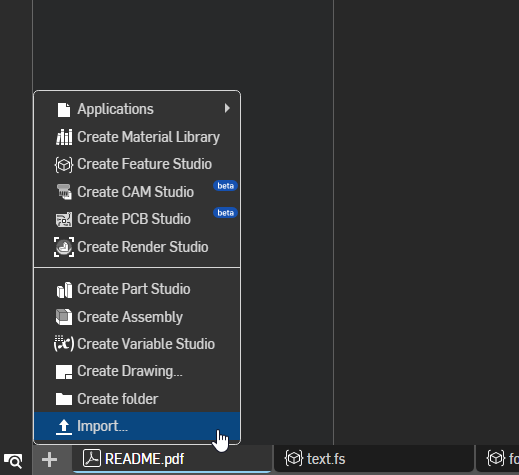
- In the bottom left of the document select "Import" and import that json file.
- Create a sketch and draw a line to use as a path later
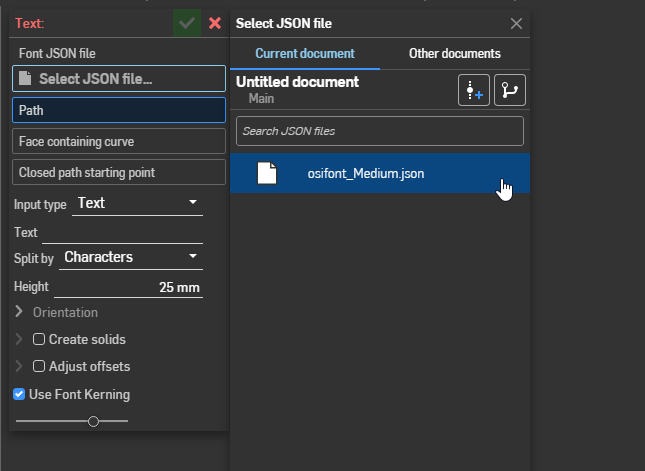
- Create a Custom Font Text feature
- Click the "Select JSON file…" option and select the imported font
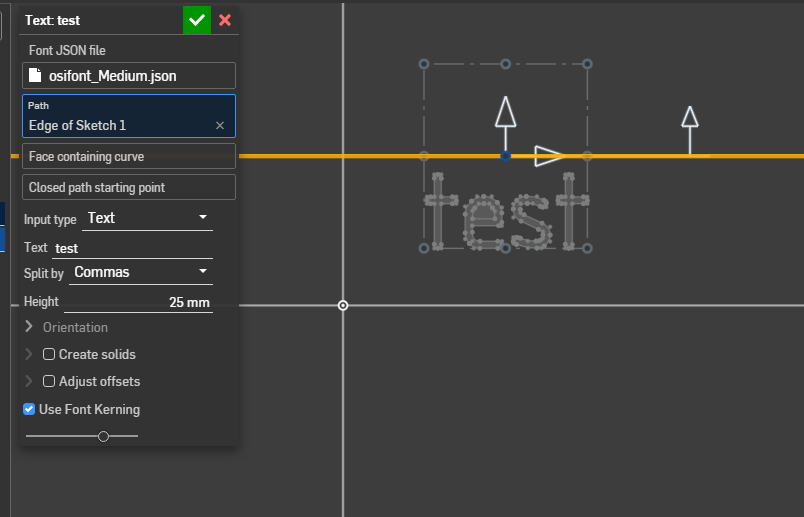
- Click "Path" and select the sketch line
- Add some text
For examples of the various options see the feature's example folder. https://cad.onshape.com/documents/0268281ab84da24693d00fc3/w/92e9d02adb082f5f6a73820f/e/8c1cdf522e3d35677a49a6de
 0
0
