Improvements to Onshape - July 17, 2026


ONSHAPE LABS
Onshape Labs is a new initiative for rapidly developing and testing cutting-edge capabilities, including AI-driven tools, directly within the Onshape cloud-native CAD and PDM platform. By combining early customer feedback with rapid product releases outside of Onshape’s standard 3-week release cycle, Onshape Labs creates a faster path to deliver advanced tools.
NVIDIA SIMREADY PUBLISHER
Onshape Labs introduces the NVIDIA SimReady Publisher, available in the Onshape App store. Go from CAD to advanced simulation faster with direct publishing from Onshape to platforms compatible with NVIDIA Omniverse, including Isaac Sim. Define robotics behavior within your Onshape assemblies, export simulation-ready OpenUSD data, and keep simulations synchronized as designs change. A robust feedback and update loop between design, simulation, and controls development helps robotics teams iterate confidently as hardware evolves.CAD
MUTUAL TRIM ACROSS MULTIPLE SURFACES
Mutual Trim now supports operations across multiple surfaces simultaneously. A new "surface to keep" selection allows you to easily specify exactly which geometry remains, streamlining complex surfacing tasks.
SUPPORT CHAINS OF CURVES IN THE SLOT SKETCH TOOL
Chained sketch slots allow Onshape users to create complex sketch slots more efficiently. This enhancement enables selecting multiple chained entities, including lines, arcs, ellipses, and splines, to create continuously trimmed slots. This is particularly useful for complex CAM toolpaths and other design elements, as it eliminates the need for manual trimming or selecting multiple regions, significantly simplifying the slot creation process.
QUERY VARIABLE: ADJACENT SELECTION TYPE
A new "Adjacent" selection type has been added to Query variables, making it easier to build robust, parametric selections that reference neighboring entities automatically.
ENHANCED CIRCULAR MEASUREMENTS
Quick measurements for circular selections now automatically display comprehensive data—including min/max, center, and axis distances—giving you the dimensions you need with fewer clicks.
BOUNDARY SURFACE APPROXIMATION FAILURES
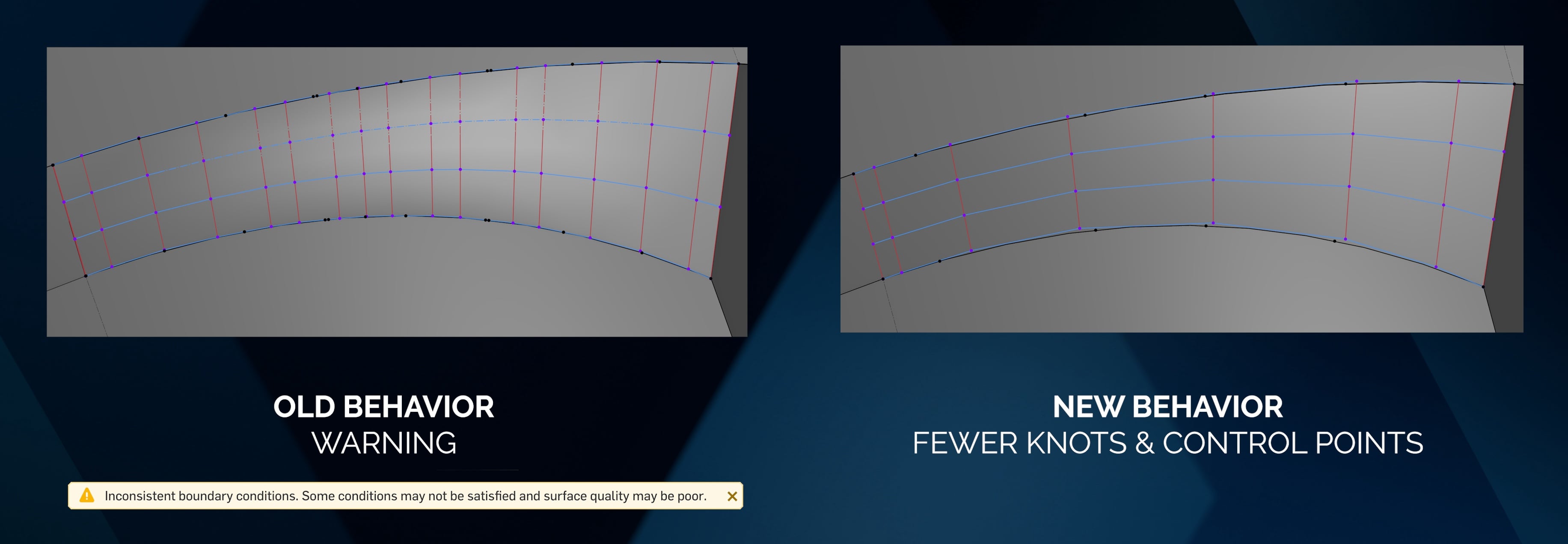
The underlying algorithms for the Boundary Surface feature have been updated. While the user interface remains unchanged, the update yields higher-quality surfaces and reduces 'inconsistent boundary conditions' warnings. The distribution of control points and knots is also cleaner using the new algorithm, improving boundary surface workflows.
RESIZE PART DROPDOWN AND TOOLTIP FOR CONFIGURED PROPERTIES
User interface enhancements now allow resizing of the part dropdown menu, alongside improved tooltips, making it easier to read and manage complex configured properties.
FORWARD AND BACK NAVIGATION IN FEATURE STUDIOS
Navigation inside Feature Studios has been enhanced with native Forward and Back capabilities, greatly speeding up custom FeatureScript development workflows.
TEXT PREVIEW FOR .CSV AND .JSON FILES
You can now preview the text contents of imported .csv and .json files directly within Onshape's document view without needing to download them first.
ASSEMBLY-LEVEL INSTANCE PROPERTIES
You can now define instance-specific properties directly at the Assembly level. This allows for greater metadata flexibility without having to alter the properties of the original part.
MOVING MATE CONNECTOR FOLLOWING GEOMETRY
Mate connectors will now intelligently follow their underlying reference geometry if that geometry is modified or moved.
SHOW TOP LEVEL ASSEMBLY ROW OPTION SETTING
A new option lets you easily toggle the visibility of the top-level assembly row in Bills of Materials (BOMs).
CONVERT TO EXPRESSION IN ASSEMBLIES
Instance checkbox and text configuration inputs can now be converted to expressions via right-click when changing the instance configuration and in configuration tables. Note: Assemblies currently do not support dynamic suppression.
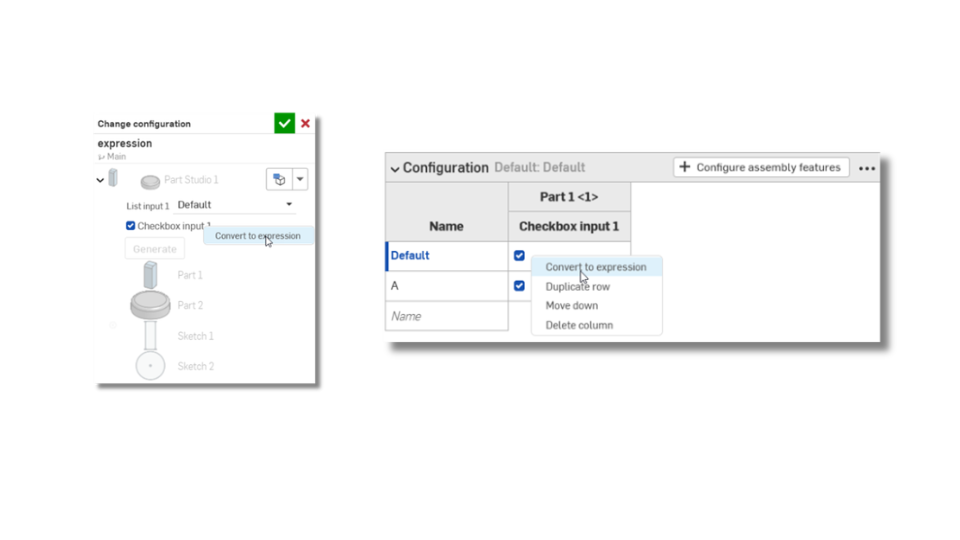
IMAGE LIBRARY INFRASTRUCTURE
A new centralized image library infrastructure has been introduced, allowing for more streamlined management of decals, backgrounds, and rendering textures.
REFLECTION ANALYSIS — LOCK ENVIRONMENT MAP TO THE OBJECT
During reflection analysis, you can now lock the environment map to the object. This ensures consistent light evaluation across surfaces as the model is rotated.
DRAWINGS
COPY A DRAWING SHEET ACROSS WORKSPACES
You can now seamlessly copy individual drawing sheets between different workspaces, improving drawing management and reuse.
SUPPORT REPLICATION FOR HOLE CALLOUTS AND EXTERNAL THREADS
The Replicate Annotations feature has been expanded. You can now quickly replicate hole callouts and external thread dimensions across patterned or repetitive drawing views.
RENDER STUDIO
MULTI-APPEARANCE APPEARANCE SETUPS
Render Studio Advanced adds support for multi-appearance setups, allowing you to quickly toggle and visualize different material states on a single model or assembly.
PCB STUDIO
STORE REFERENCE DESIGNATORS IN ONSHAPE ASSEMBLY
Reference designators are now stored natively within the Onshape Assembly rather than isolated within PCB Studio, improving cross-discipline alignment and BOM accuracy.
CAM STUDIO
POST SETTINGS FOR "MACHINE RETRACTS"
CAM studio now offers the ability to set default machine retracts for the following post-processors:
- Generic Fanuc
- Fanuc 31i B
- Tormach PathPilot
- Penta TCPC-Kinetic
- Datron Next
- Haas NGC/CHC
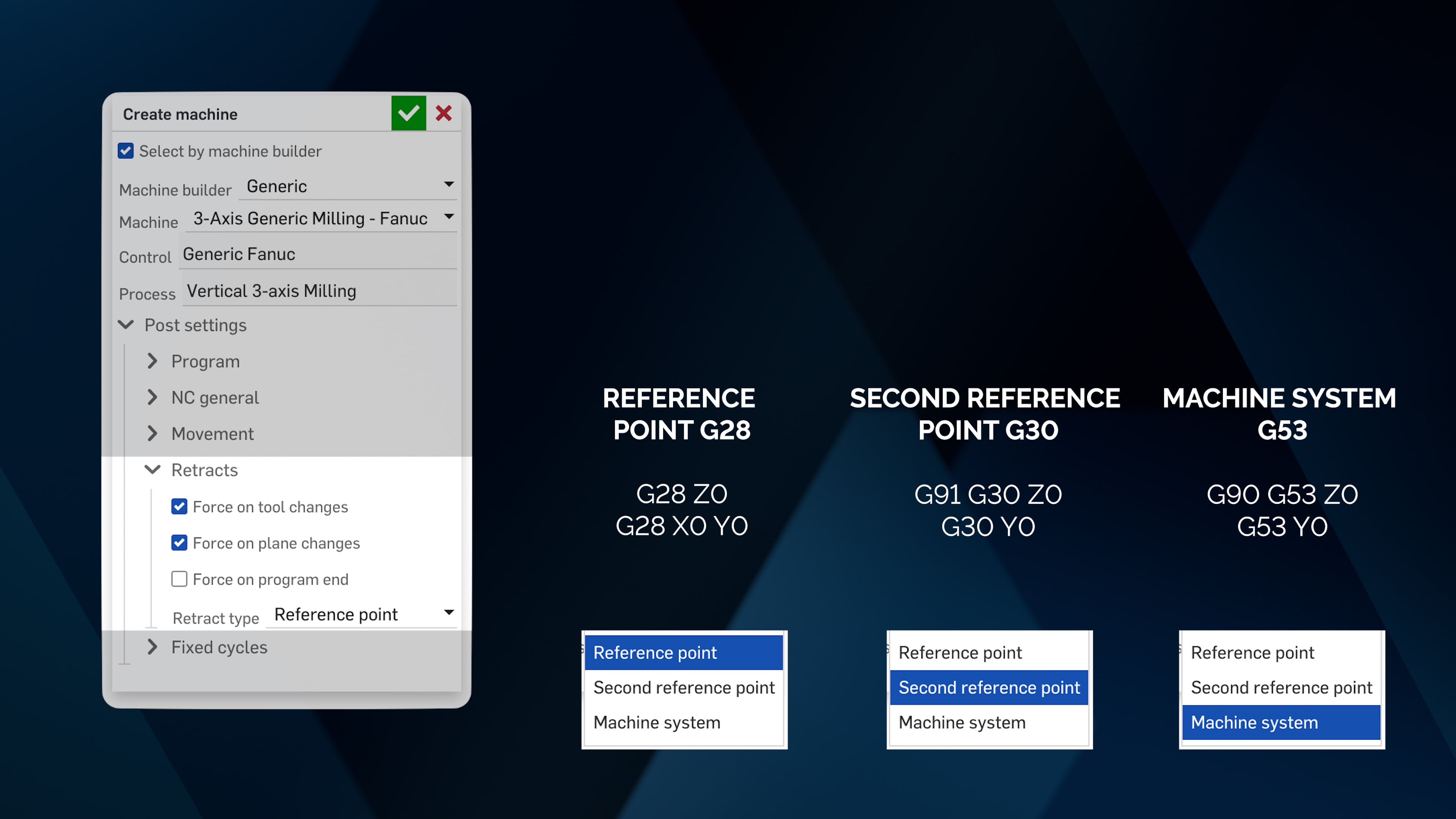
In post settings, users can now choose reference point G28, second reference point G30, or machine system G53 on tool changes, work planes that change orientation, and program end.
- Reference point G28: G28 Z0 / G28 X0 Y0
- Second reference point G30: G91 G30 Z0 / G30 Y0
- Machine system G53: G90 G53 Z0 / G53 Y0
We will continue to update existing post-processors to include these options in future releases.
BETTER HANDLING OF CUT DIRECTION BASED ON FEATURES
Cut features now have improved logic to automatically determine the correct cut direction based on your selected reference geometry.
Please take a moment to try out these new features and improvements, and leave your comments below. For a detailed list of all the changes in this update, please see the changelog.
Remember: The updates listed here are now live for all users when creating new documents. Over the next few days, these features will also be available in documents created before this update.
Comments
-
Thats a big update.
Finally featurescript has a back button! Not having a back button has been such an annoyance when working with large featurescripts.www.smartbenchsoftware.com --- Renaissance --- Kestrel -- SmartLink
Experts in Onshape Automation - Custom Features and Integrated Applications4 -
Lots to go through for sure!
Copying drawing sheets between documents is a big one. Being able to also "move" them would have been even better to avoid having to manually remove any duplication but I'll take it!A bit disappointing to see the "standard" and "advanced" render studio diverging so much… Never had an issue with having to pay more for higher res renders as there is an obvious added cost but something like the material sets should really be in the "base" version…
2 -
Feels like one of the biggest updates in a while. Onshape Labs (did MCP support drop?), surface merge improvements, boundary surface improvements, sketch slots, assembly reference designators (how do these show up in BOM view?), image libraries ….
Also from the changelog: "Improved import reliability with updated translation engine for CATIA, NX, Creo, SolidWorks, and other major CAD formats"Curious about that one.
[edit]
Also released today: Harness Flattening looks like the cable tools are getting very close to prime time:Simon Gatrall | Product Development, Engineering, Design, Onshape | Ex- IDEO, PCH, Unagi, Carbon | LinkedIn
2 -
No MCP servers yet. The thing about labs is that a lot of it will happen outside the three week cycle. New features, updates, fixes. The Omniverse publisher was actually made available in the App Store yesterday. And maybe you’ll see more from labs before three weeks are up.
Paul Chastell
TVP, Onshape Labs1 -
Anybody else having issues with performing manual library updates?
I've tried three different documents (using the "Update workspace…" from the hamburger menu) and it's been over 1/2 hour but none of them have updated…Creating a new branch also doesn't prompt a "do you want to update message"…
EDIT: two of the three have now finally updated… The option to manually update has been helpful but having to wait for an unspecified amount of time is still pretty annoying. If it's a couple minutes that's fine but 45+min isn't great considering everybody needs to stay out of the document for the update to happen at all…
2 -
Seems like the image library functionality is not available in drawings. We use images in our drawings on our engineering drawings a lot, to call out standard footing details etc, it would be very helpful to have this functionality. You can get it via "other document" but it seems like it would be easy to roll out library functionality for images to drawings as well.
3 -

It's so much. ty PTC team!
Especially interested in testing out these ones:
- ONSHAPE LABS
- ASSEMBLY-LEVEL INSTANCE PROPERTIES
- CONVERT TO EXPRESSION IN ASSEMBLIES
- IMAGE LIBRARY INFRASTRUCTURE
▚▞▚▞▚▞▚▞▚2 -
Convert to expression in assemblies is starting to feel excitingly close to actually being able to to what those other nasty systems can do. Dynamic suppression in assemblies. Just do it! Just get that dynamic suppression in assemblies! 😄
3 -
I feel like the genie just granted my wish for more wishes and I don't know what to do with this power.
0 -
Wish for measured variables at the assembly level, then we can melt some server blades with flexible models that dynamically shape shift themselves to update with assembly motion.
3 -
Assembly level Instance property and what it does for PCB studio is stupendous!!!! Good job!
1 -
Big update. Wow! Thank you, Onshape!
1 -
Huge update with useful things for us.
I really like: Mutual Trim, Image Library, Copying drawings...
To the genie: I wish the instance level properties is the first step to bring us assembly-level instance Appearances!2 -
Just noticed the css got a bit of an update, i'm using Stylus to overwrite the existing dark mode to something I find more comfortable. Since this update (or maybe the last couple) my overwriting seems to not work anymore.
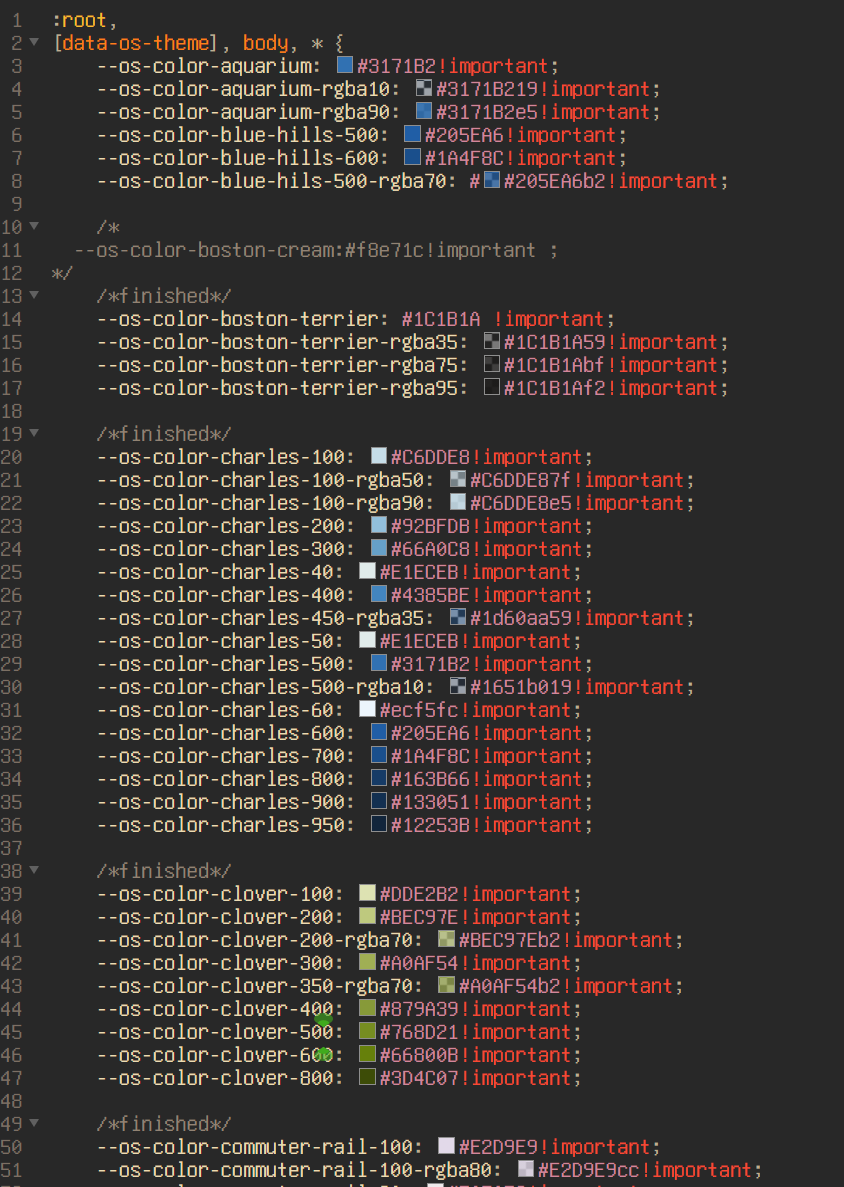
I'm struggling to understand what's happened, as there are a lot of places using variables, therefore changing these variables should inject these across the site. i.e.,
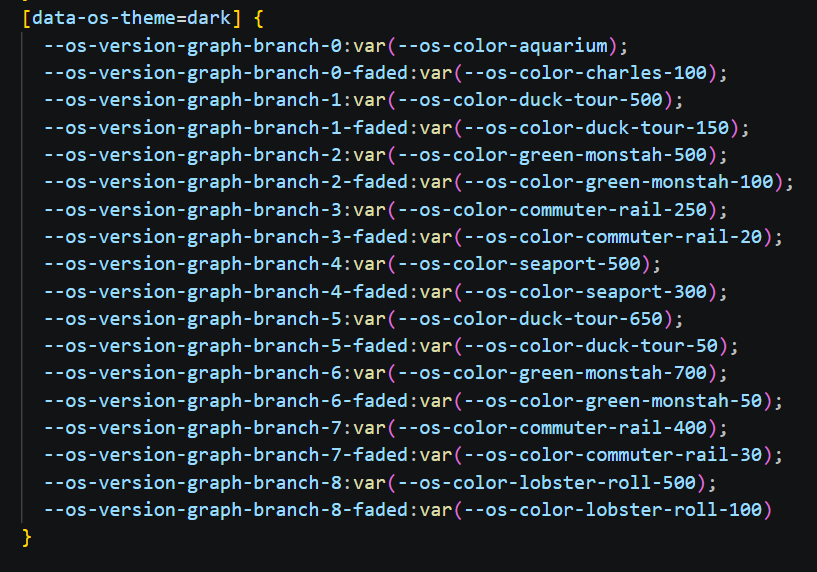
Did something happen related to css? I'm confused.
0 -
This is a heavy hitter! wow! If I list my favorites it'll be a long list, but here we go anyway:
• chains for slots - This is something I run into a lot and this looks like the perfect solution.
• Featurescript navigation - This is sooooo helpful for anyone navigating a big feature that's written using a lot of functions (as it should be). I've got to check whether there's a hotkey I can set, because I'd use that all the time, but if not, this is still very welcome.
• Readable csv and json - I've developed features using both of these and have had to resort to writing functions that print them formatted to make it easier to read. This will be great.
• Image library - I love the increasing use of libraries for things. A lot of the work that goes into CAD software doesn't scale, but with things like this you can set it up once and reap benefits for years.
• Onshape Labs - This is a super exciting frontier. The robotics stuff is especially relevant for a client of mine.
• More surfacing stuff - Mutual Trim and Boundary Surface improvements are great
…. Honestly I could just keep listing but I'd end up just repeating the entire release post: quality of life for drawings, adjacency query variables, persistent mate connectors, assembly expressions. So good. Great work everyone!4 -
ASSEMBLY-LEVEL INSTANCE PROPERTIES is a game changer for us. The only thing missing for our workflow is API access to these properties.
1 -
Big Update, loving these features!
will the mutual trim update also follow for boolean operations on solids? :)0 -
Wow! Huge Update, I love it.
Even the smaller updates are huge for the workflow of our company. Instance Properties lets us quickly define key components that we require to communicate internally. Copying the drawings is great and even the new way of displaying the distances between holes quickly helps a lot.
0 -
Big update, thanks!
IR - Assembly Instance Properties: Allow instance naming to multiple parts at once. Currently we can edit the instance name one at a time. It would be more efficient to name a set of parts all at the same time. Example being I have a set of parts, 2 or more > copy the set of parts > rename the sets, set 1, set 2.
0 -
YO Onshape Professional is so crazy! Too bad I don't have the money for it.
0 -
Been a few months since I combed the diffs looking for breadcrumbs (since the javawizard mirror has been out of date) so I haven't been able to look for clues to future updates since then. I did just scrape together my own featurescript mirror that shows the last few updates and spotted this little addition to the sheet metal roster.
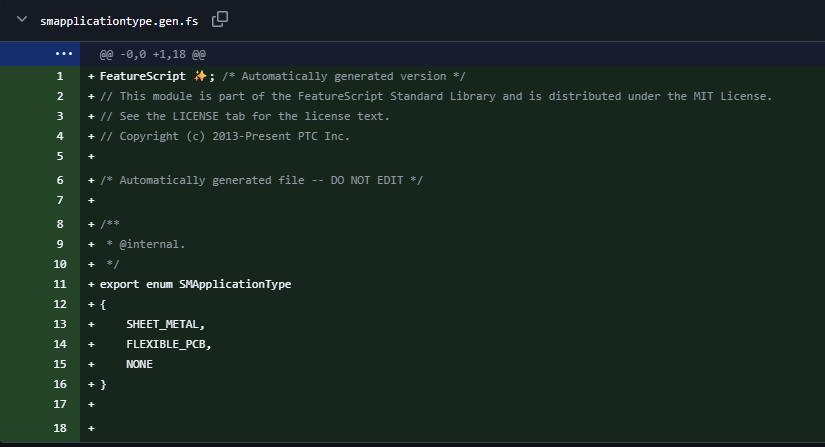
Looks like we're getting some support for non-sheet-metal flexibles in the future. I've got whole classes of bendy things patiently waiting to see the new updates to the sheet metal engine, none of which are made from sheet metal.
I also saw that the sheet metal bend feature appears to have been completely refactored, I'll have to wrap my head around how that change affects things and whether it opens any new possibilities or if it was a simple re-base.
1 -
Wow, so many updates! Thank you!
Especially like Drawing Sheet Copy & Slot Chains.
0 -
I am also having issues with this update more so than others. In two documents where we have more than a couple people working in branches, it's been a struggle to get all branches to the same version at the same time. It's been over 2 weeks since this update (maybe smaller library updates have happened in the meantime?) and I'm still getting blocked and running into issues stemming from library version mismatches.
0 -
Hmm. Just watched this video about the new Mate Connector attachment options. This along with the new
FLEXIBLE_PCBbreadcrumbs makes it clear that we're going to get support for flexible PCBs in the (hopefully near) future. Years ago I did this for a rigid flex using subassemblies that were carefully constructed to group the local components to the stiffeners. Very tedious.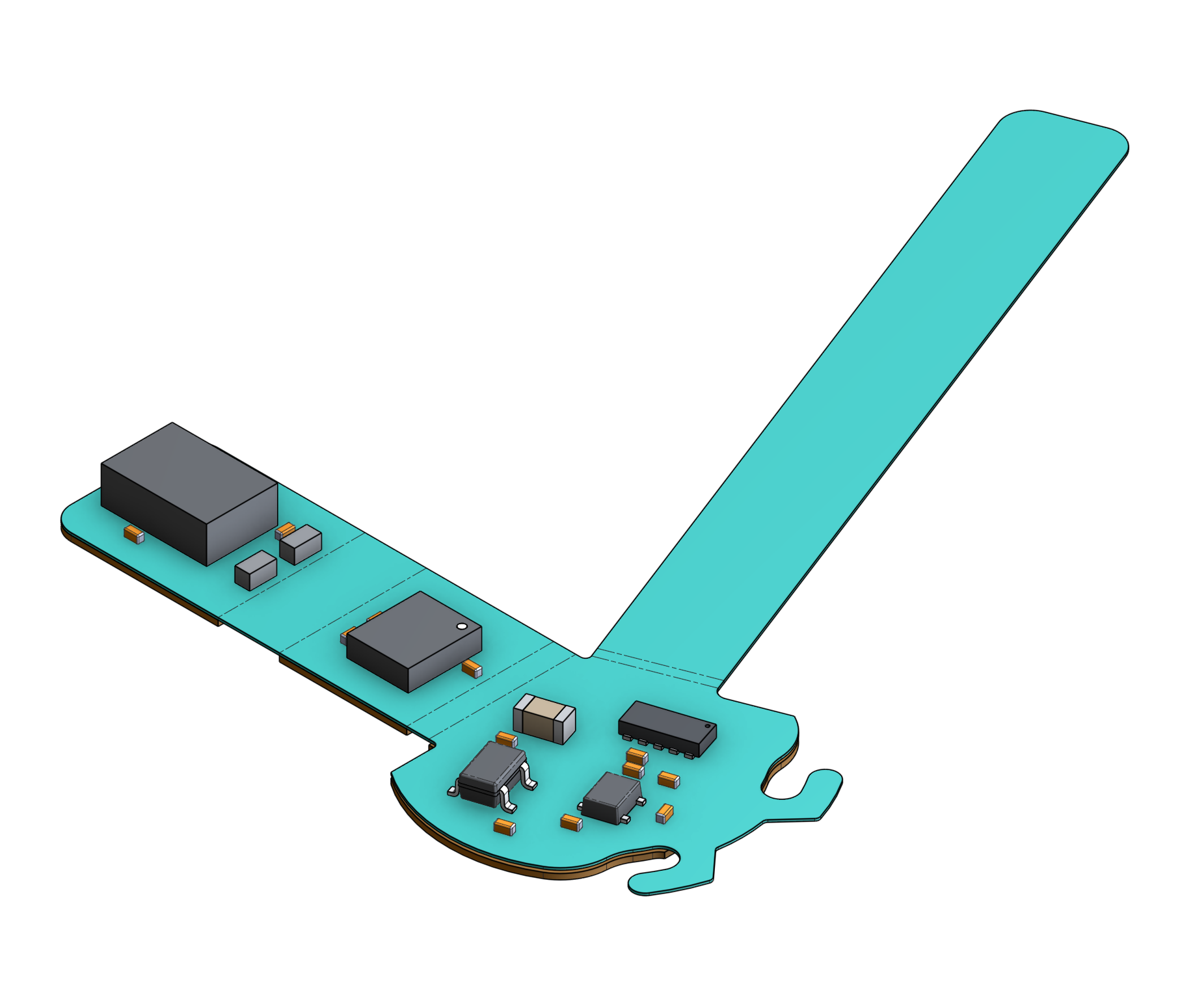
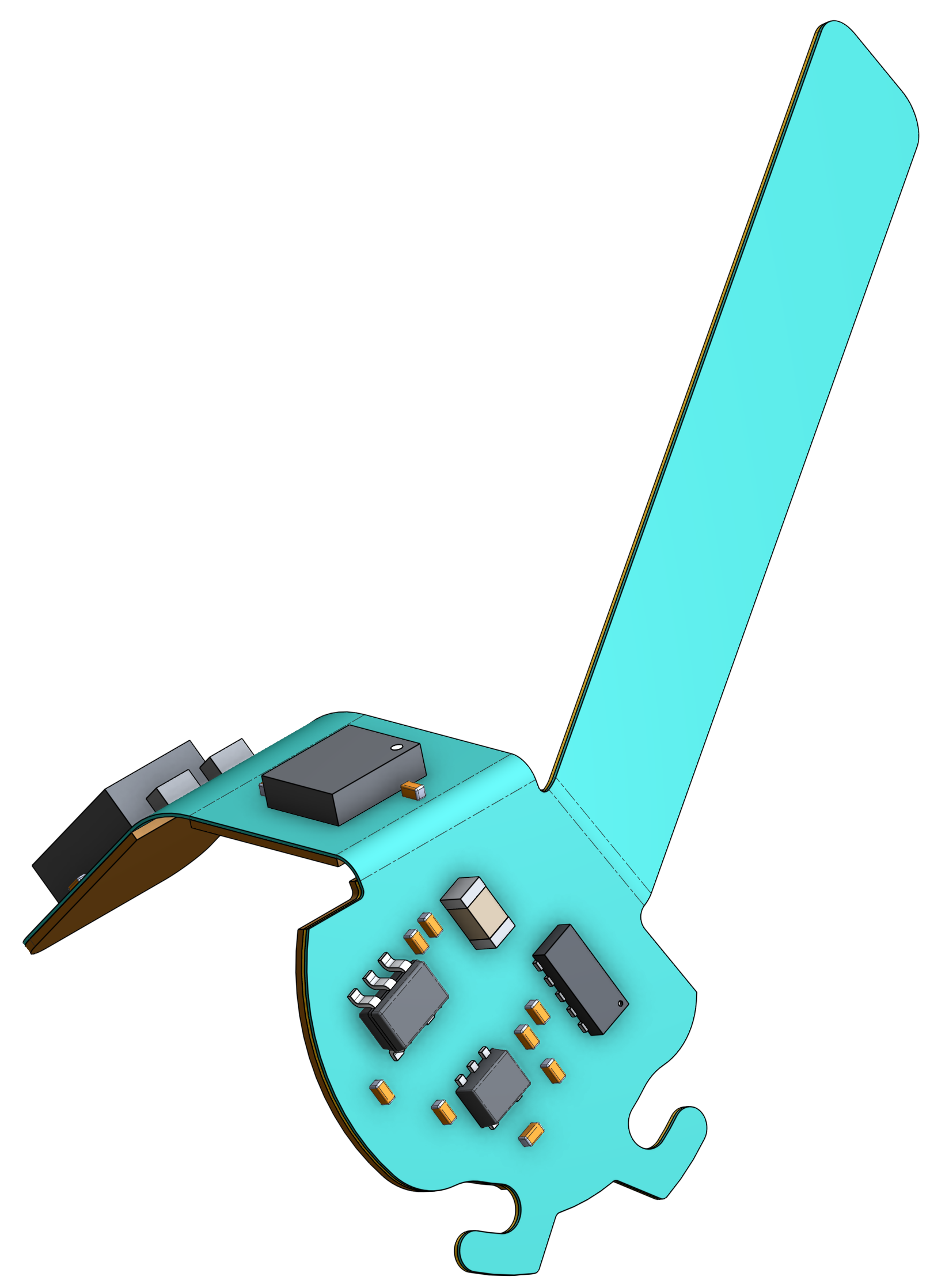
Simon Gatrall | Product Development, Engineering, Design, Onshape | Ex- IDEO, PCH, Unagi, Carbon | LinkedIn
0








