Improvements to Onshape - August 7, 2026


CAD
Persistent Center of Mass for Part Studio & Drawings
Additionally, the center of mass is now a toggle that can display the center of mass symbol on each drawing view, which you can dimension to for improved design documentation.
Frame Attributes for End Caps & Gussets
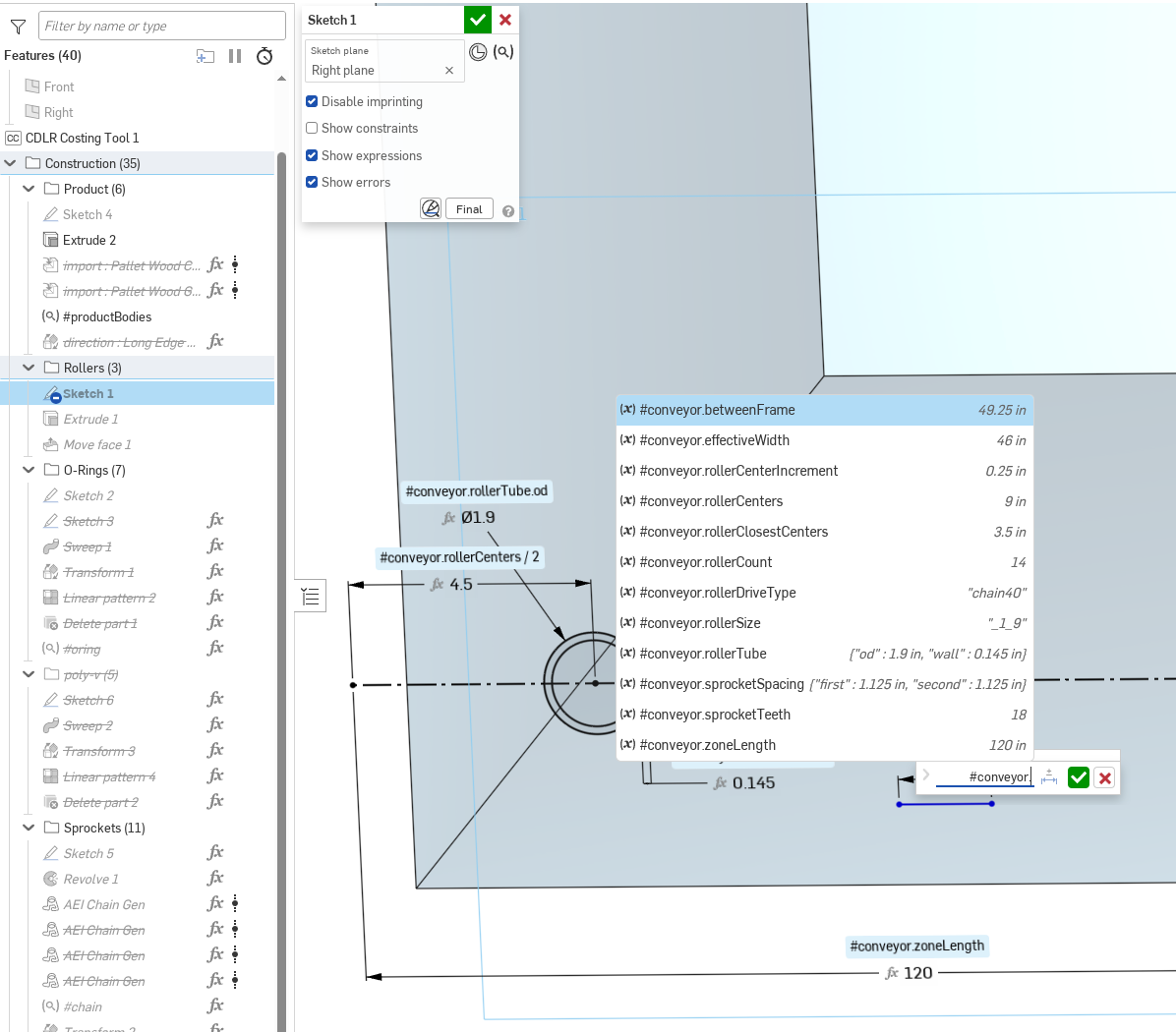
Map Variable Auto-Complete
Users can now more quickly reference the values from a Map variable by their key name by typing the name of the variable, followed by the period or an open bracket. Then, all the user needs to do is simply select the appropriate key-value pair from the drop-down list saving time when using these types of variables in Onshape.In-Context Show Internal Geometry
When working in-context, there is now an option to “Show internal geometry”, which will change the transparency of the in-context graphics to show the internal geometry of those components. You can also now select internal edges by holding down the alt key. This makes it easier to focus on the in-context elements that are most important to your design workflow.Model Based Definition
MBD Updates
This release introduces two new enhancements to Model Based Definition capabilities. The first allows users to add datums directly to any side of geometric tolerance frames for improved feature control. Additionally, the platform now enables users to share specific parts with filtered MBD data via a link icon next to the document title, facilitating faster communication of critical information among contributors.Drawings
ISO 21920 Surface Finish Symbols
Onshape has introduced ISO 21920 standard surface finish symbols to help users meet specific manufacturing requirements for themselves and their clients. The update includes options for Basic, material removal required, and material removal prohibited symbols.Document Management
Allow Multiple Users View a Release Draft
Other members of your team can now view release drafts to review any part numbers, properties, release names, notes, and approvers before a formal release is completed. This means more people can verify the information in a release is correct before the release is finalized.Link to Versions from the Revision History Dialog
Onshape now provides a hyperlink to the released version of an item from the Revision history dialog. This streamlines the process of reviewing and comparing previous revisions of a design.Feature Studio
Top Level Navigation
Top level navigation is a new feature in Feature Studios that makes it easier to find specific keywords in your custom features. Likewise, the symbols use different visual queues for the different types of keywords.Find & Replace
Search in Feature Studios now supports replace across multiple Feature Studios in a workspace. Regular expressions and capture group references are supported.setProperty Setting Materials With More Properties
Within your custom features, you can now add additional material properties with setProperty for the physical characteristics of the material such as yield strength, Young's modulus, tensile strength, etc.Administration and User Settings
Onshape Labs & FeatureScript Co-Complete Settings
You can choose to enable Onshape Labs features using multiple methods found in the help documentation here. Once you agree to the terms of use, you can select which experimental features to enable.The first of these Labs features is available to enable for FeatureScript Co-complete.
Context Menu Actions for Users
New context menu options are available when managing users. These include adding multiple users to a team in one right click option and the ability to create a new team when selecting multiple users. These options streamline the process of managing users and the teams they belong to.Custom Application Workflows
This functionality has been removed for the time being. We hope to re-introduce this functionality in a future release on Onshape.PCB Studio
PCB Studio to use Onshape Picker
When working within PCB Studio, users can now utilize the standard picker dialog when selecting parts and assemblies. This provides access to familiar options like configuration selection.CAM Studio
New machine added to cam studio. Datron M8Cude with Next controllerOnshape Labs
FeatureScript Co-Complete
FeatureScript Co-Complete, available through Onshape Labs, provides context-aware inline suggestions that understand your entire Feature Studio and automatically complete valid variables, queries, and syntax, helping you create custom features faster.Learning Center Updates
Self-Guided Onshape Bootcamp
Jump-start your Onshape journey with our Self-Guided Onshape Bootcamp (English) course. Now designed to mirror the experience of our instructor-led Bootcamps, this comprehensive crash course helps you quickly learn Onshape’s powerful tools, unique benefits, and core workflows at your own pace.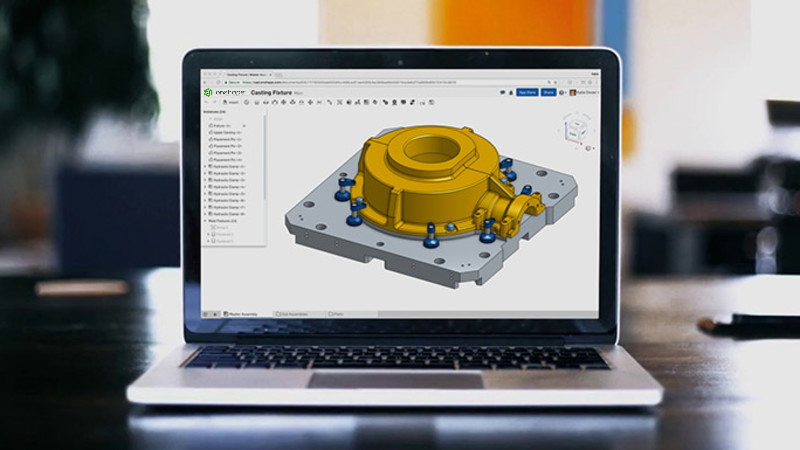
Please take a moment to try out these new features and improvements, and leave your comments below. For a detailed list of all the changes in this update, please see the changelog.
Remember: The updates listed here are now live for all users when creating new documents. Over the next few days, these features will also be available in documents created before this update.
Comments
-
I wanted to call out @Corey’s forum post as inspiration for the content in the video for material properties being expanded in FeatureScript. Thanks
Regards,Mike LaFleche @mlaflecheCAD4 -
A morning release? And its packed full of goodies?
Testing out the FeatureScript auto complete, I think my only wish is that there was a button to trigger it (like ctrl-space). Its a bit slow on the pickup, and I seem to be able to type faster than its able to think up a suggestion. Visual studio auto complete has been really helpful in speeding up my development work, so I'm interested to see if the FS one will be similarly useful.www.smartbenchsoftware.com --- Renaissance --- Kestrel -- SmartLink
Experts in Onshape Automation - Custom Features and Integrated Applications2 -
Any sign of being able to release configurations?
8 -
Wow! Amazing release across the board. Persistent Center of Mass is a game-changer for those of us that design aircraft. Thank you Onshape!
3 -
Are we benefiting from summer interns again? Seems like a great combination of ancient requests (CG symbols, links to releases in release history) and new labs/FS tools. Very happy that simple things like end caps and gussets are getting some love.
Simon Gatrall | Product Development, Engineering, Design, Onshape | Ex- IDEO, PCH, Unagi, Carbon | LinkedIn
3 -
-
That map variable change is gonna be huge for quality of life. I've been avoiding using them because I've always found them clunky to set up and clunky to use, but it's the best data structure in a lot of cases.
2 -
Yessss! I am so here for the little quality-of-life things. To me it is symbolic of care and attention to detail, and not only developing things that make sense as a bullet on marketing materials. It's design for the people who have already committed to Onshape as much or more than it is for the not-yet-users
Map autocomplete is something I've wanted since I knew you could use maps in variables. Suddenly it becomes a useable and preferred workflow for grouping variables instead of a neat party trick.
CG is something I was talking with a client about a few days ago and here it is. Same with the material definition in featurescript. That was a limitation I was explaining to someone last week.Great stuff!
p.s. if you're looking for another little one, getting lambda functions working in variable studios could be awesome. It's the place they can be most useful, and suddenly unlock a lot of company-level capabilities for niche use-cases.
4 -
Allowing multiple users to view a release draft is big for us - this streamlines our reviews and reduces how often we need to rebuild a release. Small change, big impact for us. Same with linking to versions from the revision history dialog. This one just makes sense.
1 -
Had to make a video to explain why the map autocomplete got me so excited!
10 -
Great update, like the center of mass and frame feature update. Just hope if the frame feature could have auto name based on the profile and length in the future.
1 -
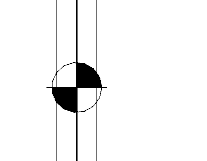
Very pleased to see CofG included.
I noted that when placed around edges it tends to be difficult to see. Could the diameter be increased (5/16" or 8mm).
Or better yet make diameter adjustable.
 1
1 -
Link to Versions from the Revision History Dialog
This is a big one for me. I have wanting this from the first time I every used the revision history dialog and realized I had to manually pick through everything in the containing release to find the link to the part I was trying to see the history of. I'm sort of bewildered it took so long to get this. 🤥
setProperty Setting Materials With More Properties
This is also a big one for me. We have custom features that create and automatically assign material/colour properties to 95% of our parts. I have always wished we could include more material properties automatically.🤗
1 -
I THOUGHT I WAS THE ONLY ONE USING MAP VALUES! This got me so bloody excited I can not even explain. I feel so seen! For those of you who haven't used them before or have fallen onto configurable variable studio's, I can say from literal professional experience, map variables are a much more intuitive and simple workflow;
I work in joinery and I use the architects nominated material tag (ex. LM01) as the variable name and I assign different material parameters based on the stock we order:
assignment →LM01
{"name":"Laminex - Polar White Gloss","thickness":16mm,"laminate":1mm, "max_width":1190mm}
use →
LM01.thickness
Perma-center of mass also an issue I once encountered. This will be super useful for stand alone joinery units!
Find and replace across multiple F.Studios is an absolute banger and the easier navigation excites me!
Full FScript material properties is a missing link I've been waiting for!! Finally my material assignment scripts make sense!FS labs seems interesting and I can't wait to start playing with it in a couple weeks.
3 -
That's a bunch of great updates. Love seeing some improvements regarding part and version links.
Question regarding MBD part link: Am I doing something wrong? My link still contains the whole document with all parts in the multipart studio. I was expecting to have the link to the specific isolated part only.
Use case: my supplier gets only the link to the relevant MBD Part.
No other parts, no assemblies, no other stuff. Only the isolated relevant data to produce the part.
Am I expecting too much here?0 -
@Urs_Egger_REACT It sounds like you want the rest of the parts in the part studio to be in isolate mode… Huh… interesting concept… stay tuned.
Regarding hiding other studios in the document, the link copy functionality has never done this. It sounds like for part of this you have a publication workflow in mind.
1 -
Just back from family holidays and then I find this! A great one. I've been waiting for the Center of Mass hing, it will be useful. The other ones, improving and streamlining everyday processes are also great.
0 -
Just as a heads up for anyone trying to use the new End cap and Gusset Cutlist functionality. They did not show up automatically. I needed to delete my existing End caps and redo them for them to show up in the Cutlist.
Also @MichaelPascoe , it would be great to have an update to Cutlist +, and/or Onshape, please add the naming to the native Cutlist feature.
Simon Gatrall | Product Development, Engineering, Design, Onshape | Ex- IDEO, PCH, Unagi, Carbon | LinkedIn
1 -
Love the new persistent center of mass feature for part studios but curious why it does not work for assemblies? Am I missing something?
0 -
Dear Pete,
MBD is made to get rid of a drawing or a second document. So you have the MBD part as single source of truth. Imagine a world with a REAL single source of truth. No step or pdf copies sent around to suppliers at all. Just a link to the original REAL onshape single source of truth.
I don't have the Onshape publications in mind, because this kind of gives up on that idea of a REAL single source of truth. Publication is a second document with maybe one or several parts and drawings. So I have to manage this publication separately again. And in Onshape Enterprise and PLM context it appears to generate more confusion than it helps.
The idea I have in mind is to create a release of a MBD part and instead of generating STP, PDF and Publications it just generates a link to the isolated MBD part and sends it over to PLM. This link then can be shared as link also in to QMS, ERP applications or shared with suppliers. This would be a gamechanger. With the link everybody in the supply chain has access to the single source of truth MBD View directly in Onshape.1 -
Awesome! Map auto-complete!
I use featurescripts to build and manage a map of parameters and use those across multiple part studios. It was always a pain having to type out and memorize all the keys and how many levels deep. This will save a bunch of time!
Glad to see center of mass persistence, but until it is available in assemblies, I'm still stuck doing workarounds… so close
Can't wait to try out the co-complete! maybe this will help me get the syntax right for generating geometry. I always struggle with that.
Love the ability to jump to definitions with top level navigation. Now this is starting to feel more like a real IDE.
All this plus dozens of fixes is the notes. You all were busy this month! 😀
1 -
Yes C of G in assemblies would be incredibly useful, shame it was not included this time around
As always this is another great update….especially the 'Show internal geometry" while in-context
1 -
There is a setting in the Drawing Properties → Annotations where the diameter can be set. Currently, this symbol is an absolute diameter (meaning it doesn't scale with the drawing view).
1 -
Good start for CoM! Now in assemblies please, to make it useful ;)
1 -