Welcome to the Onshape forum! Ask questions and join in the discussions about everything Onshape.
First time visiting? Here are some places to start:- Looking for a certain topic? Check out the categories filter or use Search (upper right).
- Need support? Ask a question to our Community Support category.
- Please submit support tickets for bugs but you can request improvements in the Product Feedback category.
- Be respectful, on topic and if you see a problem, Flag it.
If you would like to contact our Community Manager personally, feel free to send a private message or an email.
Calculating with variables only works with * and /

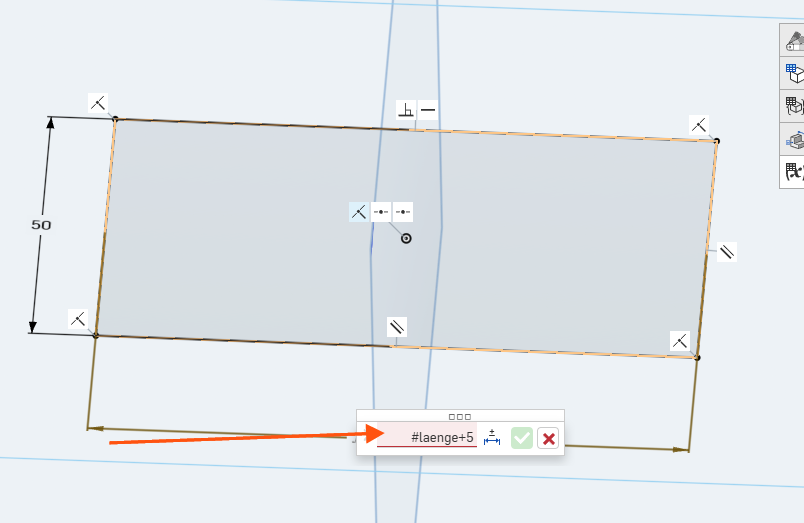
Calculating with variables only works with * and /. When I try to use + or -, the field turns red. What am I doing wrong?
Example: #high+3
Answers
-
Simon is right. Here's a video I made a while back that will hopefully help build an intuition for it
1 -
Kevin also wrote a good explanation for units way back when:
If it helps: internally, everything is in base units (meter, radian, etc.), so, if you write
2 in, that evaluates to2 * 2.54 * centimeter=2 * 2.54 * 0.01 * meter=2 * 2.54 * { "value" : 1, "unit" : { "meter" : 1 } }. Math operations check at runtime whether they're valid and error out when an unsupported operation occurs, like adding a unitless5to a length. Multiplication, of course, is valid, except when you end up with stuff like an area in a length field.0



