Welcome to the Onshape forum! Ask questions and join in the discussions about everything Onshape.
First time visiting? Here are some places to start:- Looking for a certain topic? Check out the categories filter or use Search (upper right).
- Need support? Ask a question to our Community Support category.
- Please submit support tickets for bugs but you can request improvements in the Product Feedback category.
- Be respectful, on topic and if you see a problem, Flag it.
If you would like to contact our Community Manager personally, feel free to send a private message or an email.
How to put a spherical face onto a cube?

I need to have a spherical face on one side of a cube. I have created a cube and created a sphere individually, but for some reason I can't get both created without issues in the same model. I was trying to create both parts and use a boolean operation to end up with a spherical face on one side of the cube. I have been using the top plane to create and extrude the cube and the right plane to create and revolve the sphere. I created the sphere by drawing a circle in a sketch, cutting it in half to create a semi circle then revolving the semi circle, which does work fine on its own.
What is the best way to go about getting a spherical surface on one of the cube faces? For reference, my cube is 5.5" and I am looking to have about 0.1" spherical height on one side. (i.e., the corners of the cube will end up about 0.1" lower than the center.) The sphere I have been creating is on the order of 42" in diameter to get in that ballpark.
Any suggestions are appreciated!!
Thanks!
Answers
-
Can you share your document? The steps you describe above sound reasonable, I'm guessing there is an issue with one of your sketches or how you're configuring your features. I assume that you want the spherical face to be trimmed to the cube footprint?
0 -
Let me see if i have anything that's worthy of sharing... Yes i just want to have a spherical face on the cube.
0 -
Here is the most recent model that I was looking at.
https://cad.onshape.com/documents/7b21c2496ccba0d74305d6cd/w/640d1e8a13c1f95dc9058242/e/8cc364b25cc88a136bc30d55
0 -
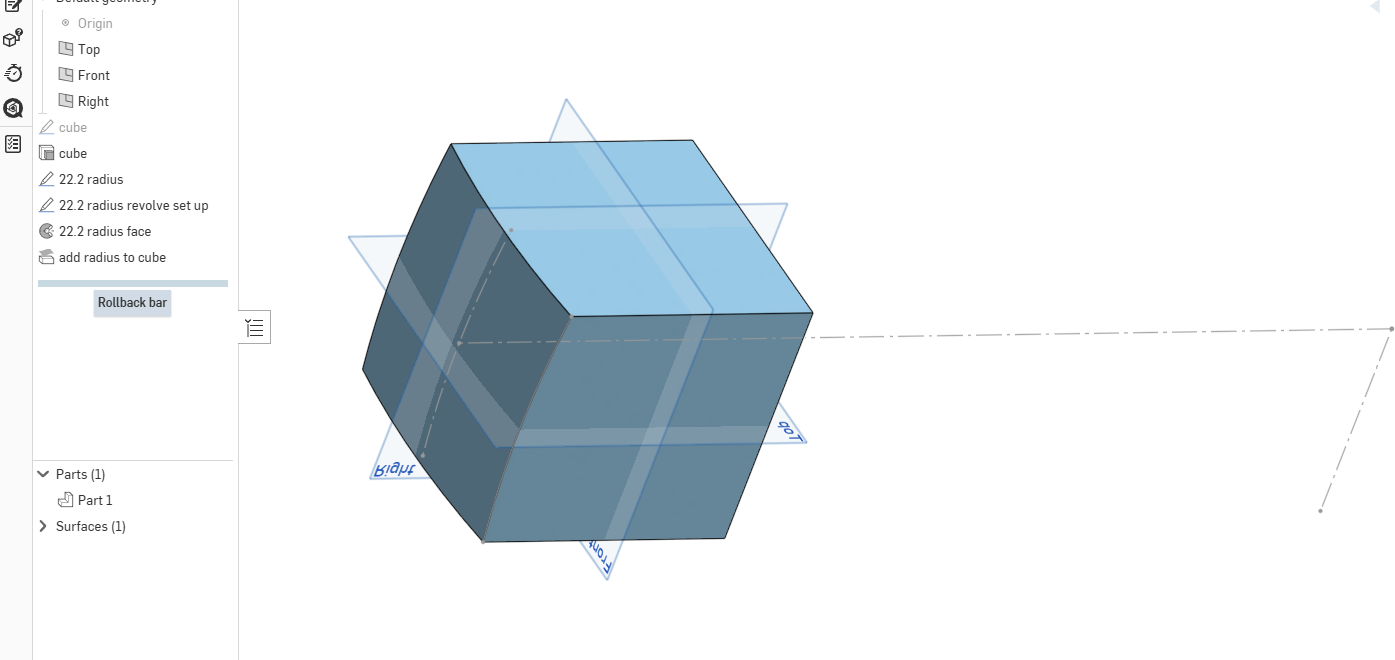
Here is a sample using a replace face to get a spherical end.
 1
1 -
-
Thanks so much. That is a really cool way to do it!
I actually figured out why what I was doing wasn't working….i wasn't closing off the end of the semi circle, so when I tried to revolve it I was only getting a spherical surface. Once I closed it off by drawing a line from end to end, it created a solid sphere like I intended.
Then, I figured out what I really wanted was a sphere with an outer shell about 0.25" thick that I could subtract from the cube to get the spherical face…I just added a 2nd semi circle outside the first one and then wa-la, I had a sphere with a 0.25" thick shell.
I like your replace face method much better though!
0

