Welcome to the Onshape forum! Ask questions and join in the discussions about everything Onshape.
First time visiting? Here are some places to start:- Looking for a certain topic? Check out the categories filter or use Search (upper right).
- Need support? Ask a question to our Community Support category.
- Please submit support tickets for bugs but you can request improvements in the Product Feedback category.
- Be respectful, on topic and if you see a problem, Flag it.
If you would like to contact our Community Manager personally, feel free to send a private message or an email.
Flange mode

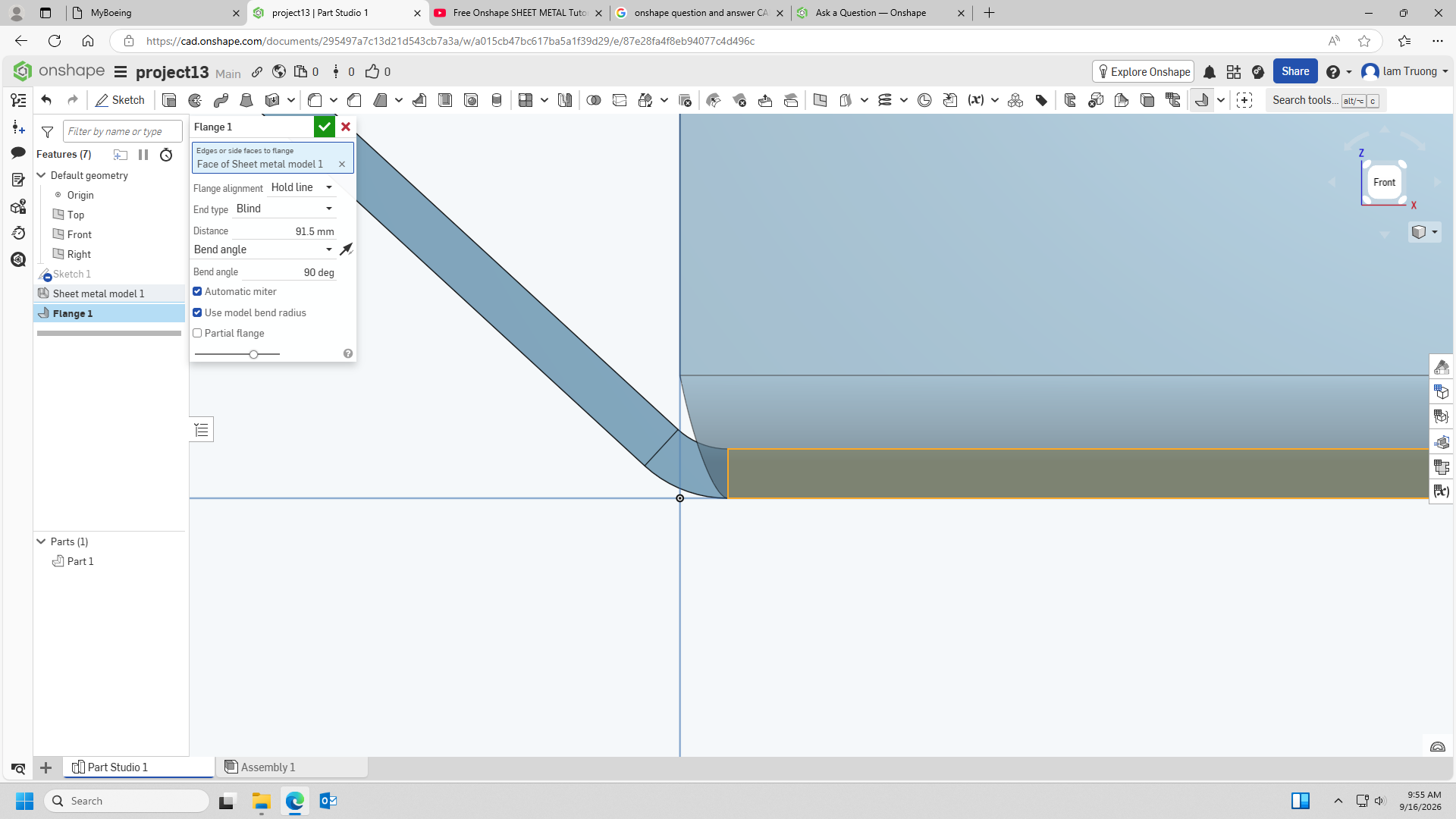
Hello everyone, I just started learning onshape follow youtube videos. I want to create a flange which go straight up from the line that I picked, but seem like it keep create an angle close to the origin point. I tried to switch Flange alignment option from Hold line to Inner, outer and middle, it was pretty close but still not what I expect. Please give me some help to fix it. Thank you very much everyone.
Answers
-
A link to the YouTube tutorial and your document would go a long way towards getting help.
Have you tried the official resources?
Engineering textbook: https://hwh.stephenteacher.com/txtbook.html0 -
I think it's the "corner type", you can either create like and add a corner feature, or probably the better option is to go back and edit you sheet metal feature and specify the corner type to "open".
0

