Welcome to the Onshape forum! Ask questions and join in the discussions about everything Onshape.
First time visiting? Here are some places to start:- Looking for a certain topic? Check out the categories filter or use Search (upper right).
- Need support? Ask a question to our Community Support category.
- Please submit support tickets for bugs but you can request improvements in the Product Feedback category.
- Be respectful, on topic and if you see a problem, Flag it.
If you would like to contact our Community Manager personally, feel free to send a private message or an email.
How to speed up Onshape?

UPDATE: This issue is resolved, thank you for helping.
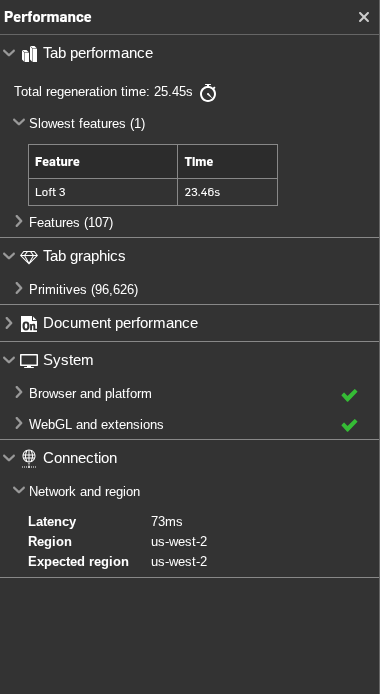
Every time I make a SINGLE edit or even open up a sketch, there is a ~20-30 second wait time while that wheel spins. The regeneration time is even listed as 23.46 seconds despite my computer being able to render 30.7 million triangles per second and my effort to leave plenty of free ram space for Onshape to use.
Best Answers
-
Please open a support ticket. That seems quite wrong, but having support look at the document is going to be critical.
John Rousseau / VP, Technical Operations / Onshape Inc.3 -
Part studio regen time is 100% independent of graphics card and RAM. It's quite literally a measure of how long the features in your Feature Tree take to rebuild (which is a shared process in any parametric CAD system).
If you tab out "Feature" you'll see the specific times for each feature in the Part Studio, but you can already see from the summary that Loft 3 is taking 23.6 seconds. So I would investigate trying to improve that feature's performance (breaking it up into multiple lofts, or simpler curve inputs for instance). OR if you're working upstream of the Loft 3 feature, then suppress or roll back above Loft 3 to make the tweaks. Then if will regen in under 2 seconds, and you can iterate quickly before rebuilding that very expensive/slow Loft3 feature.
Check out the Part Studios portion of the Maximizing Document Performance course:
2



Answers
-
Please open a support ticket. That seems quite wrong, but having support look at the document is going to be critical.
John Rousseau / VP, Technical Operations / Onshape Inc.3 -
Part studio regen time is 100% independent of graphics card and RAM. It's quite literally a measure of how long the features in your Feature Tree take to rebuild (which is a shared process in any parametric CAD system).
If you tab out "Feature" you'll see the specific times for each feature in the Part Studio, but you can already see from the summary that Loft 3 is taking 23.6 seconds. So I would investigate trying to improve that feature's performance (breaking it up into multiple lofts, or simpler curve inputs for instance). OR if you're working upstream of the Loft 3 feature, then suppress or roll back above Loft 3 to make the tweaks. Then if will regen in under 2 seconds, and you can iterate quickly before rebuilding that very expensive/slow Loft3 feature.
Check out the Part Studios portion of the Maximizing Document Performance course:
2 -
(and also log a support ticket, good point John!)
1 -
the thing is, loft 3 has only 2 profiles and no guide curves and STILL has 8844 triangles! The end conditions are "match tangent" on both profiles and there are a lot of filets though.
0 -
Anecdotal for sure, but anything under a few hundred million triangles per second has been slow when I have modeled. This is what mine is running at. Your problem definitely sounds like it needs a support ticket and checking your internet speed.
 1
1 -
Hmmm could be the fillets + end conditions that are causing it to balloon. Kinda impossible to help without seeing the doc so def would log a support ticket and toggle share w/ support! They'll have better expertise than me anyways
1
