Welcome to the Onshape forum! Ask questions and join in the discussions about everything Onshape.
First time visiting? Here are some places to start:- Looking for a certain topic? Check out the categories filter or use Search (upper right).
- Need support? Ask a question to our Community Support category.
- Please submit support tickets for bugs but you can request improvements in the Product Feedback category.
- Be respectful, on topic and if you see a problem, Flag it.
If you would like to contact our Community Manager personally, feel free to send a private message or an email.
Attachment settings in mart studio mate connector creation

Anyone finding a use for this new feature in mate connectors? I can't say I remember reading anything about its arrival and I don't really see a definition for it in the help system.
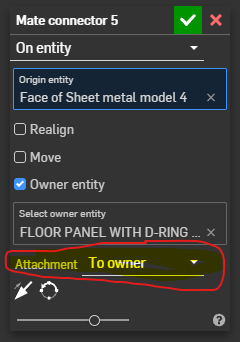
I think I understand what it is allowing us to do but, I'm not certain I understand why I would want to choose which entity on the part the mate connector is attached to. What is also throwing me for a loop all the time is, sometimes when I select where I want the mate connector, this option will automatically unfold and preselect a face to attach to, sometimes it won't, and sometimes it will select the owner option. I am not picking up on what this new functionality is providing other then making me feel like I have somthing extra to worry about everytime I create a mate connector to be sure its doing what I'm not even sure I want it to be doing. 🤨
Answers
-
It's very useful when adding explicit mate connectors to parts (or sketches) where the "origin entity" isn't on the part (or sketch). I use this often. If you only ever attach MCs to physical locations on parts, it's likely that this will seem superfluous, but if you like to add MCs in space as a common coordinate system for several parts - which may not even touch in the assembly - this is incredibly helpful.
Simon Gatrall | Product Development, Engineering, Design, Onshape | Ex- IDEO, PCH, Unagi, Carbon | LinkedIn
0 -
A key use case is with PCB Studio and rigid-flex designs. You'd have seen that in the What's New when we announced IDX4.0 support.
1 -
@S1mon I'm not sure I understand. How is the setting different from placing a mc on the origin and selecting which part is the owner? @GregBrown Do you know where this mc functionality is documented?
0 -
bro we kinda look similar
-1 -
Is there a joke hidden somewhere in here?
0 -
You can place a MC on a sketch entity, but have it owned by a part.
It wasn't always possible to have MCs that weren't attached to parts or the origin. Then they added MCs to sketches. Then they made it so you could place the MC on anything and have it owned by something else. At least that's my memory of the progression.
Date / releaseWhat changed
By July 2015
Explicit connectors already existed in Part Studios and assemblies. Onshape’s contemporary tech tipconfirms this; it isn’t their introduction announcement.
June 18, 2019 — 1.98
Added an inferred placement point at the virtual apex of conical faces, expanding available connector locations. Release explanation
September 1, 2023 — 1.169
Allowed selecting the Part Studio origin from the feature list when creating a connector. Changelog
December 15, 2023 — 1.174
Owner became optional, and curves could own connectors, extending the existing part/surface ownership options. This allowed construction connectors without dummy parts. The release also added virtual-sharp placement at filleted external corners. Release announcement
February 2, 2024 — 1.176
Added sketch-owned connectors, useful for layout-based design. Referencing sketch geometry and having the sketch own the connector are distinct capabilities. Changelog, release announcement
March 15, 2024 — 1.178
Part Studio patterned connectors could be inserted into assemblies. This improved reuse of generated connectors. Changelog
April 5, 2024 — 1.179
Improved placement on 3D curves. Current documentation describes selecting the curve for a tangent-aligned connector, versus an endpoint/control point for global-Z alignment. Changelog, current help
June 28, 2024 — 1.183
Added creation/patterning with primary direction normal to face. Also fixed selecting composite parts as explicit-connector owners from the parts list. Changelog
May 15, 2026 — 1.215
Added connector-to-connector references in Part Studios and assemblies. A new connector can use an existing connector as its origin, then be moved or realigned. Release announcement, help
July 17, 2026 — 1.218
Added an attachment choice: owner or selection for Part Studio connectors. Changelog
August 28, 2026 — 1.220
Added cross-highlighting of the owner and origin reference, making dependencies easier to inspect. Changelog
Simon Gatrall | Product Development, Engineering, Design, Onshape | Ex- IDEO, PCH, Unagi, Carbon | LinkedIn
0 -
It's very useful for Part Studio with no parts. Like Master Skeleton that drives other parts/assemblies. When you insert the sketch as a component or derived part, it brings along all the child Mate Connectors
Adrian V. | Onshape Ambassador
CAD Engineering Manager0 -
This example illustrates the difference https://cad.onshape.com/documents/9dcbbb98d4e3f9accb5a2cbe/w/f8b266a69399c607588d9782/e/1c54ba6ac563f29ad0ff0711
0 -
This worked even before the attach to option. We can select a sketch face as the owner entity without having to use the second option. Iv been doing it for years. I will get on my PC to check @lana example. Thanks for all the feedback.☺️
0 -
Well, for me it is not so much having a use case FOR it, but in certain cases a problem WITHOUT it. ;0)
One such case is when using the transform feature with the "by mate Connectors" option. That would have left an orphan MC behind.
0