How to insert diagonal brace
jon_woellhaf
Member Posts: 92 ✭✭✭
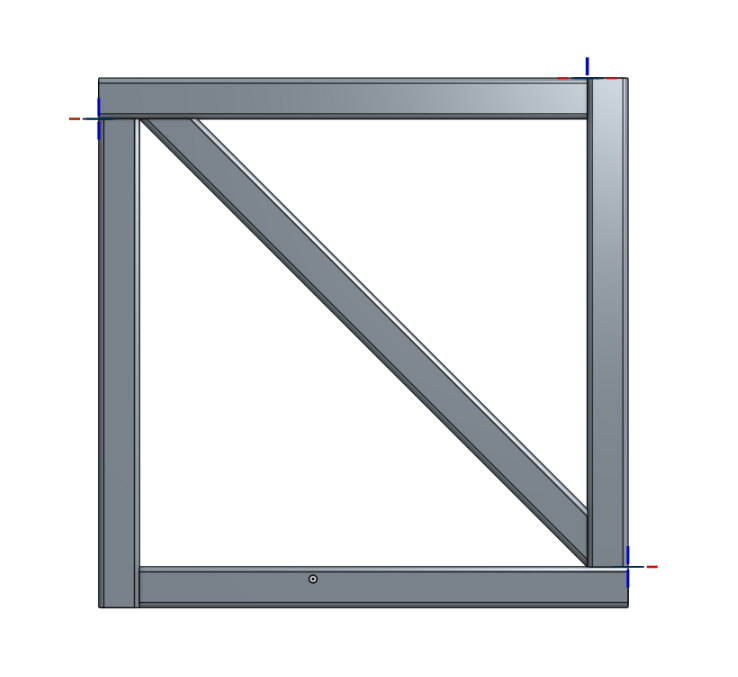
I have a square frame constructed from 2x2 square tube. How do I add a diagonal brace?
0
Best Answer
-
simply I measured your assembly across the inner diagonal corners.
Then I copied your existing tube and moved the face on one side so that the tube length egualled the previous measurement.
Next I sketched and did an extrude/remove for the 45° cuts on the ends.
See my video at the link below for a discussion and example of using planar mates to mate this part.
https://forum.onshape.com/discussion/2736/how-do-i-mate-these-parts#latest
5

Answers
-
@jon_woellhaf Assembly or part studio? please include a link and more details.0
-
Thanks, Dave.
https://cad.onshape.com/documents/03f49d0f25c7c3b949bb536b/w/010732b301d5f67d0149adaa
Assembly.
I want the model to look like it's made of four square tubes with a fifth square tube diagonal brace in the middle.
Jon0 -
-
Yes. How is it done?0
-
simply I measured your assembly across the inner diagonal corners.
Then I copied your existing tube and moved the face on one side so that the tube length egualled the previous measurement.
Next I sketched and did an extrude/remove for the 45° cuts on the ends.
See my video at the link below for a discussion and example of using planar mates to mate this part.
https://forum.onshape.com/discussion/2736/how-do-i-mate-these-parts#latest
5 -
Thanks very much, Dave.0
-
The other choice would be to place a sketch on the face, place the diagonal tube between opposing corners using midline and extrude the tube, hollow it out with an inner removed square, then use the end bars as a boolean tool (leaving the tool) (which gets you the 45 degree ends)0