Welcome to the Onshape forum! Ask questions and join in the discussions about everything Onshape.
First time visiting? Here are some places to start:- Looking for a certain topic? Check out the categories filter or use Search (upper right).
- Need support? Ask a question to our Community Support category.
- Please submit support tickets for bugs but you can request improvements in the Product Feedback category.
- Be respectful, on topic and if you see a problem, Flag it.
If you would like to contact our Community Manager personally, feel free to send a private message or an email.
Make new part based on assembly?

simon_d
Member Posts: 6 ✭
I'd really appreciate some advice from more experienced users as to the best approach to this:
I'm creating separate truss parts in parts studio and then assembling them but I need to create a new part to join the truss sections together based on the assembly. Would it be better to actually build the whole model in a parts studio or is there a way of exporting the parts that I need to make a new joining piece to link between to a new parts studio retaining the same distance between them?
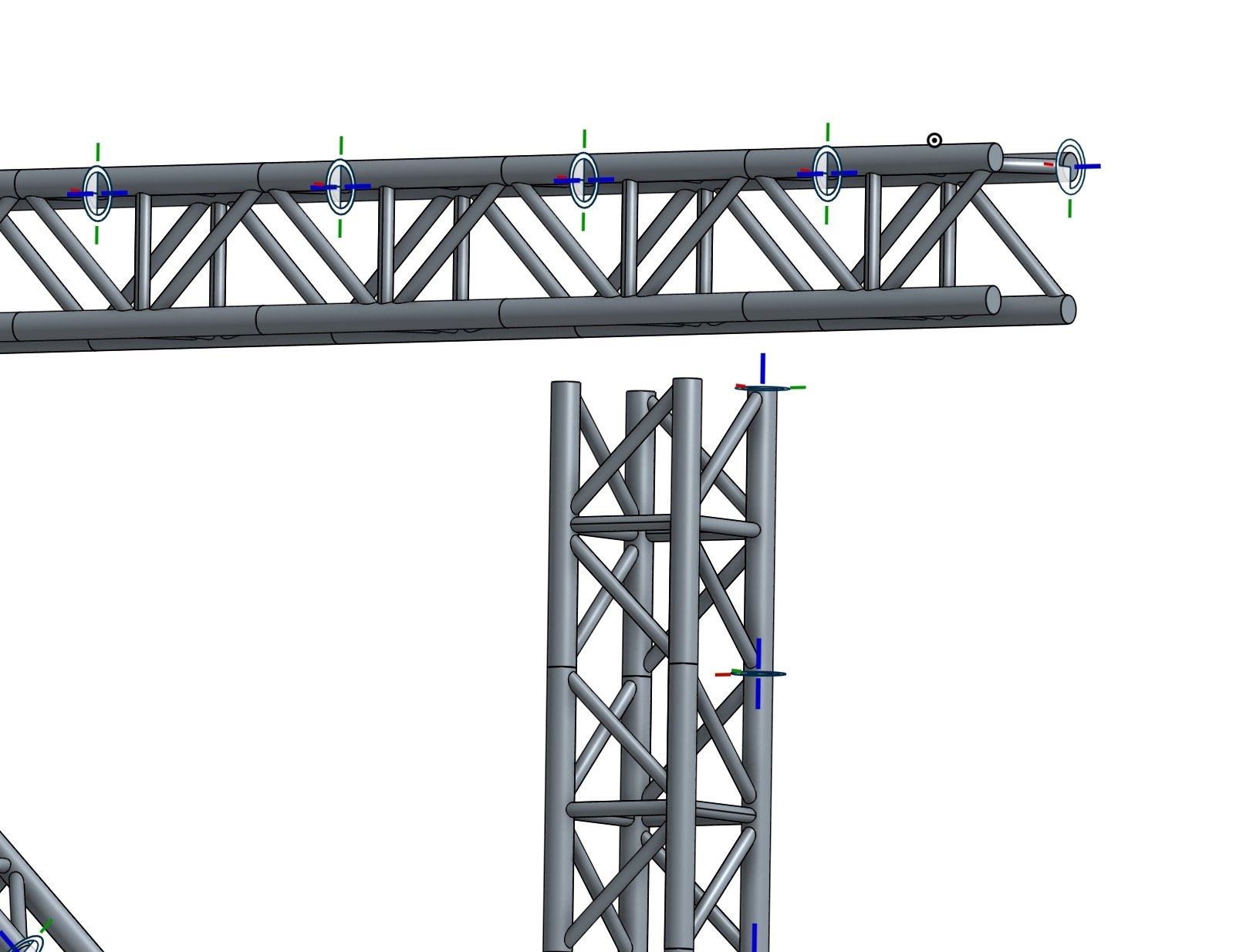
I'm creating separate truss parts in parts studio and then assembling them but I need to create a new part to join the truss sections together based on the assembly. Would it be better to actually build the whole model in a parts studio or is there a way of exporting the parts that I need to make a new joining piece to link between to a new parts studio retaining the same distance between them?
0
Best Answer
-
@simon_d , You can Export that assembly and import that again in that document by choosing second option (Flatten uploaded assemblies as part studios). Now you can create sketch and new part in same part studio having same orientation as assembly.

6

Answers
-
-
@shanshan thanks for bringing my attention to the derived feature, that's really useful but doesn't solve my current problem. I've put my parts together in an assembly and I need to create a new part to bridge the gap but unfortunately the derived feature doesn't appear to allow me to insert an assembly into a parts studio which is ideally what I need to do.
@coleman all the truss pieces are going to be connected in my model, at this point I suspect that they will all use standard joints.
Thanks for your input any further suggestions would be really appreciated.
0 -
@simon_d looking at yout photo all the truss parts appear to be identical, so you created one in parts studio then inserted ?(10+)times into the assembly.
I would go back to your parts studio and create two parts together. (you may be able to mirror or derive distance required to save you work time). Then create your adjoining piece in the parts studio. You can insert pieces seperately into the assy area so no need to start again from scratch.
0 -
@peter_hall thanks for your reply. Yes I've created the individual truss elements in parts studios and then as I assemble them in different configurations I need to create new parts based on the assembly to make new connections. For instance in the attached photo I need to make a new 'T' joint to attach the vertical truss to the horizontal.
I'm not clear on how to recreate the distance between these parts that I have arranged in an assembly in a parts studio so that I can create a new part to fit?
Many thanks
Simon
0 -
@simon_d , You can Export that assembly and import that again in that document by choosing second option (Flatten uploaded assemblies as part studios). Now you can create sketch and new part in same part studio having same orientation as assembly.
6 -
There should be an option to convert an assembly to a flattened parts studio without having to export and then import.4