How to rotate a part in onshape

Best Answers
-
In the part studio you can use the transform>rotate feature.5
-
@Reuben_Abraham, Please refer transform steps which will solve your requirement.
 Transform

Transform adjusts a part's location and orientation in 3D space with the option to copy the part in place.
 Steps
- Click
 .
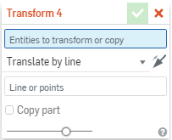
- Select the method of moving the part (transform type):
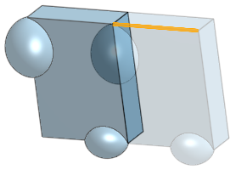
- Translate by line - Select an entity such as a part edge
- Translate by distance - Specify a value and select an entity to indicate direction
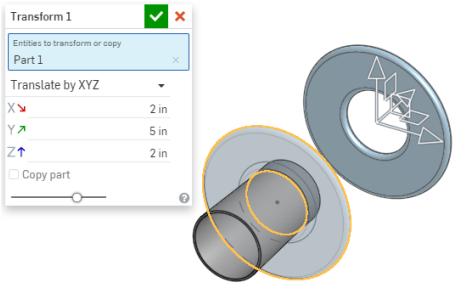
- Translate by XYZ - Specify axis values to move along or optionally, use the drag manipulator that appears to position the part along axis
- Transform by mate connectors - Specify two mate connectors by which to reorient the placement of the part.
- Rotate - Move the part about an axis specified by selecting an entity
- Copy in place - Make a copy of the part at the same location; this creates a separate and independent part enabling you to:
- Make changes to one part and use both to create different bodies during a later operation.
- Make a copy of a part prior to a series of operations enabling you to reference the original state for ancillary operations.
- Create multiple copies of a part in order to create multiple variants.
If you need to create multiple copies of a part at once, use the Pattern feature with a distance of 0 (zero).
- Scale uniformly - Scale a part by a specific factor and select a point to scale about; optionally copy the part
- Click
 .
Translate by line
Before translate by line
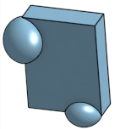

After translate by line
 Translate by distance
Before translate by distance

After translate by distance
 Translate by XYZ
Before translate by XYZ


After translate by XYZ with copy part option checked
 Transform by mate connectors
Before transform by mate connectors
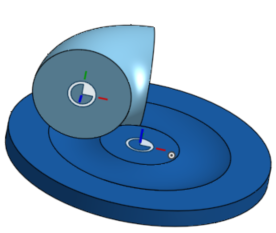
After transform by mate connectors
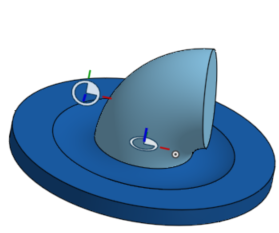 Rotate
Before rotate

After rotate
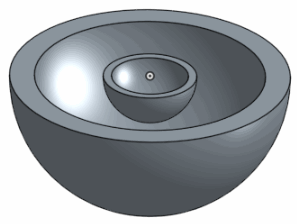
 Copy in place
Before copy in place

After copy in place
 Scale uniformly
Before scale uniformly

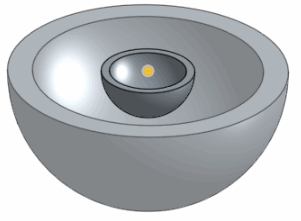
After scale uniformly
5 - Click


Answers
-
In the part studio you can use the transform>rotate feature.5
-
@Reuben_Abraham, Please refer transform steps which will solve your requirement. Transform
Transform adjusts a part's location and orientation in 3D space with the option to copy the part in place.
Steps
- Click .
- Select the method of moving the part (transform type):
- Translate by line - Select an entity such as a part edge
- Translate by distance - Specify a value and select an entity to indicate direction
- Translate by XYZ - Specify axis values to move along or optionally, use the drag manipulator that appears to position the part along axis
- Transform by mate connectors - Specify two mate connectors by which to reorient the placement of the part.
- Rotate - Move the part about an axis specified by selecting an entity
- Copy in place - Make a copy of the part at the same location; this creates a separate and independent part enabling you to:
- Make changes to one part and use both to create different bodies during a later operation.
- Make a copy of a part prior to a series of operations enabling you to reference the original state for ancillary operations.
- Create multiple copies of a part in order to create multiple variants.
If you need to create multiple copies of a part at once, use the Pattern feature with a distance of 0 (zero).
- Scale uniformly - Scale a part by a specific factor and select a point to scale about; optionally copy the part
- Click .
Translate by line
Before translate by line
After translate by line
Translate by distance
Before translate by distance
After translate by distance
Translate by XYZ
Before translate by XYZ
After translate by XYZ with copy part option checked
Transform by mate connectors
Before transform by mate connectors
After transform by mate connectors
Rotate
Before rotate
After rotate
Copy in place
Before copy in place
After copy in place
Scale uniformly
Before scale uniformly
After scale uniformly
5 - Click
-
I've created a ring with a bevel. The bevel may be on the wrong side for printing so I want to rotate the part 180 degrees.
I can't for the life of me figure out the AXIS requirement. I try to click planes but that doesn't do it. I'm lost.0 -
A few thoughts:varocketry said:I've created a ring with a bevel. The bevel may be on the wrong side for printing so I want to rotate the part 180 degrees.
I can't for the life of me figure out the AXIS requirement. I try to click planes but that doesn't do it. I'm lost.
1. It's best to take advantage of parametric CAD and just remodel the bevel on the right side.
2. Perhaps you can just rotate it in your slicer?
3. Failing 1 and 2, you can make an axis in a couple of easy ways - either make a sketch with a line to use as the axis, or use an implicit mate connector. Like so: https://cad.onshape.com/documents/b20feacf1f8a1423557fbc16/w/05f2f52b4ed4feaea73e0b78/e/60e16f608fd3f60c448934610