Welcome to the Onshape forum! Ask questions and join in the discussions about everything Onshape.
First time visiting? Here are some places to start:- Looking for a certain topic? Check out the categories filter or use Search (upper right).
- Need support? Ask a question to our Community Support category.
- Please submit support tickets for bugs but you can request improvements in the Product Feedback category.
- Be respectful, on topic and if you see a problem, Flag it.
If you would like to contact our Community Manager personally, feel free to send a private message or an email.
Updated FeatureScript: Socket Screw Generator V 3.1 now names screws nicely

dave_cowden
Member, Developers Posts: 484 ✭✭✭
Hey, everyone:
Had a bit of time today, so its time for a Socket Screw Generator update! The newest version puts the size, length, and # of places into the title, which was a user-requested feature:
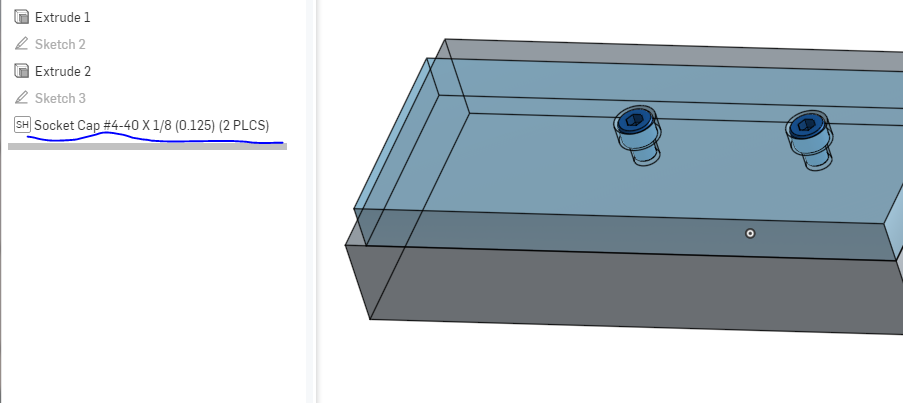
The (N PLCS) part will only show up if you have more than one.
Other planned improvements:
* hex heads
* a few fixes for metric threads
Enjoy!
https://cad.onshape.com/documents/2d7e0a6b68c2039da4221ebc/w/06d0026261b3d9bb908f74a1/e/b92e2707bc8e8165e208a55e
Had a bit of time today, so its time for a Socket Screw Generator update! The newest version puts the size, length, and # of places into the title, which was a user-requested feature:
The (N PLCS) part will only show up if you have more than one.
Other planned improvements:
* hex heads
* a few fixes for metric threads
Enjoy!
https://cad.onshape.com/documents/2d7e0a6b68c2039da4221ebc/w/06d0026261b3d9bb908f74a1/e/b92e2707bc8e8165e208a55e
0
Comments
-
Thanks for the useful update and the very useful FS.
I see that you added M1.6 and M2, would it be possible to also add M2.5?
And, (I think I already mentioned it elsewhere) Metric "M" type screws don't come with different pitches. That means that people using metric screws don't necessarily know the pitch of a say M5 screw (at least I don't). Since you offer different pitches for the same M size I have to open my data book to choose the right screw which is quite inconvenient. -> I'd prefer a simple list of standard metric screws (M1.6, M2, M2.5, M3...) If you also want to provide metric fine pitch threads (usually called MF) a seperate MF list would be easier to use than a list which mixes M and MF screws.
Just my thoughts....
0 -
@lutz_niggl Yes, you are right. This is on my list
Do any other users of this feature care to chime in on their preference for having course and fine threads separated out? It seems odd to do it for metric but not for ansi. Should I split out fine and course for ansi also?
There is one other concern. FS does not provide a way to shorten or paginate the feature, and I have already gotten some comments that on smaller screens it is too long when fully open. Adding another step to separate course and fine will make it even longer.
Perhaps I could combine the choice of ansi/ISO and course/fine into one, list box? IE, ansi-nc, ansi-nc, iso-m, and iso-mf?
0 -
Hi Dave.
My vote would be to separate coarse / fine threads with a drop-down box, with the default set to course.
In passing on the menu size; I was surprised how much more usable screen is available just by running the browser full screen and with he task bar auto hiding.
ANSI threads should be hidden behind a password protected option, also with a $10 per use per bolt fee. Perhaps that way we can drag countries stuck in the 19th century towards joining the rest of the world in using SI units
Owen S.
Business Systems and Configuration Controller
HWM-Water Ltd1 -
hehe, that's quite an agenda! I'm trying to do cool stuff, but i'm not sure i'm up to trying to change the world just yet.0
-
@dave_cowden I just tried socket flat screws, looks like the angles of the the screw head and the corresponding countersink are different.
 0
0 -
@lutz_niggl thanks for reporting that. I was able to reproduce, it happens with ISO flat. I'll get a fix done!
0 -
@lutz_niggl This was a bug, due to the difference in countersink angle between ANSI and ISO screws. It is fixed in the latest version ( 3.2 ).
Sorry for introducing a bug! I've begun work on the next version, which will:
* separate course and fine thread series in both ANSI and ISO
* Add M2.5 threads
0 -
Great, looking forward to testing it.0
-
A couple of questions regarding this script. Does it create real threads that can be used with 3d printer? And if so is the screw that is generated a normal part, that I could just union another part onto it if I wanted to make a different head, etc.?
Thanks.
0 -
hi @brian_wagener no it does not. this was intentional-- most times people dont print fasteners ( even with 3d printers, its more common in my experience to simply tap the holes unless the screws are very large )
its on my list to add a 'generate real threads' feature. I've architected the script to allow that-- the cosmetic helix created is the 'real' helix, so i just need to cut the threads.
The screw generated is a normal part-- so you could union another part. in fact, you should be able to draw a triangle sketch at the right point on the screw, and then use the helix generated by 'cosmetic threads' to do a sweep cut. That's precisely what i'll automate when I add this feature.
I have a new version coming within a week or so that will add low profile socket head screws, and hex head bolts. After that, i'll be able to add more features. I'm still deliberating between adding more head types or adding nuts/washers or adding real threads.1 -
@dave_cowden Automatically cutting threads would be awesome! Are you still working toward that? If so, when do you think you'll publish it? Thanks for such a great tool.
0 -
@ryan_henning
You may be interested in the Thread Creator custom feature:
https://cad.onshape.com/documents/6b640a407d78066bd5e41c7a/w/4693805578a72f40ebfb4ea3/e/f8aea9e5c33e02eab0854a4f
You can go to that document and press the '+' in the toolbar to add the custom feature to your own toolbar.Jake Rosenfeld - Modeling Team0 -
Hi @ryan_henning, I am, but working towards it is something of a loose term I am afraid. I've not been making fast progress because I've had a lot of other activities taking up my time, and the custom Featurescripts don't pay very well

0 -
@Jake_Rosenfeld YES! That Tread Creator you posted works perfectly in tandem with @dave_cowden's Socket Screw Generator. Thank you both.
0 -
just a question, how do i select the location? i cant seem to select a point to place it.0