Any relation like Creo?

zhongxuebo
Member Posts: 4 ✭
Question about relation.
For example I drew a line A which length is 20mm
Then I drew another line B, but the intent length should be 1/4 of former one. (5mm)
So later I can just change dimension A then update B automatically.
I already find some solution using variable, but that's not so flexible.
Maybe that's OK for simple model, but not so good for complex model.

Thanks!
For example I drew a line A which length is 20mm
Then I drew another line B, but the intent length should be 1/4 of former one. (5mm)
So later I can just change dimension A then update B automatically.
I already find some solution using variable, but that's not so flexible.
Maybe that's OK for simple model, but not so good for complex model.
Thanks!
0
Answers
-
-
@zhongxuebo, I used variable in dimensions and expressions for many big model but till time i haven't faced any issue in single document. Kindly refer below example steps for more detail.
Using the variable in a dimensionIn below video I have taken your example and changing value it won't create problem when changing.- Begin creating a dimension as usual.
-
In the dimension field, enter # and the variable name (and optionally, as part of an expression (as shown below):
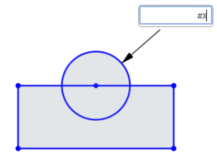 and
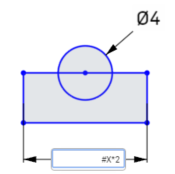
- When you save the dimension, the variable is replaced with the value and the expression (if applicable) is solved.

- When you double-click the dimension for editing, the variable (and expression) is displayed:


If you need variable act like creo relation then raise a improvement request for that. In near future we hope that this facility will be provided by Onshape.
0