Sweep tool help

yuggniiks
Member Posts: 25 EDU
Hi,
I'm attempting to use sweep to cut a shape through a solid. The shape I'm trying to sweep is on this vertical face and is a rectangle:
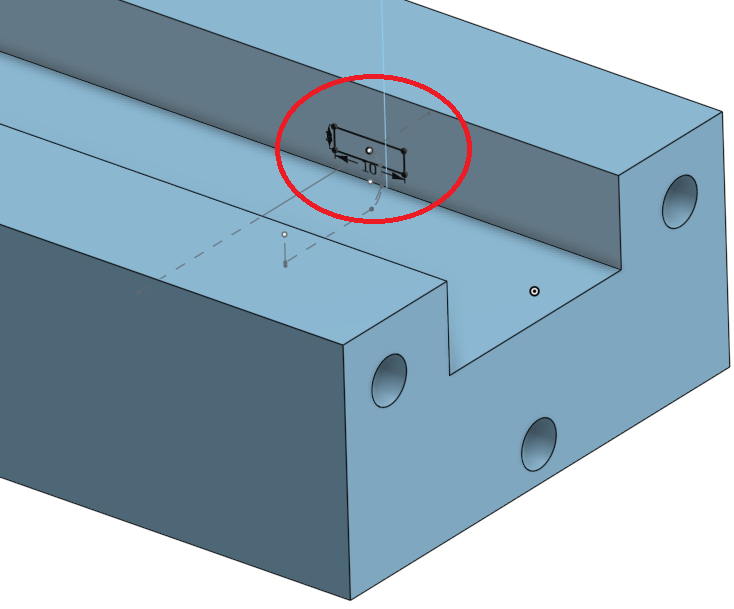
I'm not sure why the feature is "angled" at the midway point shown circled in red here:

What is the recommended way to fix this, as if I mirror the sweep feature it looks like this:

Thanks!
Link to drawing:
0
Best Answers
-
What's happening is that Onshape maintains the angle of your shape (rectangle) relative to the path. The sketch plane with your rectangle is not perpendicular to the path at the starting point, so that angle is maintained along the entire path. You could create a new sketch plane that is perpendicular to your path, and you would likely see something closer to what you are expecting. One quick fix would be to just extend your path past the center of the part, so that the two channels over-lap when mirrored (Its possible this could throw an error. I haven't tested it it.)
Alternatively, you could create a sketch showing what you want the cross-section of the path to be, and then just do an extruded cut from that sketch to create the channel. That would probably be the route that I would take so that it would be easier to fine-tune different segments of the channel.6 -
https://cad.onshape.com/documents/25df7230855f9e278da339bc/w/645b1dad610c3f42040e96af/e/0f6bbd6c7eaade6a058a27bc
Here's a quick example. I created a plane where I wanted the channel. Then, I drew a sketch with the cross-section of the channel. Lastly, I extruded that sketch using the "remove" option.

5

Answers
-
What's happening is that Onshape maintains the angle of your shape (rectangle) relative to the path. The sketch plane with your rectangle is not perpendicular to the path at the starting point, so that angle is maintained along the entire path. You could create a new sketch plane that is perpendicular to your path, and you would likely see something closer to what you are expecting. One quick fix would be to just extend your path past the center of the part, so that the two channels over-lap when mirrored (Its possible this could throw an error. I haven't tested it it.)
Alternatively, you could create a sketch showing what you want the cross-section of the path to be, and then just do an extruded cut from that sketch to create the channel. That would probably be the route that I would take so that it would be easier to fine-tune different segments of the channel.6 -
Thanks @tim_hess427 ! I tested out your 'quick fix' with the overlapping solution and it worked!I will attempt the other two methods, for practice.0
-
@tim_hess427
I was able to model your first two solutions.I'm now trying to understand the last recommendation, create a sketch of path, then extrude cut from that sketch. I'm not sure I follow this one. Do you have a simple example? Or perhaps a link to this?Thanks again for your suggestions, they were helpful!
0 -
Here's a quick example. I created a plane where I wanted the channel. Then, I drew a sketch with the cross-section of the channel. Lastly, I extruded that sketch using the "remove" option.
5 -
Oh I see, I wouldn't have thought of that. Brilliant!
Thanks again for taking the time to educate
0 -
No problem! I'm always picking up new tips and methods from these forums. I'm happy to pay it forward!
0