Welcome to the Onshape forum! Ask questions and join in the discussions about everything Onshape.
First time visiting? Here are some places to start:- Looking for a certain topic? Check out the categories filter or use Search (upper right).
- Need support? Ask a question to our Community Support category.
- Please submit support tickets for bugs but you can request improvements in the Product Feedback category.
- Be respectful, on topic and if you see a problem, Flag it.
If you would like to contact our Community Manager personally, feel free to send a private message or an email.
angleBetween with a reference
 EvanReese
Member, Mentor Posts: 2,967 PRO
EvanReese
Member, Mentor Posts: 2,967 PRO
I'm trying to measure the angle between two 3D vectors using angleBetween(vector1, vector2, ref). I'm trying to get the visual angle of the lines when looking in the direction of ref. The help says this function returns the angle "as witnessed from the tip of a third 3-dimensional vector", which sounds like what I want, but I keep getting 90°. Am I making a mistake or just don't understand the function's intent?
Here's my test studio.
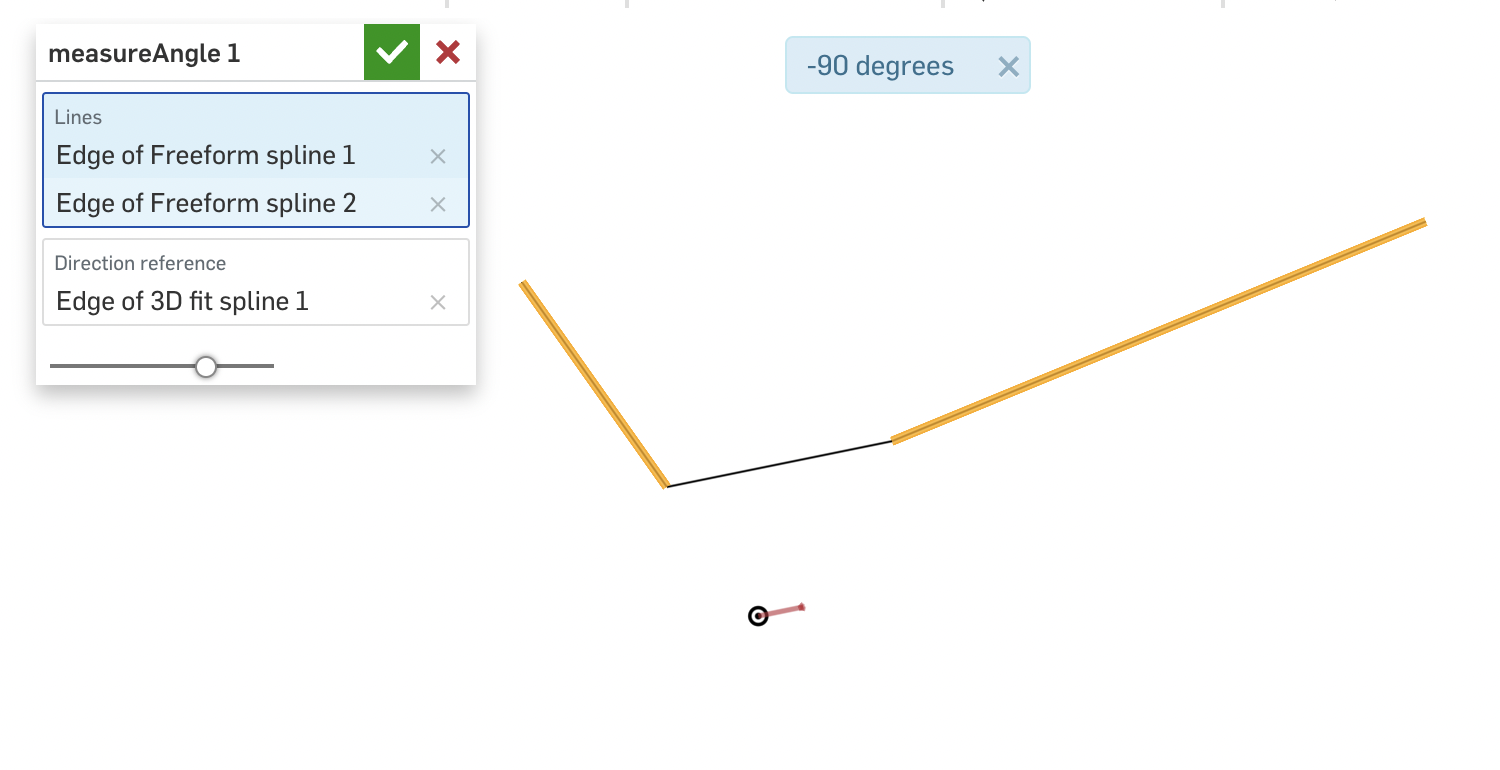
Here's my test studio.
0
Best Answers
-
 mahir
Member, Developers Posts: 1,323 ✭✭✭✭✭
Interesting problem. I took a look under the hood, and this is how angleBetween(vector1, vector2, ref) is calculating the angle. I don't get the vector math, but it is what it is.
mahir
Member, Developers Posts: 1,323 ✭✭✭✭✭
Interesting problem. I took a look under the hood, and this is how angleBetween(vector1, vector2, ref) is calculating the angle. I don't get the vector math, but it is what it is.var dotProd = dot(vector1, vector2); var area = dot(cross(vector1, vector2), normalize(ref)); return atan2(area, dotProd);<br>
In your example, vector1 and vector2 are normal to each other, which means dotProd=0. So, regardless of what you use as the ref vector, atan2(area, dotProd) will always be -90deg. Conceptually, this doesn't seem to follow the description of the angleBetween function since it's simple enough to visualize that the vectors when projected onto a plane normal to ref do not look anywhere near perpendicular.
Seems that this is either a logic error in the function that fails in certain corner cases, or the description of the function needs to be modified to reflect the actual math being applied. That being said, it's not too difficult to do what you want manually by individually projecting each vector and then measuring the angle between them. After a little googling, it looks like a vector projection onto a plane is just that same vector with the normal portion subtracted.var vector1p = vector1 - dot(vector1, ref)*ref; var vector2p = vector2 - dot(vector2, ref)*ref; var angle = angleBetween(vector1p, vector2p);
Here's a link to the modified code.
https://cad.onshape.com/documents/5e71b5547ac70bd80f596144/w/84e01b532a5be6c2f7a4c970/e/4ccf956c5319aa08f99fee65-1 -
 Jacob_Corder
Member Posts: 141 PRO
Just make a plane using the direction reference and origin
Jacob_Corder
Member Posts: 141 PRO
Just make a plane using the direction reference and origin
then get the closest point on each using evDistance
then get one tangentLine from each edge using evEdgeTangentLine using parameter from evDistance
adjust the tangentLine to the plane using tangentLine = project(plane,tangentLine )
now call angleBetween for each tangent Line.
I never have it return 90 or neg 90, always the correct angle. if you want to be sure its the smallest angle you can simply call angleBetween 2x like this, but if you are running it a lot where a performance hit is likely, then just make sure to reverse the tangentLine if the parameter on each edge is 1 or close to 1.
var ang0 = angleBetween(tangentLine0.direction,tangentLine1.direction)
var ang1 = angleBetween(tangentLine0.direction,tangentLine1.direction*-1)
if(ang1<ang0) ang0=ang1;
this will work with all curve types.
0
Answers
Seems that this is either a logic error in the function that fails in certain corner cases, or the description of the function needs to be modified to reflect the actual math being applied. That being said, it's not too difficult to do what you want manually by individually projecting each vector and then measuring the angle between them. After a little googling, it looks like a vector projection onto a plane is just that same vector with the normal portion subtracted.
Here's a link to the modified code.
https://cad.onshape.com/documents/5e71b5547ac70bd80f596144/w/84e01b532a5be6c2f7a4c970/e/4ccf956c5319aa08f99fee65
The Onsherpa | Reach peak Onshape productivity
www.theonsherpa.com
then get the closest point on each using evDistance
then get one tangentLine from each edge using evEdgeTangentLine using parameter from evDistance
adjust the tangentLine to the plane using tangentLine = project(plane,tangentLine )
now call angleBetween for each tangent Line.
I never have it return 90 or neg 90, always the correct angle. if you want to be sure its the smallest angle you can simply call angleBetween 2x like this, but if you are running it a lot where a performance hit is likely, then just make sure to reverse the tangentLine if the parameter on each edge is 1 or close to 1.
var ang0 = angleBetween(tangentLine0.direction,tangentLine1.direction)
var ang1 = angleBetween(tangentLine0.direction,tangentLine1.direction*-1)
if(ang1<ang0) ang0=ang1;
this will work with all curve types.
annotation { "Feature Type Name" : "Angle Between Edges" } export const angleBetweenEdges = defineFeature(function(context is Context, id is Id, definition is map) precondition { annotation { "Name" : "edges", "Filter" : EntityType.EDGE, "MaxNumberOfPicks" : 2 } definition.edges is Query; annotation { "Name" : "Reference Axis", "Filter" : QueryFilterCompound.ALLOWS_AXIS, "MaxNumberOfPicks" : 1 } definition.axis is Query; } { var edges =evaluateQuery(context, definition.edges); var axisDir; if(isQueryEmpty(context, definition.axis)==false) { axisDir =evAxis(context, { "axis" : definition.axis }) ; } var ang = getAngleBetweenEdges(context, edges[0], edges[1], axisDir,true); reportFeatureInfo(context, id, "angle: "~ ang/degree); }); export function getAngleBetweenEdges(context is Context, sourceEdge is Query, toEdge is Query,refPlaneLineOrDirection,showDebugEntities is boolean ) { // "arcLengthParameterization":false for speed purposes var sLines = evEdgeTangentLines(context, { "edge" : sourceEdge, "parameters" : [0, 1], "arcLengthParameterization" : false }); var toLines = evEdgeTangentLines(context, { "edge" : toEdge, "parameters" : [0, 1], "arcLengthParameterization" : false }); var dist = evDistance(context, { "side0" : sourceEdge, "side1" : toEdge, "arcLengthParameterization":false }); var sLineIndex = dist.sides[0].parameter; var toLineIndex = dist.sides[1].parameter; //now we correct the deviation found in the return parameterization to determine direction for min angle between if (sLineIndex - .1 < 0) { sLineIndex = 0; } else if (sLineIndex + .1 > 1) { sLineIndex = 1; } if (toLineIndex - .1 < 0) { toLineIndex = 0; } else if (toLineIndex + .1 > 1) { toLineIndex = 1; } if(refPlaneLineOrDirection is Vector) refPlaneLineOrDirection = plane(zeroVector(3)*meter , refPlaneLineOrDirection); if(refPlaneLineOrDirection is Line) refPlaneLineOrDirection = plane(refPlaneLineOrDirection.origin,refPlaneLineOrDirection.direction); if(refPlaneLineOrDirection is Plane) { toLines[toLineIndex] = project(refPlaneLineOrDirection, toLines[toLineIndex]); sLines[sLineIndex] = project(refPlaneLineOrDirection, sLines[sLineIndex]); } if(toLineIndex ==1) { toLines[toLineIndex].direction *=-1; } if(sLineIndex ==1) { sLines[sLineIndex].direction *=-1; } if(showDebugEntities==true) { var int =intersection(toLines[toLineIndex], sLines[sLineIndex]); if(refPlaneLineOrDirection is Plane && int.dim ==0) refPlaneLineOrDirection.origin = int.intersection; if(int.dim ==0 && dist.distance > .5*millimeter) { try silent(addDebugArrow(context, toLines[toLineIndex].origin, int.intersection, .25 * millimeter, DebugColor.RED)); try silent(addDebugArrow(context, sLines[sLineIndex].origin, int.intersection, .25 * millimeter, DebugColor.GREEN)); } else { try(addDebugArrow(context, toLines[toLineIndex].origin, toLines[toLineIndex].origin + toLines[toLineIndex].direction*(10*millimeter), .25 * millimeter, DebugColor.RED)); try(addDebugArrow(context, sLines[sLineIndex].origin, sLines[sLineIndex].origin + sLines[sLineIndex].direction*(10*millimeter), .25 * millimeter, DebugColor.GREEN)); } } return angleBetween(toLines[toLineIndex].direction, sLines[sLineIndex].direction ); }That's pretty similar to what I was going to do, but I like your way using project() instead of evDistance(), which is more roundabout. I don't think I've used that function before. Thanks for the tip. I got it working.
The Onsherpa | Reach peak Onshape productivity
www.theonsherpa.com
The Onsherpa | Reach peak Onshape productivity
www.theonsherpa.com
Edit: Nevermind. Looks like using project() is even more straightforward along with a wrapper function. Cheers.
I must have read your reply too quickly and missed that part. So sorry! You absolutely answered my question and I've marked it as such.
The Onsherpa | Reach peak Onshape productivity
www.theonsherpa.com
basically, if you are pinching milliseconds, use only numeric values and arrays, or skip arrays and use x, y , z