Moving a Sketch

stuart_every
Member Posts: 3 ✭
Very new to Onshape, but not CAD
A couple of components which I am modelling share the same basic footprint, so copied Sketch1 from the first Part, then pasted it onto the Front Plane in a new Part.
Couldn't figure out how to easily move the whole Sketch, so that its Centre point was aligned to the Plane Centre Point.
Seems to be related to Transform, but could't get the white arrow Tool up, whilst in the sketch
A couple of components which I am modelling share the same basic footprint, so copied Sketch1 from the first Part, then pasted it onto the Front Plane in a new Part.
Couldn't figure out how to easily move the whole Sketch, so that its Centre point was aligned to the Plane Centre Point.
Seems to be related to Transform, but could't get the white arrow Tool up, whilst in the sketch
0
Best Answer
-
@stuart_every, Your requirement is introduced by Onshape in "improvement to Onshape-September 14th 2016" list. Kindly refer below video and thread posted by @NeilCooke for transform sketch by value or by snapping,
https://forum.onshape.com/discussion/4707/improvements-to-onshape-september-14th-2016#latest
The Sketch Transform tool now lets you translate and rotate by exact distances or angles and snap to existing sketch geometry.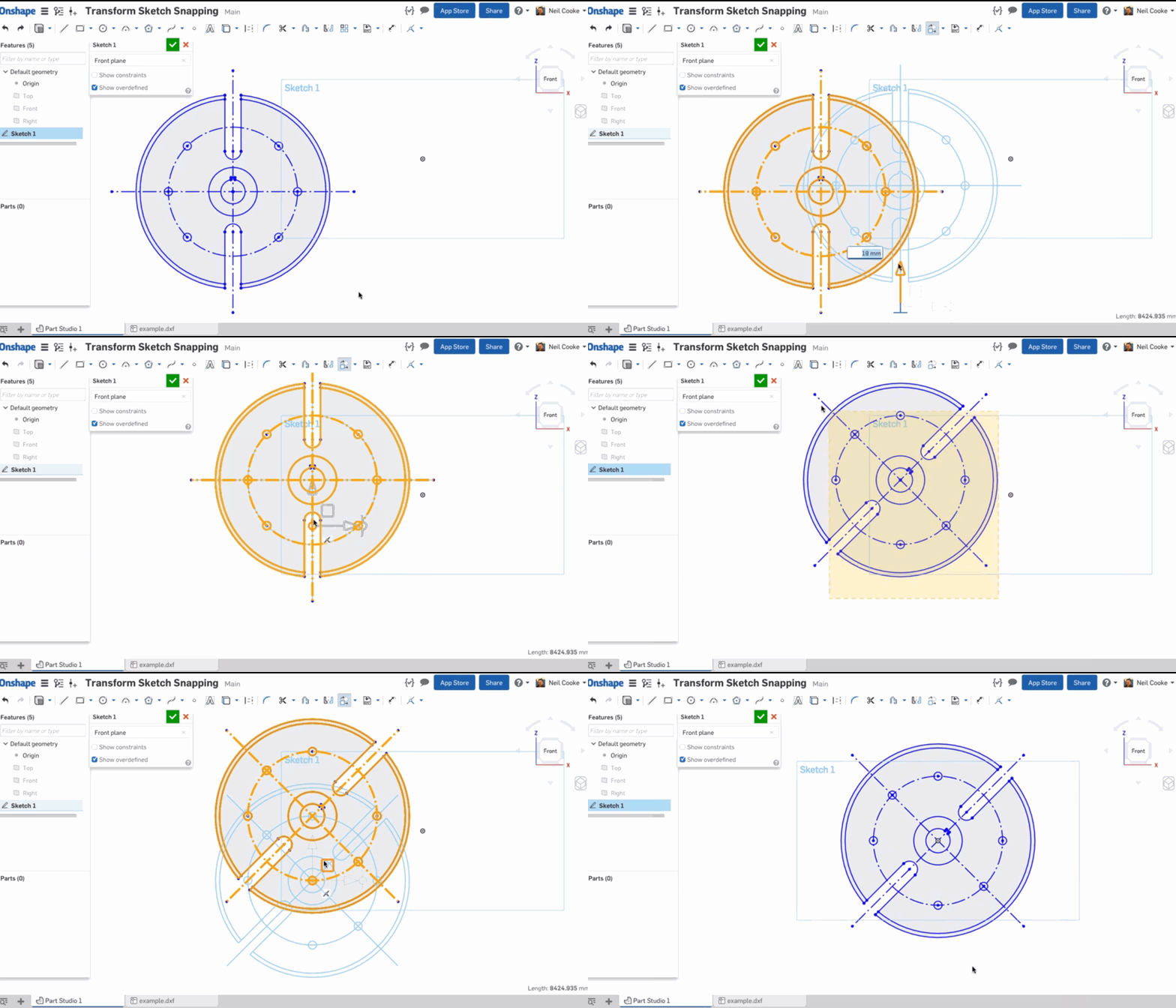
Please refer below stepsSteps
- Click
 .
. - Select the sketch entities you want to move.
- Use the manipulator to drag and orient the sketch.
- Click in space when the sketch is placed and oriented as desired.

When rotating via the manipulator, an angle field activates. Enter an angle, press Enter, and click in space to set the angle:

Place the manipulator’s ball point to orient a snap point for the sketch:

- Drag the ball point to a point on the sketch you wish to use as a snap point:

- Use the plane to drag the sketch ball point to the snap point on another sketch (in this case the lower-left point of the square):

- Click off the sketch to set the transform:

For more information, see Transforming sketches
Tips
- Pre- and post-selection is supported; entities can be added and removed during the operation.
- Click off the sketch or press Enter to commit the transform and exit the operation. Press Esc to cancel the operation.
- In the case of no rotation or 180 degree rotation, internal constraints are unchanged.
- In the case of 90 degree or 270 degree rotation, horizontal and vertical constraints swap.
- In some cases, construction geometry may be added to maintain degrees of freedom.
- Directed dimensions are deleted, and may be replaced with construction geometry and minimum dimensions.
- Transform is also supported for images, text, DWG, and DXF .
5 - Click

Answers
-
@stuart_every, Your requirement is introduced by Onshape in "improvement to Onshape-September 14th 2016" list. Kindly refer below video and thread posted by @NeilCooke for transform sketch by value or by snapping,
https://forum.onshape.com/discussion/4707/improvements-to-onshape-september-14th-2016#latest
The Sketch Transform tool now lets you translate and rotate by exact distances or angles and snap to existing sketch geometry.
Please refer below stepsSteps
- Click .
- Select the sketch entities you want to move.
- Use the manipulator to drag and orient the sketch.
- Click in space when the sketch is placed and oriented as desired.
When rotating via the manipulator, an angle field activates. Enter an angle, press Enter, and click in space to set the angle:
Place the manipulator’s ball point to orient a snap point for the sketch:
- Drag the ball point to a point on the sketch you wish to use as a snap point:
- Use the plane to drag the sketch ball point to the snap point on another sketch (in this case the lower-left point of the square):
- Click off the sketch to set the transform:
For more information, see Transforming sketches
Tips
- Pre- and post-selection is supported; entities can be added and removed during the operation.
- Click off the sketch or press Enter to commit the transform and exit the operation. Press Esc to cancel the operation.
- In the case of no rotation or 180 degree rotation, internal constraints are unchanged.
- In the case of 90 degree or 270 degree rotation, horizontal and vertical constraints swap.
- In some cases, construction geometry may be added to maintain degrees of freedom.
- Directed dimensions are deleted, and may be replaced with construction geometry and minimum dimensions.
- Transform is also supported for images, text, DWG, and DXF .
5 - Click
-
I don't get the arrows when selecting transform.-2
-
Neither do I
0 -
This is in the sketch transform (i.e. available while editing the sketch), I suspect you are trying to use the transform feature...peter_wallis said:Neither do I0
