Welcome to the Onshape forum! Ask questions and join in the discussions about everything Onshape.
First time visiting? Here are some places to start:- Looking for a certain topic? Check out the categories filter or use Search (upper right).
- Need support? Ask a question to our Community Support category.
- Please submit support tickets for bugs but you can request improvements in the Product Feedback category.
- Be respectful, on topic and if you see a problem, Flag it.
If you would like to contact our Community Manager personally, feel free to send a private message or an email.
Best Of
Re: Improvements to Onshape - March 8th, 2021
@Hans_Ole_Leirvik I generated a ticket for your date formatting request. We have more formats to support in drawings. Here are the ones we have an improvement to support:
dd-mm-yyyy
d-MMM-yyyy
dd/mm/yy
dd/mm/yyyy
dd.mm.yy
dd.mm.yyyy
dd-mm-yyyy
d-MMM-yyyy
dd/mm/yy
dd/mm/yyyy
dd.mm.yy
dd.mm.yyyy

Improvements to Onshape - March 8th, 2021
This month everyone is busy at Onshape gearing up for our FIRST EVER Onshape LIVE Conference on March 11th! Here is an overview of what you can expect during the conference. Our developers have also been busy; this month we are releasing a number of highly requested features. Let’s take a look!

CAD IMPROVEMENTS
BOM TEMPLATES
Company administrators can now create a template of their Bill of Materials customization that can be applied to future assemblies. BOM Templates are immediately available to everyone in your company and the default BOM Template can be set in your company settings.PERFORMANCE ADVISOR
You'll find a new Performance Advisor feature that helps you to better understand factors affecting performance in the Document.CALLOUT GROUPING
You can now group Callouts with Notes, Bend Notes, Hole Tags and GD&T symbols.DRAWING PERFORMANCE IMPROVEMENTS
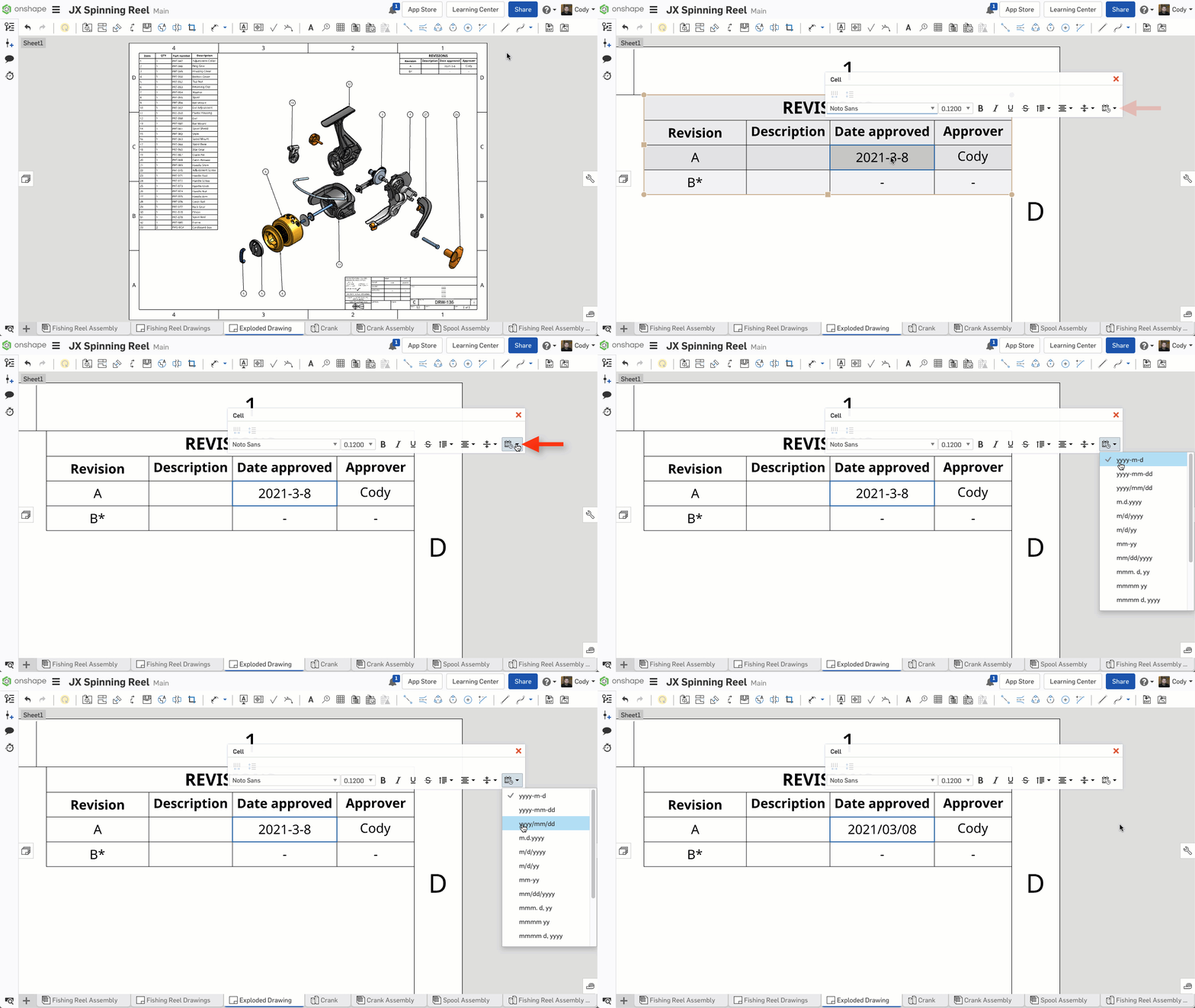
Performance improvements have been made to adding annotations to drawings in Onshape. These changes improve interactivity when adding annotations to drawings with a large number of edges.REVISION TABLE IMPROVEMENTS
You can now change the Date Format for columns in a Revision Table.MOBILE IMPROVEMENTS
VIEW-ONLY TOOLBAR FOR ANDROID
You will now see a View-only toolbar when opening View-only Documents on Android devices. This toolbar makes a Document easier to navigate for those that are not experts.Please take a moment to try out these new features and improvements and leave your comments below. For a detailed list of all the changes in this update, please see the changelog.
Remember: The updates listed here are now live for all users when creating new Documents and over the next few days these features will also be available in Documents created before the date of this update.

Re: Improvements to Onshape - March 8th, 2021
OOOhh yeaaa, BOM templates!
Let's see how well that drawing performance works out I have a few nasty ones to give a go
Holy crap, you weren't kidding about drawing annotation performance...
this drawing used to take a dozen seconds per click, now it's almost as quick as a small assembly.
There are still small lag spikes here and there, but nothing like it was. This drawing used to take hours to update, now it's back down to minutes like it should be.
Excellent Job!


Let's see how well that drawing performance works out
I have a few nasty ones to give a goHoly crap, you weren't kidding about drawing annotation performance...
this drawing used to take a dozen seconds per click, now it's almost as quick as a small assembly.
There are still small lag spikes here and there, but nothing like it was. This drawing used to take hours to update, now it's back down to minutes like it should be.
Excellent Job!
