Welcome to the Onshape forum! Ask questions and join in the discussions about everything Onshape.
First time visiting? Here are some places to start:- Looking for a certain topic? Check out the categories filter or use Search (upper right).
- Need support? Ask a question to our Community Support category.
- Please submit support tickets for bugs but you can request improvements in the Product Feedback category.
- Be respectful, on topic and if you see a problem, Flag it.
If you would like to contact our Community Manager personally, feel free to send a private message or an email.
Best Of
Re: Abusing UIHints for Fun and Profit

Seriously, that's a pretty creative use of the system; I certainly never thought of the interaction of the two UIHints.
BTW (and I know it's still not practical) the way to get around keeping a list of random numbers is to use a secure pseudo-random number generator (https://en.wikipedia.org/wiki/Cryptographically_secure_pseudorandom_number_generator) based on just one secret key.

Abusing UIHints for Fun and Profit

Re: Improvements to Onshape - March 29th, 2021

Re: Improvements to Onshape - March 29th, 2021

Improvements to Onshape - March 29th, 2021
CAD IMPROVEMENTS
VARIABLE TABLE
Variables can now be viewed, created or edited in a new panel on the right-hand side of the screen in a Part Studio. This new variable table makes it much easier to find and edit variables, especially when multiple variables are scattered throughout your Feature list.
DRAWING IMPROVEMENTS
EXPORT IMAGES
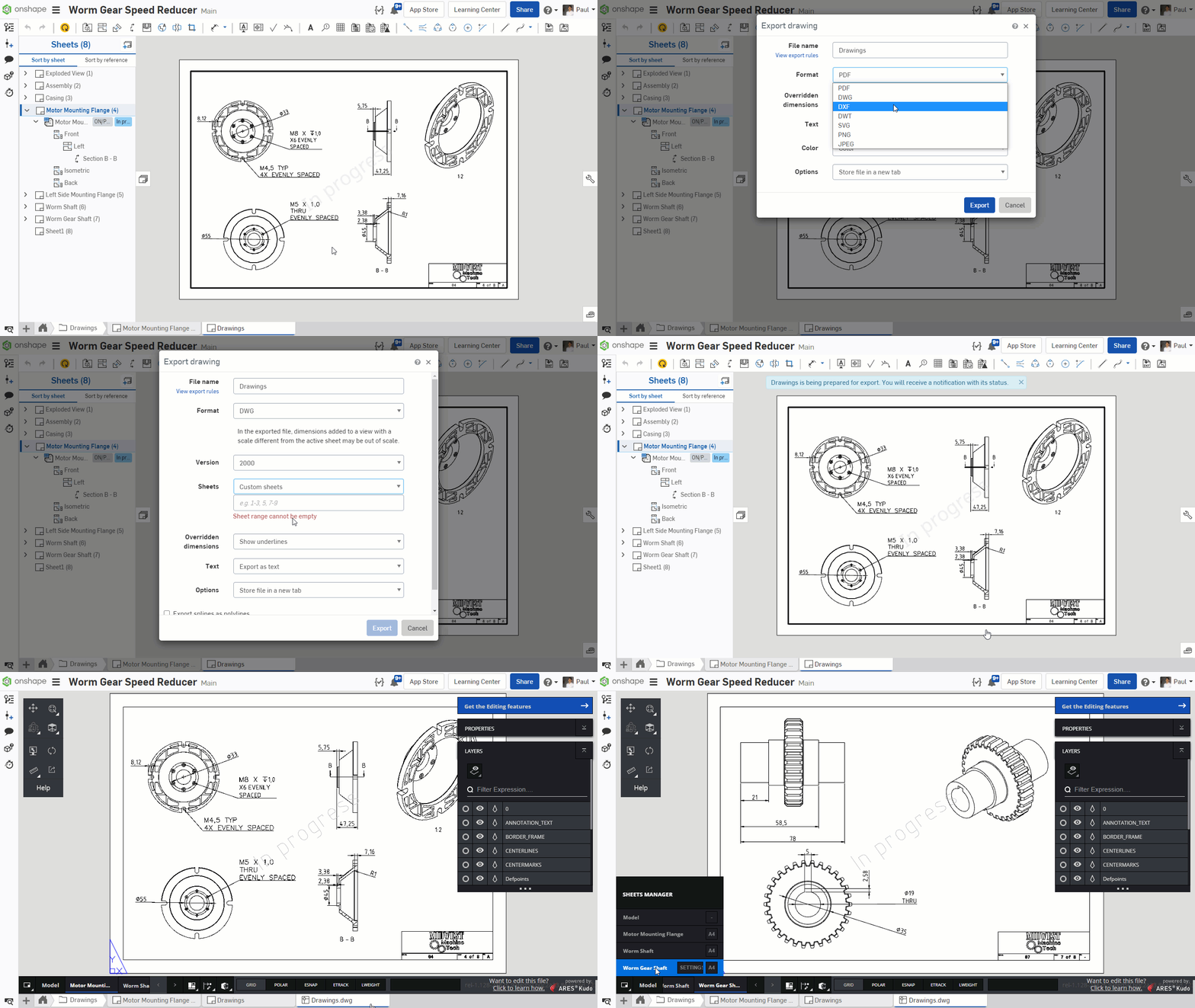
Drawing sheets can now be exported as SVG, JPEG or PNG image formats.

SECTION AND DETAIL VIEW IDENTIFIERS
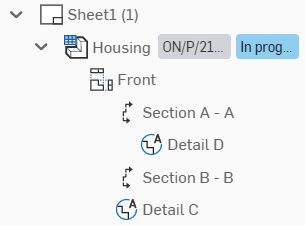
Currently the drawings sheet panel only shows “Section” and “Detail” for those types of views. In this release, the drawing sheet panel has been Improved to reveal Section and Detail view identifiers like “Section A-A” or “Detail B”.
EXPORT SELECTED DRAWING SHEETS
Until now, for DWG and DXF formats, you only had two choices when exporting a drawing: export all sheets or export the current sheet. Now you can also specify which sheet you want to export. Use the “Custom sheets” option and specify the range of sheets you would like to export. This is very similar to how you would select pages for a printer.
MOBILE IMPROVEMENTS
IOS - MASS PROPERTIES OVERRIDE
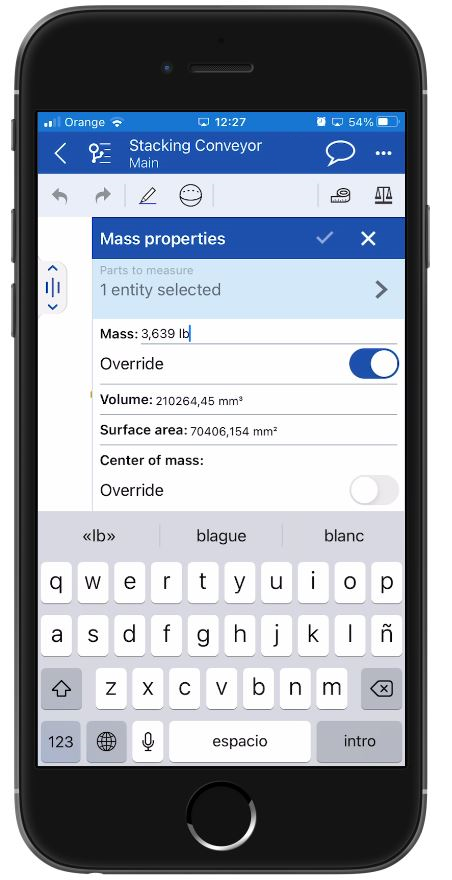
With this release, we have added the functionality to override mass properties. Sometimes users will want to give a part a prescribed mass since the density is not easily calculated. This prevents the user from having to back calculate a density to give the part the mass they want.
IOS - HIDE ALL MATES/HIDE OTHER MATES
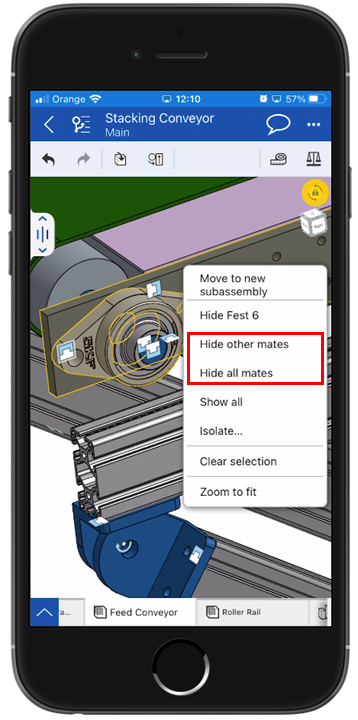
With this release, we have added the functionality to hide all mates or hide other mates. This gives you more flexibility when working in the assembly environment.
GENERAL IMPROVEMENTS
EDUCATION ACCOUNT EXPIRY NOTIFICATIONS
Education Standard users will now receive a notification to renew their account at least one week before their account expires to ensure continuity. If the account is not renewed, it will be downgraded to the Onshape Free plan.
PERFORMANCE IMPROVEMENTS
In addition to adding great new features every 3 weeks, improving performance is a top priority here at Onshape. With this update, we have improved assembly opening time and reduced client side memory usage – in other words, less data is needed so your assemblies will open faster.
ENTERPRISE IMPROVEMENT
INTEGRATING WITH PingOne
With this release, we have new instructions showing users how to integrate Onshape’s Enterprise with PingOne.
Please take a moment to try out these new features and improvements and leave your comments below. For a detailed list of all the changes in this update, please see the changelog.
Remember: The updates listed here are now live for all users when creating new Onshape Documents and over the next few days these features will also be available in Documents created before the date of this update.
