Welcome to the Onshape forum! Ask questions and join in the discussions about everything Onshape.
First time visiting? Here are some places to start:- Looking for a certain topic? Check out the categories filter or use Search (upper right).
- Need support? Ask a question to our Community Support category.
- Please submit support tickets for bugs but you can request improvements in the Product Feedback category.
- Be respectful, on topic and if you see a problem, Flag it.
If you would like to contact our Community Manager personally, feel free to send a private message or an email.
Best Of
Re: Can robust complex surfaces be modelled.
These are great insights. I'm not a ID, I was a web designer than turned mechanical engineer. I found I had so many overlapping skills with IDs. I think I've had the privilege to watch ID from the side. The engineer in me is interested in the system of design. And I see the output being prototypes, screen renderings etc. And then people managing the business are suppose to take these outputs and make decisions. From my 20 years experience doing this I've boiled it all down to risk management. A design is only as good a positive result from trustworthy consumer insights study, because the risk of it being not accepted by the target consumer has evidence to prove it's ok. People feel safer to say lets go with that. Business decisions are a leap of faith because even engineers can guarantee anything. Can get lucky on the market, or it flops and it had nothing to do with how well the design process was done.
I see robust modelling as an enabler for collaborative design. And on Onshape it's even more enhanced. In web design, content management systems liberated the designer from becoming a "web master" and having to update lines of HTML code. I used CMS systems to enhance the design process, my clients could start with the content and I could use the content to design a better website. Some years later when I was a CAD tech in SW, I had a boss who always wanted to see the design first and then make changes. This is when I developed robust CAD methods. My web development experience helped, as I was driving the design with central variables. I could sit with my boss and go, what configuration do you want? It was real time collaboration with the decision maker. I was reducing risk too, because if he got new information to a design better, he knew it was a quick change on my end.
In startups adaptation was the best mindset to have. In large organisations with scale it's a different kind of risk management. Trying to sell the concept of robust modelling is proving challenging. Even if I do make a convincing demo, it's lost on them as it's so far ahead of what they are use to. The silo mindset = passing on troubles to other departments /outsource it. The worst part of it is this unfounded belief things can't be done differently. That's the worst because it suggests there's not much hope for it ever changing. Hence for being a bit lost and lonely in this quest and want to connect to some like minded experts. The Onshape team have also been great.

Re: Anyone have an FS that can convert a decimal length to a (reduced) fractional equivalent
I have seen clever people use clever ways to do this. I thought to myself "….I do not trust math. Nor cleverness. Nor software, come to think of it."
I present to you: A lookup table.
You can use the feature or you can call the exported function convertToFraction from your own code. You can specify the output format by "precision" or 1/16, 1/32, and 1/64 increments. It finds the closest match. An output of "precision 1" returns a fractional representation that fits in X/Y. A "precision 2" returns XX/YY, etc.
A concrete example:
input: .04
output as nearest 1/16: 1/16 (.0625 is closer to .04 than 0)
output as nearest 1/32: 1/32 (.03125 is closer to .04 than 0)
output as nearest 1/64: 3/64 (.046…)
output as precision 1: 0 (0 is closer than 1/9)
output as precision 2: 1/25
output as precision 3: 1/25 (.04 is exactly 1/25)
output as precision 4: 1/25 (.04 is exactly 1/25)
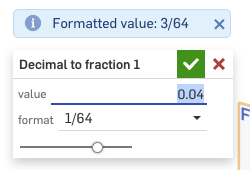
Thanks to my former co-conspiratorllaborator at Onshape, the inestimable @Lindsay_Early for help with this.
If you find any problems or errors with it, let me know. Hope it helps!
https://cad.onshape.com/documents/5298c06ac953e3d41305f9b8/w/4c86b4c728c75b0abe3ab25d/e/97b8534fe1c74a16ffd44cd0
 jnewth
Re: Can robust complex surfaces be modelled.
Perhaps entity attribute tagging and query variables would then go beyond the robust category and fall into the adaptive category. But yes, totally possible if you set it up correctly.
Fyi the easiest way to tag and find entities with attributes is currently with the
 Query Finder. This is a very different approach from using the built in
 Query Variables as query variables are actually saving queries not just tagging entities with an attribute. I found that both have their perks and their limitations.
Tagging an entity with an attribute, will keep that attribute with the entity even if the entity splits into several different parts or has a boolean applied to it, which can be useful downstream. However, it does not search for a query so new edges will not be found. This way can also let you pass selections through derives, which is not possible with a query variable at the moment.
Query variables or just queries are excellent because the query search can be re-evaluated on use, so it would even find new edges. But if the edges are not within the original query like with a split or boolean for example, it may not find the edges since its a different query all together.


Re: FS Node Studio beta.
FS Node studio got the update which improves the instance ordering capabilities in cases when the inputs/outputs are ambiguous, which occurs when you deal with effectful function nodes like print, sketch and instantiator.
Konst_Sh
Re: Can robust complex surfaces be modelled.
At Trek Bikes we leverage the power of Onshape's configuration options for our Carbon Fiber and Alloy bike designs. Think about modeling a bicycle frame that comes in many sizes. Our long standard has been develop one size first, typically a middle size, and really get the ID dialed. Then duplicate, change the centerline geometry to the next size, update, and reshape.
The problem occurs once we get to the bookend sizes. Often times due to tighter angles on size small, and really stretched shapes of an XL we miss something that causes the manufacturing process already determined to not work, or additional size specific parts are needed. In order to keep the manufacturing process the same across the size run and keep sku's down we then end up going back and updating the already completed first sizes so they can meet those needs. It's a lot of rework as you can imagine.
I'm working to master all sizes together. Meaning I configure our CL geometry sketch, and hang supporting sketches and features on it so in a way as the CL is changes between sizes the entire model updates.
I think @EvanReese says it well above;
"A side note on configuring aesthetic surfaces: I always look for subtle geometric relationships I can establish, so my curves/surfaces can update in a pleasing way even for sizes I've not planned for. But as your ID friend says, there are subjective aspects to surfacing in ID (sometimes you gotta eyeball it), however I don't think that precludes configuration. You can position points by eye, even if they are driven by configured dimensions."
Expanding on that,
I leverage sketch constrains and helper geometry over dimensions. Think of in terms of proportion and position things accordingly. IE this point should be 2/5's along the length on a line across the size range. There are a lot of tools in Onshape that use percentages for placement, use them instead of static dimensions.
You gotta eyeball them, so where needed configure a dimension, do this as little as you can get away with.
The bridging curve is your best friend. Its robust, and does a great job holding consistent shape across changing parameters within reason. The magnitudes can further be configured for outlier sizes.
I haven't dug into Query Variables yet, shame on me - too busy!, but before they existed I have been using @lana's Assign Identity FS to configure selected vertices, edges, or faces. This FS helped almost eliminate the need for whole size specific subsets of feature's needed to generate a specific size where the original set could not get it done.
There's more to it than this for really complex models, hope to share more later.
The past few projects I have been able to configure the full size run up to our first release. This has saved loads of time later in the production phase as we are able to foresee most issues from the start. Once these products are made public, I'll be sure to share more.
 Nick_Holzem
Re: Can robust complex surfaces be modelled.
@euan_dykes I'm trained as an Industrial Designer, and have done a lot of professional projects in Onshape with teams of people at my former agency. Yes it is definitely possible. There's huge value in a unified team. I'm always surprised when teams allow the ID to be thought of as so separate from the rest of the product development as if there's nothing valuable for them to do once an initial concept is together. As any product developer knows, the process is a series of experiments, pivots, and compromises, and I believe that a good Industrial Design culture encourages the ID people to steward their design vision though that gauntlet up to production.
A side note on configuring aesthetic surfaces: I always look for subtle geometric relationships I can establish, so my curves/surfaces can update in a pleasing way even for sizes I've not planned for. But as your ID friend says, there are subjective aspects to surfacing in ID (sometimes you gotta eyeball it), however I don't think that precludes configuration. You can position points by eye, even if they are driven by configured dimensions.