Welcome to the Onshape forum! Ask questions and join in the discussions about everything Onshape.
First time visiting? Here are some places to start:- Looking for a certain topic? Check out the categories filter or use Search (upper right).
- Need support? Ask a question to our Community Support category.
- Please submit support tickets for bugs but you can request improvements in the Product Feedback category.
- Be respectful, on topic and if you see a problem, Flag it.
If you would like to contact our Community Manager personally, feel free to send a private message or an email.
Best Of
Improvements to Onshape - May 16th, 2025
VISUALIZATION
ISOLATE AND MAKE TRANSPARENT
The Isolate and Make transparent tools now include a slider to adjust transparency. An option to select transparent geometry enables both tools to be used effectively when interacting with both transparent and opaque geometry.PART STUDIOS
REPLACE FACE
The Replace face feature now accepts more than one face as a replacement, enabling more complex results with a single feature.PUBLICATIONS
INSERT RELEASED PARTS
Released parts can now be added individually to a Publication. This removes any other parts in the Part Studio, reduces clutter and ambiguity, and protects intellectual property.GENERAL
RESUME LAST LOCATION
After a period of inactivity, the current Onshape session may be signed out. Signing back in will resume the last session, either opening the last active Document, navigating to the last open folder, or showing the last search results.SORT FOLDERS IN "MOVE TO..." DIALOG
When moving Documents, Publications and Folders using the "Move to..." context menu, the list of Projects and Folders can now be sorted alphabetically or by Last modified for easier navigation.
ONSHAPE VISION
CONNECT MULTIPLE DOCUMENT TABS
Multiple Onshape Document tabs can now be shared from the Onshape mobile app on an iOS device to the Onshape Vision app on Apple Vision Pro. After a Document is shared, return to the Documents page and all shared Documents will be listed in the dialog as shown below. The Document will still be viewable in Onshape Vision even though it has been closed on Onshape mobile. Open one or more further Documents and share with the Onshape Vision app. All Documents will be shown and available to view on the Onshape Vision Documents page.
Please take a moment to try out these new features and improvements and leave your comments below. For a detailed list of all the changes in this update, please see the changelog.

Re: Fully customizable Gridfinity Bin & Base Generator - Forstner Bit Storage. How do I use this?
Hi John,
there are two places you might want to look at:
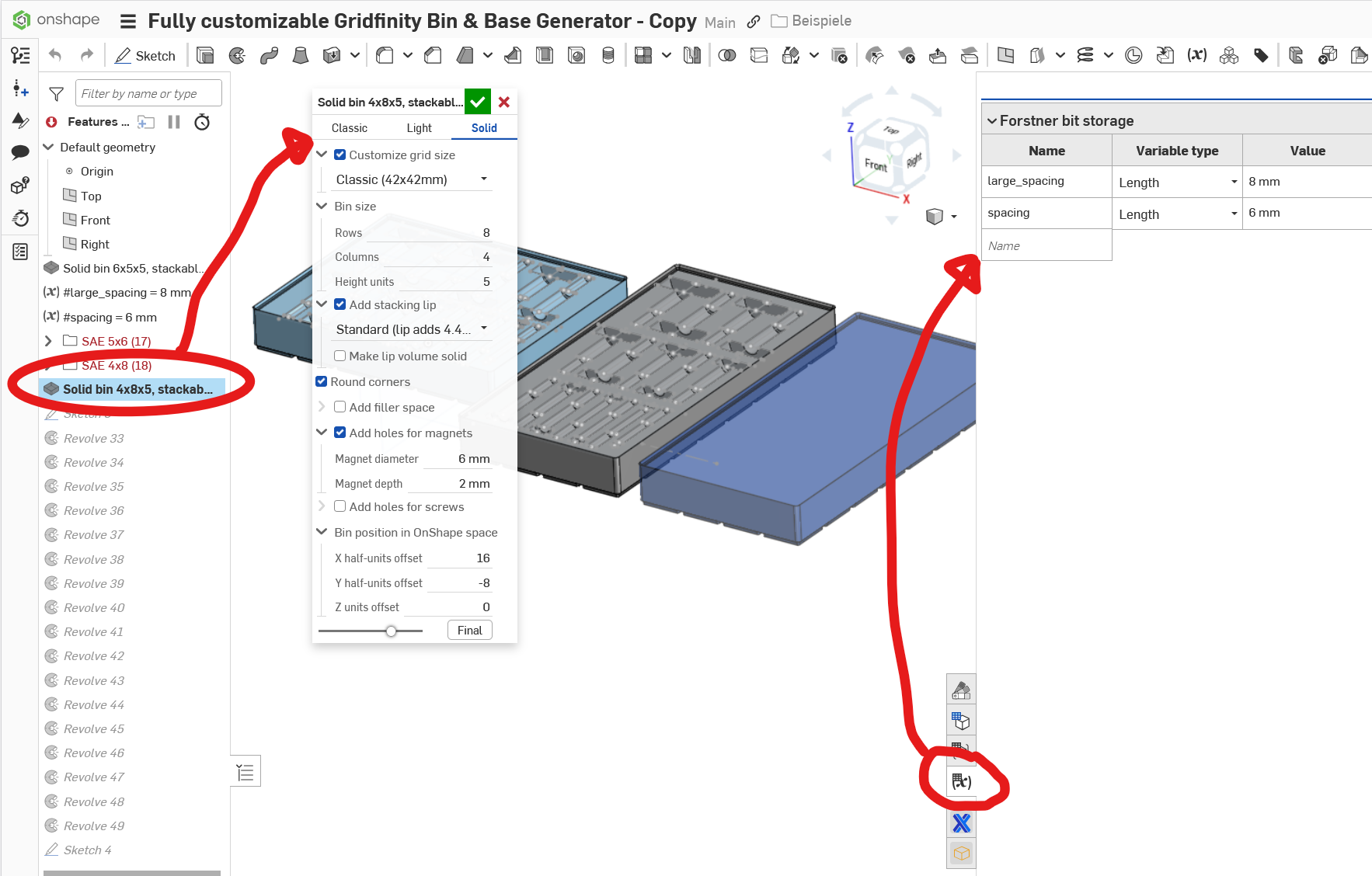
The one on the left is the Feature Script that handles the bin sizes (Look at grid on lower side of bins!) and the other is the variable table that handles the spacing of the bits. Just play around with the values you find there and see what they do if you change them. Always only change one by one, wait for the result! ;0)

Re: My Education plan has just expired and I can't find out how to renew it.
David_202 said:I am having the same problem, it does not appear to be resolved.
Okay, so I just kind of figured out how to take action. Go to your Onshape homepage and click on your profile. Once the menu drops down, you're gonna click on "View support ticket" or whatever. Then, you're gonna have to submit a request, asking for someone to renew your educational subscription. I just did that, so hopefully, they'll get back to me soon. Idk if you've already figured this out or now but I hope this helps!

Re: My Education plan has just expired and I can't find out how to renew it.
There is an option for me to renew my account inside of the Onshape home page, but it bugs out. All the support team has told me to do so far is to try to make a new edu account with the same info at cad.onshape.com/edu, but that doesn't work either. I've been locked out of all of my documents for 2+ weeks, and I contacted them again, anybody have any other solutions?

Re: how to put the cubes together in assembly?
Try searching Public documents for "Rubik's". You could search the forum for the same subject - it's been discussed here before.
Re: Announcing The Onsherpa
With sherpa in the name, Evan will can guide you through task as large as Everest. 😁

Re: I absolutely love Onshape!
Yeah the reason I don't post much of my FeatureScript endeavors on here is because there's a lot I can't demo. I did do some demos on Onshape's old podcast Innovator's Insider, but those are pretty old. The only video I know we have is from LiveWorx 2023, where I do a few quick demos on some specific custom features. But our workflow is more about the sum of its parts instead of focusing on a few custom features, and currently I can't demo that in its entirety.
I can talk about a few ways we've leveraged the API to work with templates and I can discuss some of the ways we've put attributes on parts to create a system where parts can talk to each other in order to enforce business rules. That might be better suited to a private message or a call. Shoot me a message if you have more questions.

Re: Workflow for Tolerancing/Different Manufacturing Processes
Configurations sounds like what you are after. You could have one for 3d print, one for CNC.
Suggest using move-face features for your tolerancing. Then you can change the value with a configuration. Or, have one move face for CNC, and a second for 3d print. Then control their supression with the configuraion.
As a check, do you really need two versions? 3D printers are quite good these days. Holes still tend to come in a hair undersized, but the rest of the model is usually pretty good. Holes are usually for screw clearance, so even if undersize, they might still work.
Re: Part naming/ID after breaking a part into three pieces
I'm not sure if the "assign identity" FS would help here (https://cad.onshape.com/documents/fcf31e8bc171b06037008400/v/7e1b5b2304e2bd6d9223a41a/e/e076332e1669ea9babcaf65b)… maybe worth a shot.
However I have to ask why you are combining into a single part and later trying to extract a single key from that… This seems like a strange workflow and I suspect there might be a better way of doing what you are trying to achieve but it's hard to tell without knowing what you are trying to do…
