Welcome to the Onshape forum! Ask questions and join in the discussions about everything Onshape.
First time visiting? Here are some places to start:- Looking for a certain topic? Check out the categories filter or use Search (upper right).
- Need support? Ask a question to our Community Support category.
- Please submit support tickets for bugs but you can request improvements in the Product Feedback category.
- Be respectful, on topic and if you see a problem, Flag it.
If you would like to contact our Community Manager personally, feel free to send a private message or an email.
Best Of
Re: Tips on troubleshooting issues with boolean
It happens if the parts are only just touching on an edge, but they don't have the same face.
The parasolid kernel doesn't know how to deal with that. what's in/out…
You seem to be working around the issue that you couldn't thicken the whole surface in one go.
That's a tell that something more fundamental is off with the quality of you surfaces… So I'd rather focus on that than work around it.
Probably caused by the loft ending up in a singular point which creates a lot of tension in the surface:
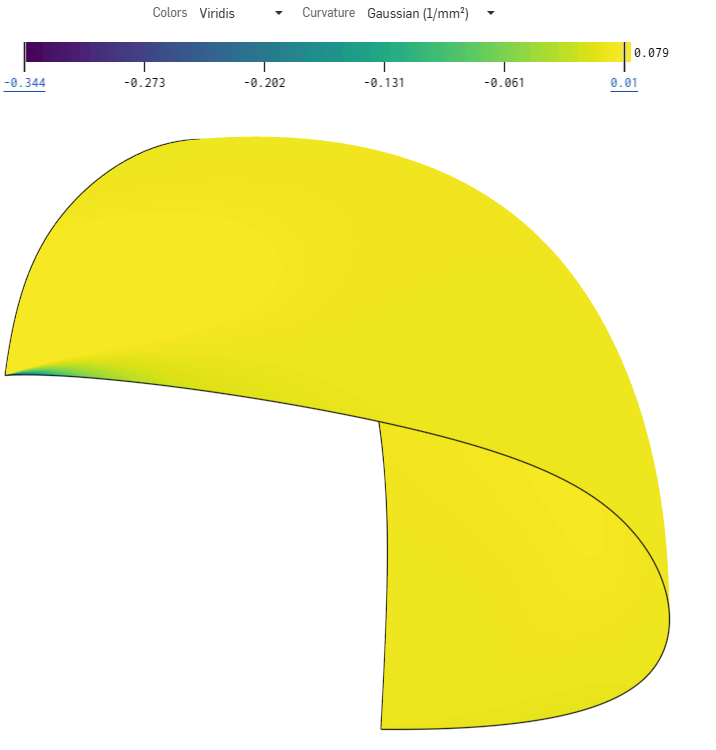
You generally don't want all the isocurves of a face to end up in a point. They'd better run parralellish.
@EvanReese explains well here why, somewhere around minute 25, but it may be worth watching the whole thing.
not sure what the best strategy would be to create a 'helmet' with a proper 4 sided surface while working in a mirrored workflow…
Anybody?
another tip: Using a projected curve without approximating isn't recommended either because it's a less smooth input curve.
also @GregBrown has a lot of videos on good surfacing technique that may be usefull for you

Re: I don't see the new "query variable" feature in existing documents
Customizing toolbars can cause some weirdness when new things are added…
At least the "Search tools" will find it now (used to not find things that weren't in any toolbars), I ran into that when a new tool was added a while back (don't remember which one…).
Toolbar customization needs some love as it's pretty messy right now!

Re: Intro to CAD
So far, we have just finished Unit 1. The kids seem to enjoy it. It does go faster than the recommended time frames. Is there an answer key to the assessments? Just to double check. Thanks. I love the instructions next to the video tutorials. Very helpful!

Re: How do I stop tilting of the mouse wheel rotating the view.
|f anyone else ends up here.
Rotate is not a normal Onshape mouse wheel thing. This is a sign that your mouse is being very weird and sending keyboard arrow keys. Your options on fixing that basically amount to:
1: new mouse
2: get mouse vendor software and hope it will let you disable the behaviour
3: get AutoHotKey and AutoHotInterception and use them to prevent the mouse from sending keyboard keys
4: take the mouse apart and fix it permanently

Re: Custom Feature: Cable/Wire Routing
Changelog for release 1.204.0
⭐️ Added Connector descriptions, layout directions, and mass in anticipation of future capabilities
⭐️ Added Connector type "Splice"
⭐️ Added drag and "use previous" to Connector > insert feature
⭐️ Added Splice prefix designation to Wire data feature
⭐️ Added Splice workflow to Wire ref and Wire route features

Re: For Loop For Dummies


Re: Standard Content
Yes, but it does not create a parametic connection and frequently fails, especially with length (and countersunk screws). So if we change the hole, the old bolt stays in and no error flagged.
Yes, but I did not mean the manual snap mode doesn't do the right thing. I mean the insert standard content tool itself: In OS, countersunk screws are meant to be referenced by the point of the countersink/head cone. When inserting into preselected holes, this does never ever work, though. The autosize returns an error and when the correct fastener size is set manually they end up being inserted too high or too low or even upside down. Also the insertion of multiple bolts in a preselected face doesn't work with countersunk (only in rare cases). I usually have to insert them one by one.
Possibly, the tool expects a face and a cylinder to work, not a cone.
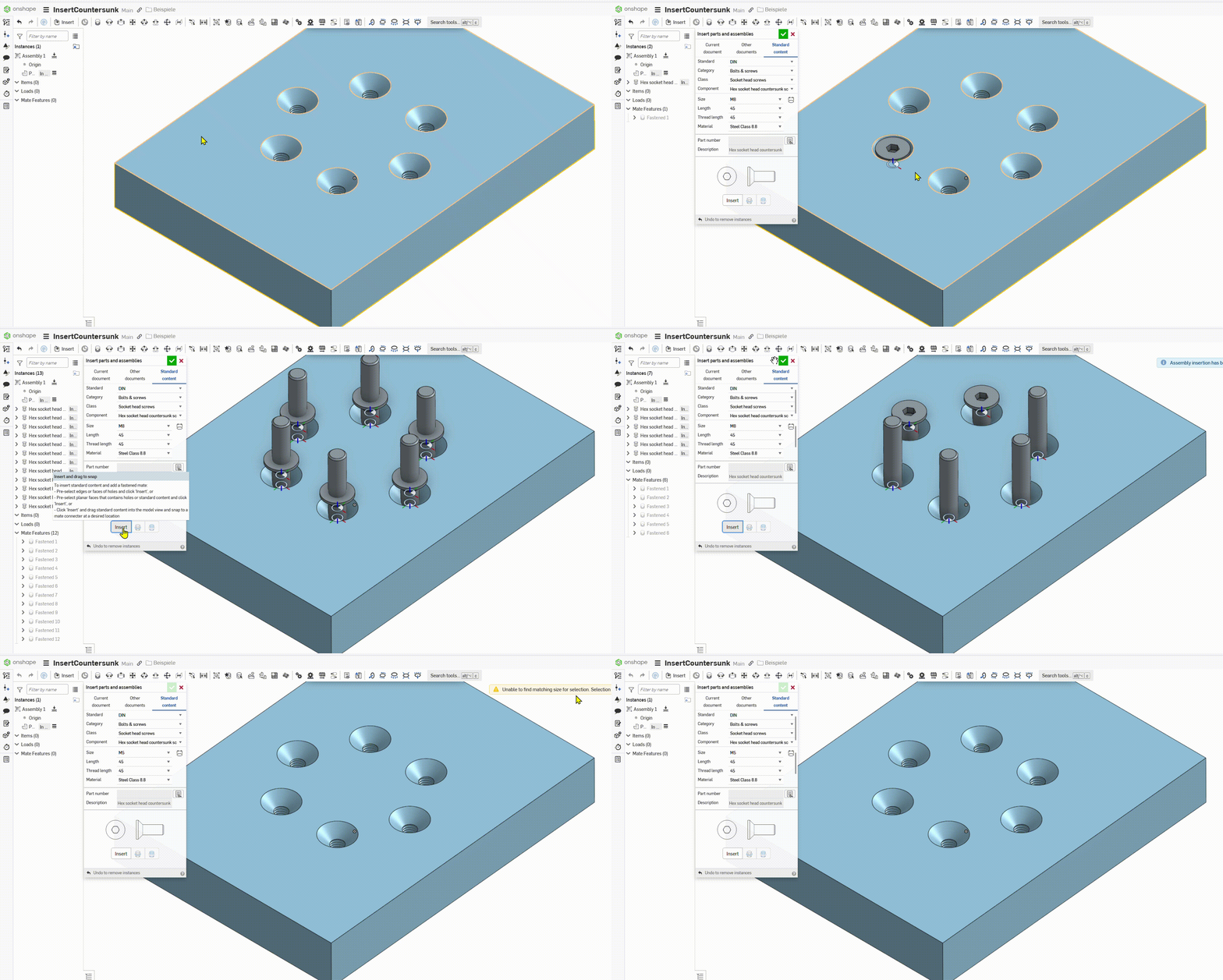
In theory, it should put fasteners into all hole in this face. It doesn't, only places one at a time. I already tried other 'non.documented' selections that could make sense, but they just do 'non documented' things then ;0)

Re: Enter inches in mm project?
Agreed that those skills can be learned in CAD, but there is A LOT going on in CAD. I start my students off on the drawing board as they (hopefully) can use a pencil and rule so there is less overhead to learning the fundementals.

Re: Standard Content
If and when we get FeatureScript in assemblies, standard content could - in theory - become a lot smarter.
 S1mon
S1mon
Re: Custom Feature: Gridfinity Bin & Base Generators
you have to go to your Onshape and add the script by clicking the "Add custom feature" button.
Just in case it's useful, I made another version of a gridfinity generator that tries to follow more strictly the gridfinity dimensions. You can find it here, also with instructions into how to add it to your workspace:
