Welcome to the Onshape forum! Ask questions and join in the discussions about everything Onshape.
First time visiting? Here are some places to start:- Looking for a certain topic? Check out the categories filter or use Search (upper right).
- Need support? Ask a question to our Community Support category.
- Please submit support tickets for bugs but you can request improvements in the Product Feedback category.
- Be respectful, on topic and if you see a problem, Flag it.
If you would like to contact our Community Manager personally, feel free to send a private message or an email.
Best Of
Improvements to Onshape - August 29th, 2025
CAD IMPROVEMENTS
QUERY VARIABLES
The new Query variable tool allows you to create parametrically-defined selections. These selections are available to be used downstream as input selections in virtually all Onshape features. Since they automatically update and rebuild based on design changes to your model, they maintain design intent in ways that previously would not be possible.
Query variables are incredibly powerful, have wide-reaching use cases, and a large depth of functionality. Please be sure to review the Help Documentation for more information.
DERIVED PROPERTIES
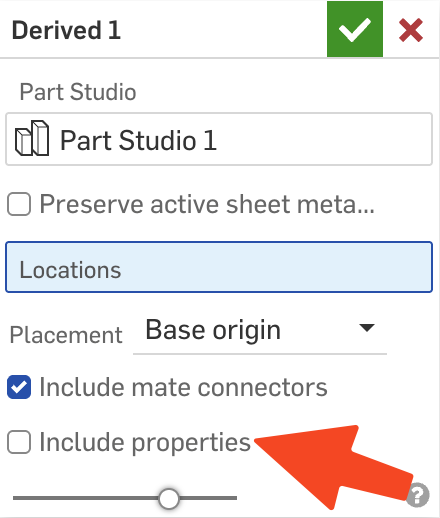
When using Derive, there is now a checkbox to include properties from the derived part, and if they are not included, the properties are automatically cleared in the new Part.
DRAWINGS IMPROVEMENTS
TRIM SKETCH
The new Trim tool in Drawings quickly cleans up excess geometry by trimming to intersections or removing entire entities and points.COSMETIC THREAD PROPERTIES
Onshape Drawings now includes controls for cosmetic thread style and appearance. Choose ANSI, ISO, or JIS standards, and adjust color or line thickness to match your templates.REVISION TABLE CALLOUT NOTIFICATION
Onshape Drawings now provides a blue notification when revision callouts are hidden. Right-click the revision row and select Show Revision Callouts to unhide them, giving you clear visibility and control.DATA MANAGEMENT IMPROVEMENTS
DOCUMENT NOTES
Document Notes bring design context directly into your work. Add text, Markdown, and links inside any document, and see the same notes on the Documents and Search page. Notes are for the entire Document, and are not version or workspace specific.IMPORT IMPROVEMENTS

DXF EXPORT WITH WORKSPACE UNITS OPTION

UPDATE WORKSPACE
CAM STUDIO IMPROVEMENTS
PROGRESSIVE SELECTION FILTER FOR HOLES
CAM Studio now includes powerful selection tools for machining. Quickly select all blind or through holes, then filter by diameter or depth to set up drilling operations faster.NEW MACHINE SUPPORT
Thermwood CS45 5 x 10 foot router
PCB STUDIO IMPROVEMENTS
PCB STUDIO TREE
PCB Studio now displays a full feature tree for imported ECAD data. IDF data show boards, components, and keep-in/out areas, while IDX data also include layers, stack-ups, and regions.Please take a moment to try out these new features and improvements and leave your comments below. For a detailed list of all the changes in this update, please see the changelog.

Re: Loft between ends of two tubes in different planes.
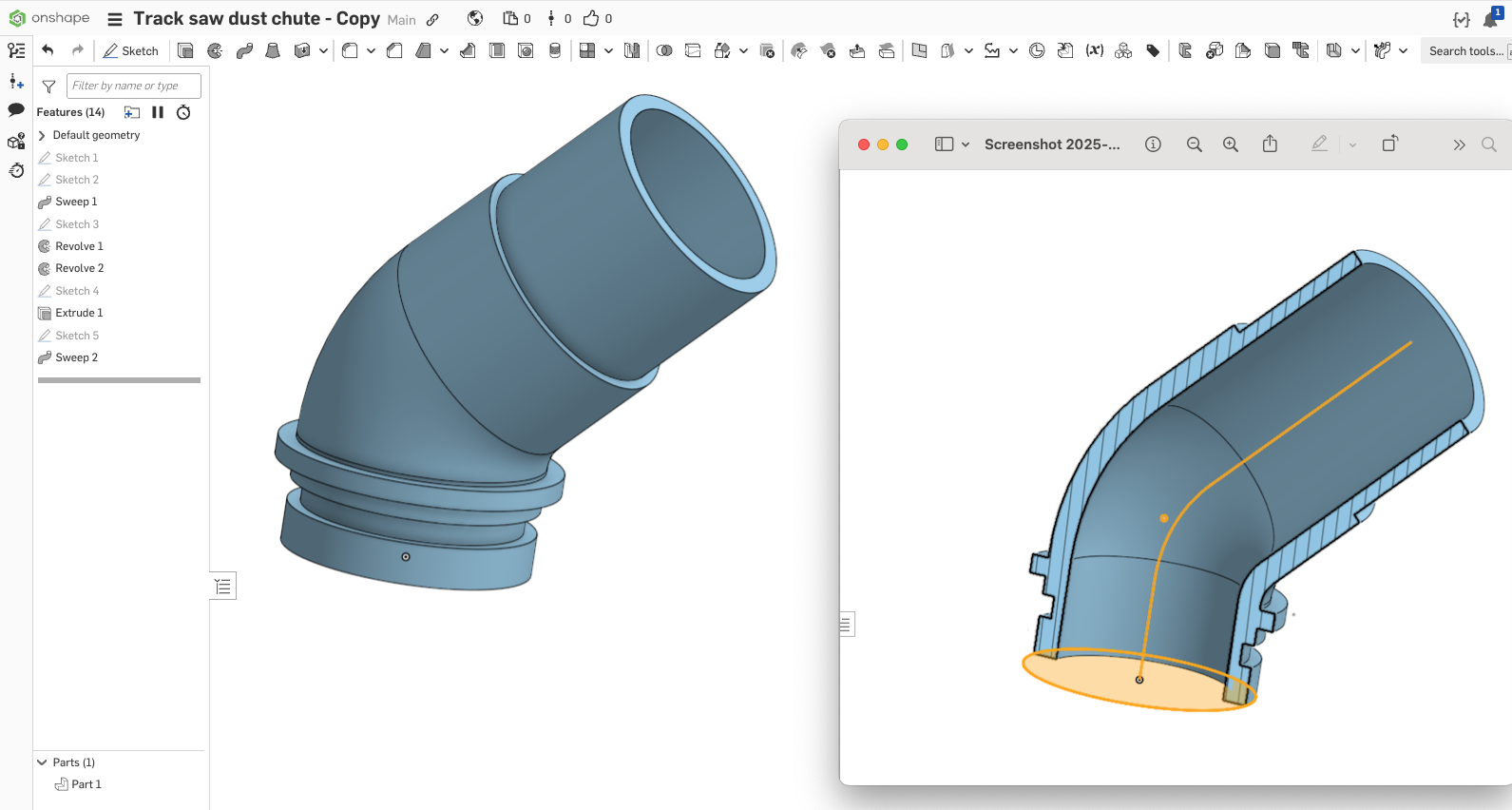
@oliver_richards_grubb …. the best approach would be to use a Sweep Feature for the primary shape..and then a series of Revolves and Extrudes to add the details…

Re: Improvements to Onshape - August 29th, 2025
Query variables! Never thought I'd see the day.
I made a video a few months back about how queries in selections were technically possible through the API, and how powerful they would be.
Like many things in Onshape, I really appreciate the implementation of them is accessible through featurescript. This means that a custom feature can as part of its "output" can create query variables to be used by the used downstream. Opens up some interesting workflow potential.
Document notes is also fantastic.

Re: when a sketch is not fully defined, is there a way to change the highlight from blue
ChatGPT tells a lot of nonsens when days are long, but in point 1 it is right with the orange: That is in fact the complimentary contrast colour for blue. I don't agree with the idea to differentiate partly and unconstrained curves with more colour tones. How many subtle tones does it take to visualize a curve with 26 vertices gradually becoming fully constrained? An entity is either fully constrained or not. It is not that we have too few shades of constraints, it is just that we cannot spot the important one.
So I'd agree with ChatGPT to highlight that one, EG like I outlined above. It causes no clutter and is simple and effective.

Re: when a sketch is not fully defined, is there a way to change the highlight from blue
I agree 1000%. It's especially painful if it's an unconstrained endpoint under one that is. One thing that sometimes helps is to switch - even temporarily - to dark mode. The contrast with the dark mode colors is a little better.
 S1mon
S1mon
Re: Improvements to Onshape - August 29th, 2025
I have a youtube deep dive I'm about to upload…
 GregBrown
Re: when a sketch is not fully defined, is there a way to change the highlight from blue
In my opinion, any unconstrained end point or vertice is pretty close to a "serious issue" or on it's way to become one any time. I see no reason not to use a more alerting mark for these. Since sketch vertices can exist on top of each other, it might be worth while thinking of always displaying unconstrained vertices on top of others AND giving an unconstrained one a red halo, do it shines out even if obscured by something else on top of it.
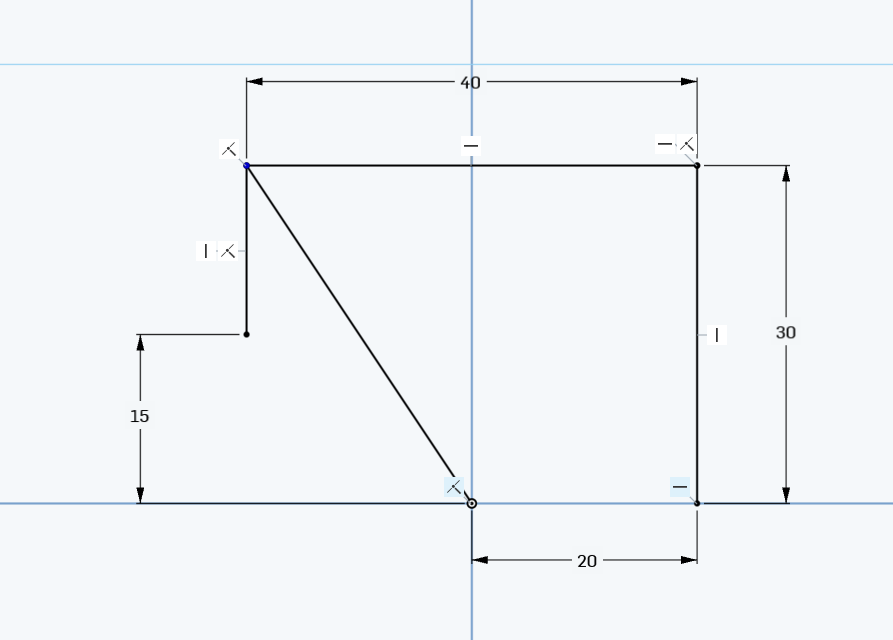
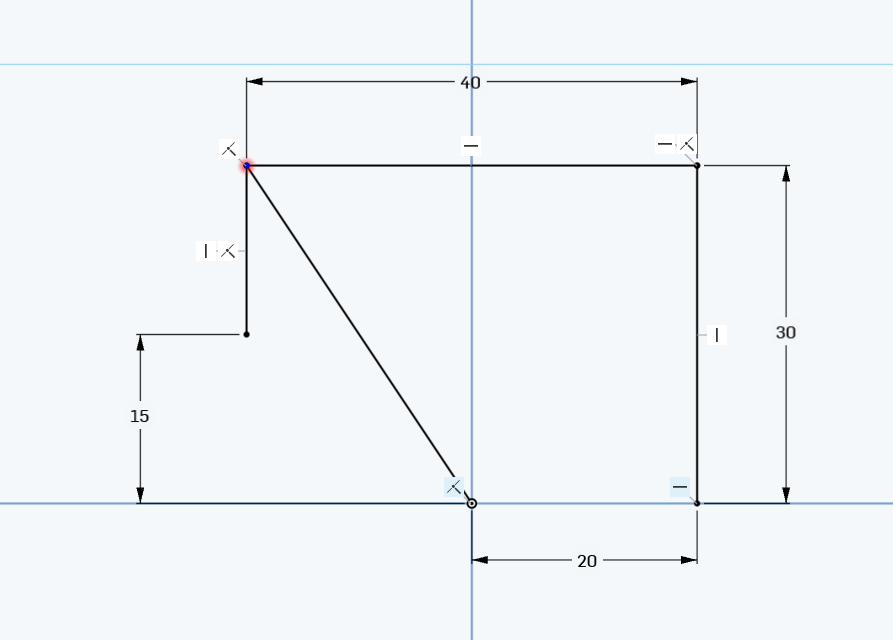
Also, as can be seen in the above screen shots, a blue point on a light blue backgrund (the plane, which typically goes along with a sketch) reduces contrast even more and the combination is certainly a bad choice.
Re: Improvements to Onshape - August 29th, 2025
Thank you Thank you Thank you for updating the .dxf exporting option.

Re: Improvements to Onshape - August 29th, 2025
Document Notes 🤩!!! , also feel like we need some Webinars on the power and use-cases for Query Variable

Re: How to split a part at a feature such as dovetails?
Thank you so much! I appreciate your help :)