Welcome to the Onshape forum! Ask questions and join in the discussions about everything Onshape.
First time visiting? Here are some places to start:- Looking for a certain topic? Check out the categories filter or use Search (upper right).
- Need support? Ask a question to our Community Support category.
- Please submit support tickets for bugs but you can request improvements in the Product Feedback category.
- Be respectful, on topic and if you see a problem, Flag it.
If you would like to contact our Community Manager personally, feel free to send a private message or an email.
Best Of
Feature Request - Make the entire folder of feature tree suppressed for configurations
For configuring different designs, it would be awesome if it allows me to suppress the entire folder to switch between designs. Let me know if I'm missing anything - but currently it seems that it only allow me to toggle one feature at a time. It would be amazing if I can work on two parallel designs by toggling between the two, and it's much cleaner if I can suppress a folder of features, rather than just one by one.
Thank you!

Re: 3D Connexion 3D mouse - It's productive; not how you think it might be
they were standard issue and absolutely critical at Honda r&d. We did a lot of manual curve fitting to scan data and being able to orient the view along the curve (to foreshorten it) was essential.

Re: Tips on troubleshooting issues with boolean
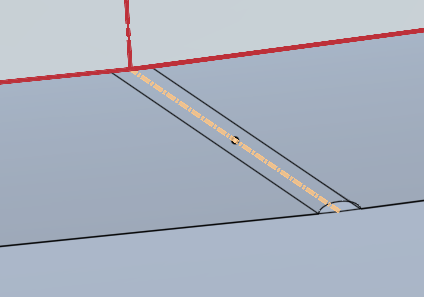
It's funny how one small missing constraint in the very first feature can spark such a deep discussion. The reason the boolean failed was because sketch 'side view' was missing a perpendicular constraint between the construction line and the one magnitude segment of the curve. This caused a crevice to be created on the first thicken operation. then mirroring it created like a half cone sorta type of divot. then when you went to boolean the next piece it did not like the 0 thickness at the top of the half cone.
As far as a step by step how to troubleshoot that, I'm not sure how to explain that tbh. Kinda comes with experience and more issues that that you struggle with, it becomes sorta like common sense over time. Understanding what non-manifold meant was a huge help. That description of an issue certainly doesn't lend its hand to making it easy for newcomers to figure out what is wrong. Turning on translucency at times might help, locate an issue such as this.
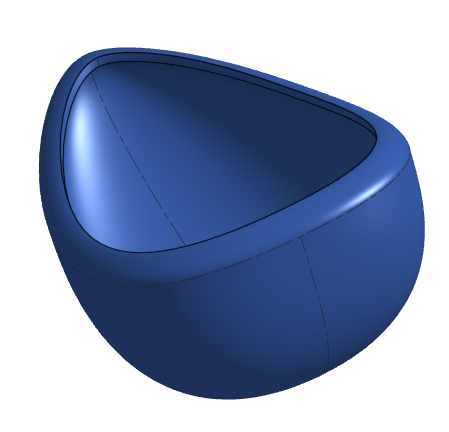
Here's a copy of your document with the perpendicular constraint added (minus a coincident constraint on the magnitude segment). and the boolean without error.
https://cad.onshape.com/documents/b0032b4224ed53a65a8c4c19/w/2fdbbd9c1f6c2fa35848257c/e/96b1837cbc650bd824b7696a
 MDesign

Re: Loft problem.
You need to select both faces of the each profile as 1 selection, so that Onshape knows that both faces are to be treated as one profile for the loft:

When you select your first face, click the drop-down arrow next to "Face of Sketch 1" and it will now be ready to accept several inputs that it will collect as your first profile.
This "collector" feature works for many feature selection boxes - you can select multiple edges for loft, sweep, etc.

Make sure you click inside the "Faces and sketch regions" box to make it blue, so that you add to your selection for Profile 1, rather than start your selection for Profile 2:


Hope this helps!
Romeo

Re: Improvements to Onshape - August 29th, 2025
I finally got around to playing with Query Variable in a real model and it's insane, as a person who doesn't make his own FeatureScripts. It adds Grasshopper functionality within parametric CAD. Way to make selection sets ACTUALLY useful, guys …
Edge selection for lofting is always a pain, especially when edges go missing or a selection breaks. The ability to select all the edges of a surface and then add additional queries to narrow that the selection pretty much guarantees you're selecting what you want every time.
Kudos to the Onshape team! I expect every competitor is going to be copying this one.
 ry_gb
ry_gb
Re: Boot Camp Classes.- HORRIBLE HOURS
I'm sure it's 50/50 that, and that's when Onshape's Boston based crew is operating. There is a self paced boot camp option they offer that's recording based for people way outside of east coast operating hours or faster/slower than the instructor is going to take things. My team members seemed to find that option worthwhile.

Re: 🧰CADSharp Toolbox App (FREE!) 🎉
I'm just happy that the 3-imports-in-a-trenchcoat idea saw the light of day for configurable import geometry.