Welcome to the Onshape forum! Ask questions and join in the discussions about everything Onshape.
First time visiting? Here are some places to start:- Looking for a certain topic? Check out the categories filter or use Search (upper right).
- Need support? Ask a question to our Community Support category.
- Please submit support tickets for bugs but you can request improvements in the Product Feedback category.
- Be respectful, on topic and if you see a problem, Flag it.
If you would like to contact our Community Manager personally, feel free to send a private message or an email.
Best Of


Re: How to Calculate laser cutting length ?
Or for $10 you can get a copy from fs.place that shows a toolpath and drops some estimates into a table for you.

Printable Fillets
I made a custom feature to easily implement printable fillets, aka fillets that have a slightly sharper transition to the faces than a standard tangential fillet, to enable more accurate 3D printing. This is my first attempt at something like this, and constructive feedback is very welcome. https://cad.onshape.com/documents/643eceb32d9650249dd16a3e/w/78be64c6d1a48ea091dd93cb/e/16321f49c31ef6b8038a0f53

Re: How to Calculate laser cutting length ?
.
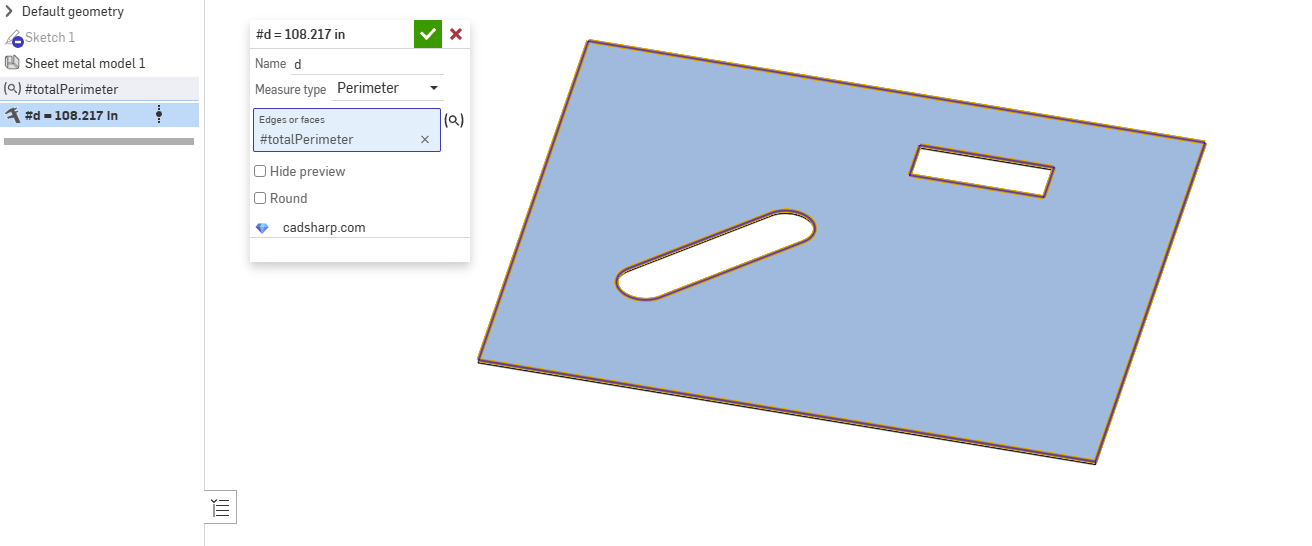
You could use the new Query Variable paired with
 Measure Value by @Konst_Sh to dynamically get this measurement:

Re: Improvements to Onshape - September 19th, 2025
Another huge update! Assembly Mirror looks great, can't wait to try it out
It would be better if the Assembly Mirror maintained Active Sheet-metal

Re: Move part studio out of document without variable studio
Unchecking "insert into all…" will fix the issue in this specific case since you aren't actually using the variables in the tab.
A general "fix" for tabs unintentionally getting "dragged along" when moving to a new doc is to change the reference to a version. So in this case you could create a version in your document and point the part studio to use the version of the variable studio instead of the workspace reference. Then you would be able to move just the part studio. This also applies to assemblies and any other reference.

Re: Assembly Planes - Where are they?
Mate Connectors can be used to create a section view. Just select the Mate Connector, and the section plane will be defined by the XY plane of the Mate Connector.