Welcome to the Onshape forum! Ask questions and join in the discussions about everything Onshape.
First time visiting? Here are some places to start:- Looking for a certain topic? Check out the categories filter or use Search (upper right).
- Need support? Ask a question to our Community Support category.
- Please submit support tickets for bugs but you can request improvements in the Product Feedback category.
- Be respectful, on topic and if you see a problem, Flag it.
If you would like to contact our Community Manager personally, feel free to send a private message or an email.
Best Of
Import images directly from clipboard
Hello,
I'm just starting to learn the ins and outs of CAD and it is fun so far. But one use case that has appeared very often is importing an image that I got from a datasheet or whatever and creating sketches quickly. I was hoping that I could take a screenshot and paste it directly into a sketch without having to go through the import process of having to save the image on my computer first. If I just paste an image directly into a sketch, I get a toast saying Clipboard is empty.
I'm ok with the image being placed
1. on the root of the project,
2. next to the part studio in the same folder
3. or even better, placed inside a folder with the same name as the part studio.
Overall this would really hasten the process of scaling a design to real life dimensions.
The process of importing and scaling the image by using the first dimension on it is honestly pretty good but perhaps a direct import dialog to control the settings of the image import might be good to avoid having to imediately use the transform tool to rotate. Kind of like what fusion has when you import an image canvas. This however is something seperate and not really that important of a feature to me.
Thank you for working on a CAD software thats just ready to go without too much sign in faffing, I hope it keeps on improving!

Re: Create surface from perpendicular sketches? (making 3D printed mask)
ooh yeah. That made me really excited since it's also Parasolid. It gives me hope that Onshape could roll out a tool like that someday.

Re: Create surface from perpendicular sketches? (making 3D printed mask)
@MichaelPascoe How much… you need? Pleasure to do business with you 🤣
You've made so many great features for free, you've never had any real funding?

Re: New Custom Feature: Animate
I was thinking, it would be really neat if the animate feature had an option to create a closed loop, like this.
This timeline was made using the animate feature, then wrapping the timeline to a cylinder. Took a few work arounds. But I'm sure you could do it in many less features, this was just a proof of concept:
I borrowed the original model from @yip_cm
https://cad.onshape.com/documents/99370308e8a0832e33ea429f/w/6642ae255bceb8bd5accfbc8/e/e30bbb48bf7b931…


Re: Escher Stairs - how to keep the ball rolling down the stairs continuously?
Yes, you can do this by using a cylindrical mate with cylindrical timeline guides. Note that the tangent mate parts will need to be copied and have an additional slider mate on each of them to allow the "needle" to fit to the timeline. Without this modification, the mates will break.
Note that my modifications to the part studio are level 1, so very rough and proof of concept only. You could probably do this in only a few features once you figure out what is needed.

Re: Holes and Constraints
Use an alternate plane to start holes.


Re: Improvements to Onshape - June 27th, 2025
I agree with other users that the new documents page is a big step backwards. It is very frustrating to use.
Comments
- There is way too much wasted space at the top of the window.
- Suggest new "Last opened by me" section be removed since it appears to be redundant with the "Recently opened" option in the left-hand vertical menu
- Suggest new "Folders" menu be moved into the left-hand vertical menu
- "Last opened by me" and "Folders" menus do not remember collapsed state when moving back and forth between Onshape editing modes
Re: sweep a constant profile along a 3d path while setting the orientation at waypoints along that path
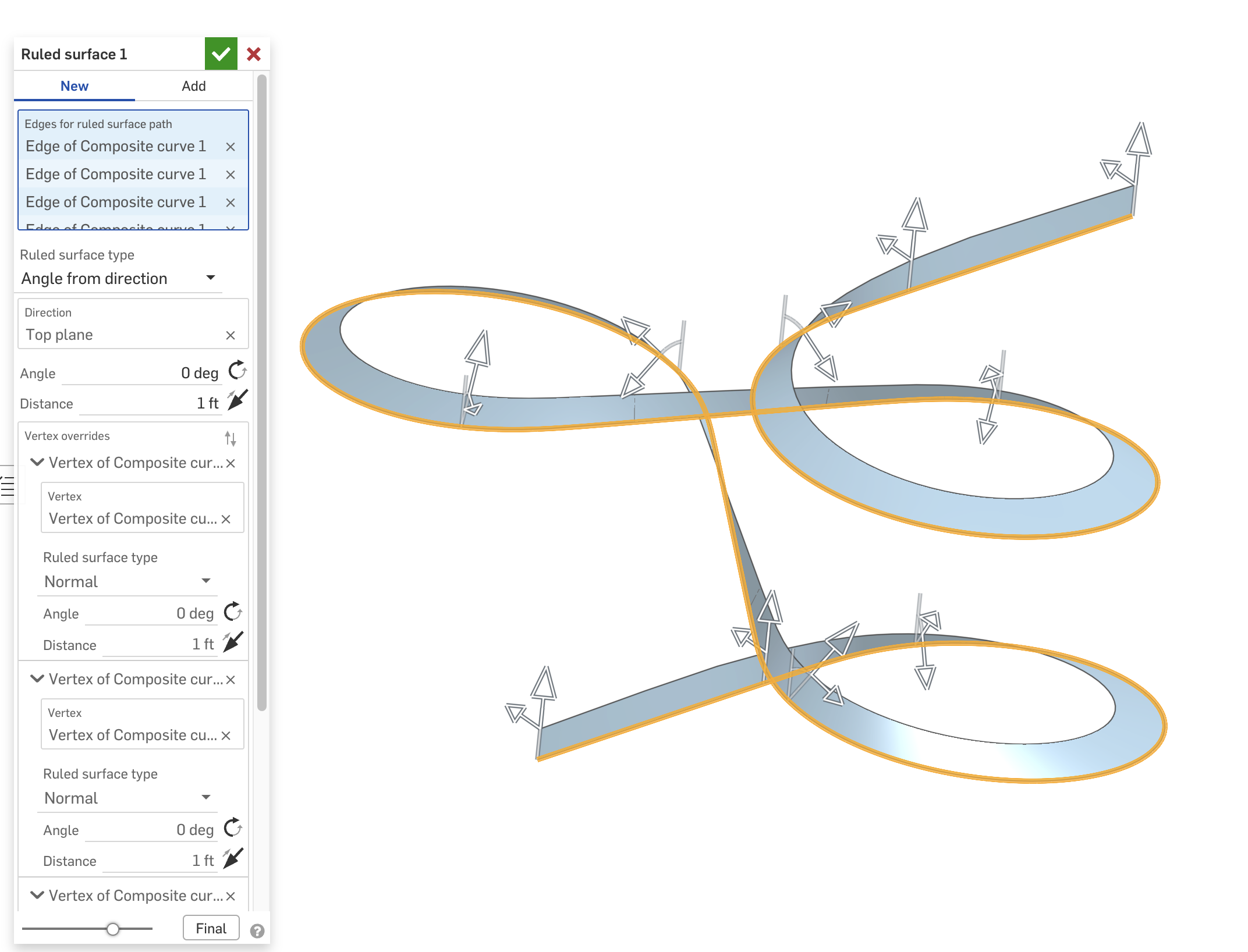
@eric_rollins Use a ruled surface to make a reference for the sweep feature to use as a "face to lock".
In the Ruled Surface
- use "angle from direction"
- add vertex overrides where you want to change the angle
- check "use cubic interpolation" to make it smooth
In the Sweep
- change Profile Control to "Lock profile faces" and choose all of the faces of the ruled surface.
Here's an example I did recently of this.
Lumber Profiles in Weldments Options
I use onshape to model structures built with lumber. Would be nice if lumber was a group with all of the profiles.