Welcome to the Onshape forum! Ask questions and join in the discussions about everything Onshape.
First time visiting? Here are some places to start:- Looking for a certain topic? Check out the categories filter or use Search (upper right).
- Need support? Ask a question to our Community Support category.
- Please submit support tickets for bugs but you can request improvements in the Product Feedback category.
- Be respectful, on topic and if you see a problem, Flag it.
If you would like to contact our Community Manager personally, feel free to send a private message or an email.
Best Of
Re: Featurescript Dev Paid Contract: BOM Auto-Kitting Featurescript
Thank you everyone for responding! I'll be reaching out over the next few days! To save future people's time, I think enough people have reached out that this is closed for now!

Re: Make extrude removal stop before walls get too thin while maintaining a consistent cross section
Hello @S1mon, thank you so much for your quick reply. I was able to come up with another solution inspired by your idea which required less workarounds for the difficult geometry of the foil profile.
Thank you also for fixing the loft at the end by making it have a normal to profile end condition - I was not able to do this before but with your changes I was able to.
I first tried to use the HAVF tool but this gave me slightly assymetrical foils which caused some issues. This could have been mitigated but I decided to keep with what I was already using.
Then I edited the Carbon Spar Entry Points sketch to add the minimum boundary around it in the sketch rather than making the minimum boundary in the End Loft. I extruded surfaces from each of these minimum boundary boxes that I made in the sketch and also make an extrusion in new mode for each of the spars like your document. I made the extrusions go Up to Next rather than up to the end vertex as this worked better for me. These are labelled Spar Template Tool and Spar Minimum Wall Template Tool.
I then made a sketch on the chord plane of where the Spar Minimum Wall Template Tool intercepted the outer surface of the part. This sketch was labelled Spar Minimum Wall Thickness Intercept. I then did one split for each of the spars on the point of intersection. Then just a boolean subtract to make the spar holes.
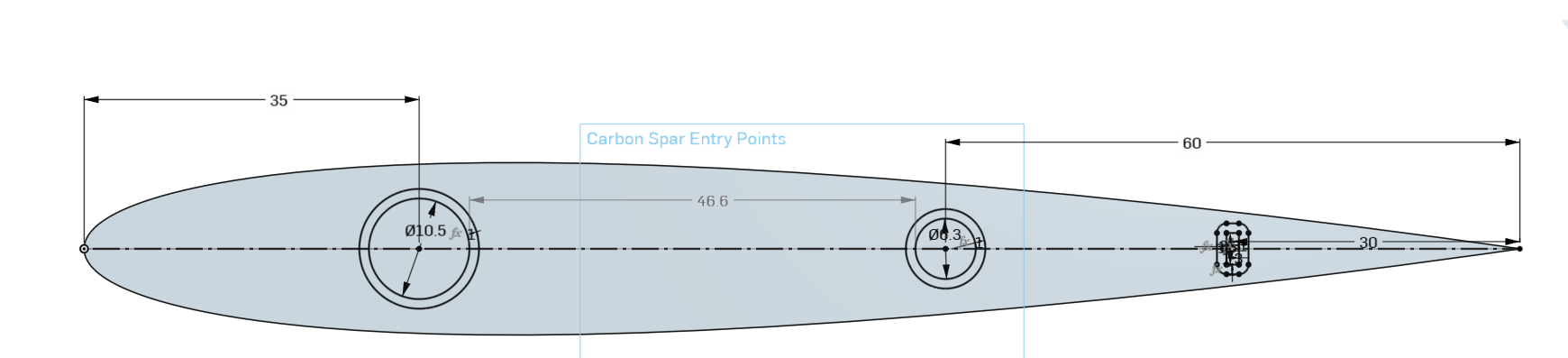

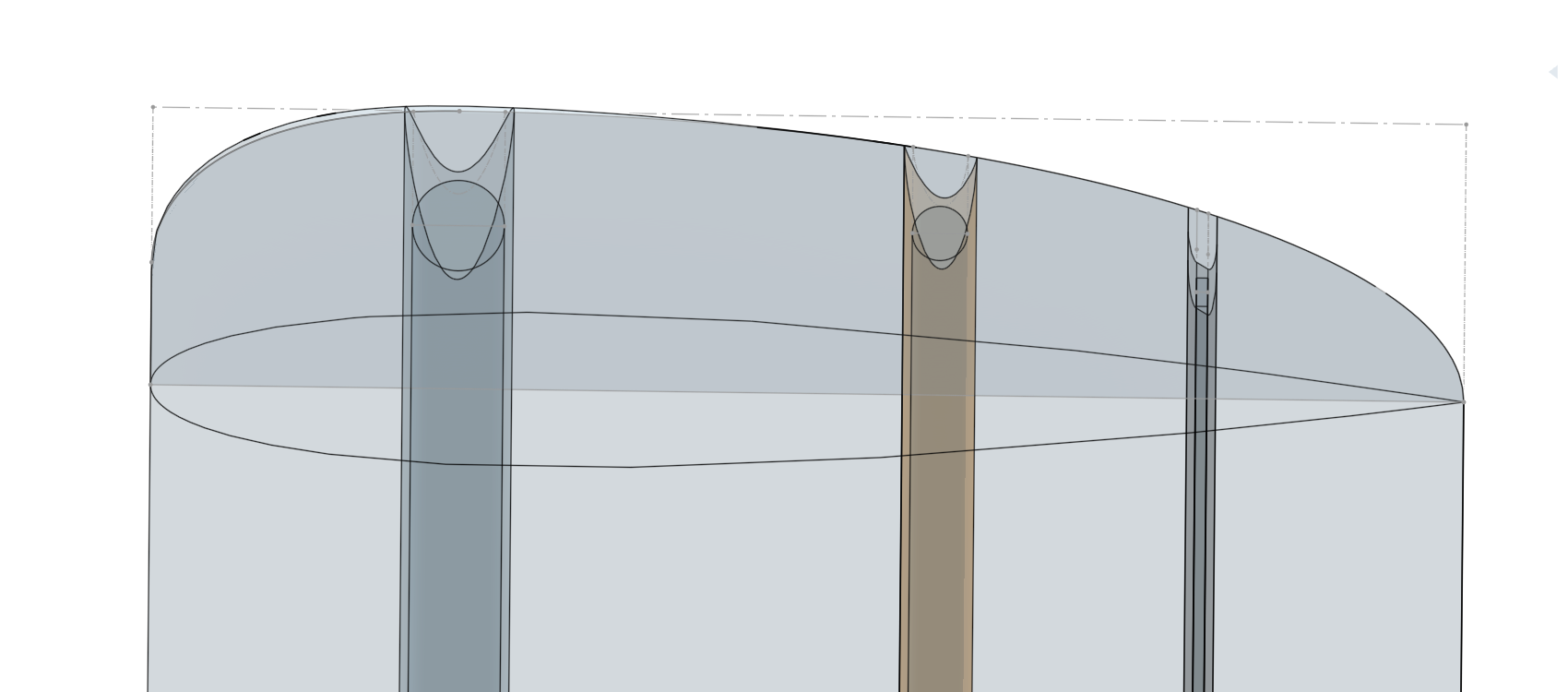
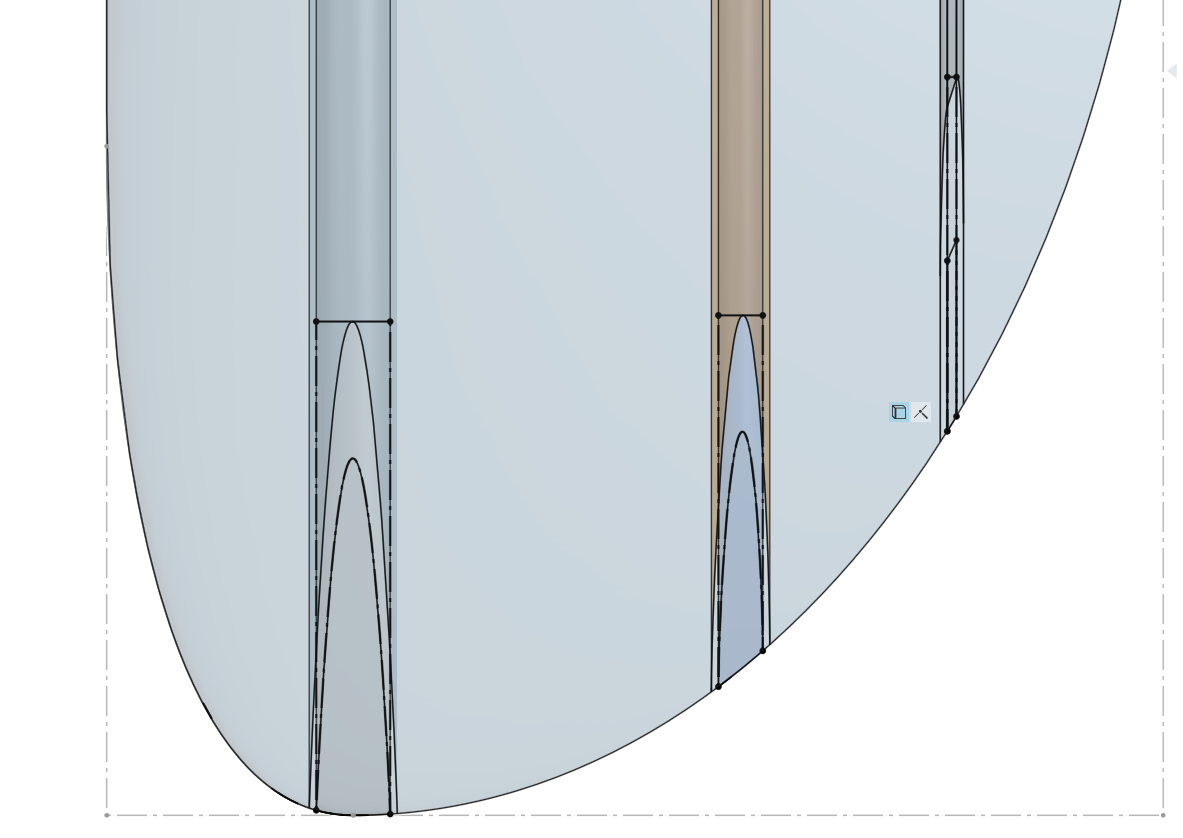
I just have a few quick questions about some of the issues it seemed that you had to work around in your document. For the offset surface to work, you had to cut the round end off and do some face blends otherwise it would create errors - is this a problem specific to foils? What causes this issue?
Also, when I was playing with the shape of the End Loft, I found that if I used the condition Match Curvature it would not allow me to use the Use function on the spars in my Spar Minimum Wall Thickness sketch. It works just fine with Normal to Profile though. Is this related to the problem above? What causes this?
Thank you so much.
Re: New Custom Feature: Segmented Pipe
sorry, forgot to make public:
https://cad.onshape.com/documents/b08acb3b79f42f8e5008740a/w/d1a55166098ecdeb1b2675e0/e/5f0750551e96fa080dcb00a3

Re: Custom Features Collection
Wow. That's an epic project you have started! Thank you for putting in the time and effort for this. I think most of us would just be happy with that list at the start but you're going further with docummentation!
Bookmarking this one.

Re: Featurescript Dev Paid Contract: BOM Auto-Kitting Featurescript
Hi Max,
This looks like a solid use case for combining FeatureScript with the Onshape API to pull part data from assemblies and generate something printable. I can put together a clean, maintainable solution that handles the labeling and sizing logic.
Happy to walk you through how I would approach it.
You can reach out to me on my email here
Colin
Re: Custom Features Collection
Right on, well enjoy your time off!
As someone who doesn't know enough about this stuff, I wonder if an AI could crawl the entire forum and infer the top features and their descriptions. Any of you geniuses know how to do that? The forum is still the main place for me to find custom features, but only because I keep up with new posts week-to-week and have for years. If I were just coming to Onshape I don't know whether I'd catch up on that.

New Custom feature: Publish geometry
I'm pleased to announce that my Publish geometry Custom feature is now… published.
Like many other CAD systems (Creo, CATIA etc) the Publish geometry is intended to make Top Down Design workflows much more efficient by providing an easy way to collate references (bodies, faces, curves, sketches, mate connectors) needed for certain downstream activities into a single feature. This feature creates a (composite) part that can be Derived into other Part Studios, into the same or other documents.
Because the Publish geometry creates a part, it can be version/revision managed, ensuring that downstream collaborators always are working with the correct references.
The Publish geometry can also be inserted into an assembly to provide a "scaffold" for assembly of other instances. For this reason, the "Exclude from BOM" property is set by default, though you can override this.
Intended usage is for this feature to be used on high level, skeleton (early concept/layout) parts, and NOT at the end of a multi-hundred feature epically detailed Part studio. The reason for this? When a Derive feature is used, it regenerates and carries along with it the contents of the whole part studio. So even if you only "published" one face, it will carry the weight of everything else in the Part studio. Hence it should be used early in skeleton/layout Part Studios where you are laying out the interfaces, the key keepin/keepout bodies, the key csys/datums (Mate connectors!) and so on.
If you do have a complex assembly (either from a an existing native Onshape assembly or a giant imported STEP file) then it can be used in the following way: create an in-context Part studio (ICPS) of the assembly, then in that ICPS, use the Publish geometry feature on only the key references you need! The double good whammy here is that 1) the ICPS will ensure that the Part studio is lightweight, and 2) you get all the benefits of the Publish geometry workflow.
I made a quick video to introduce this:

Re: Custom Features Collection
Thanks for your feedback!
I was not secretly hoping that my initiative would reach “you”.
As I mentioned, I will be gone for 2 weeks, but I intend to finish everything I started in August.
I am aware that the story is endless, but I will undertake the editing up to 250 pages, the important thing would be that each page is filled with authentic and relevant information.
(What motivated me?
Maybe it was that I wanted to see an information document like this, but I haven’t come across one in half a year, so I created it!
That’s just how it is!) 😎

Re: Custom Features Collection
This is a lot of great work. This is the most complete list I've seen. I'm not sure it scales for one person to maintain something like this.
We really need a FeatureStore which has user ratings and better discoverability. A few people have attempted to do so, but this really needs to be a PTC Onshape feature. There's already an App store for other types of add ons - that should be extended for FeatureScripts.
Part of what needs to be covered is deprecation and overlap by built in features. There are a few obvious examples like Beams which - as far as I know - is fully replaced by Frames. @EvanReese 's FaceCurves is mostly covered by Isoparametric curve (although there are still some great improvements over the built in).
 S1mon
S1mon