Welcome to the Onshape forum! Ask questions and join in the discussions about everything Onshape.
First time visiting? Here are some places to start:- Looking for a certain topic? Check out the categories filter or use Search (upper right).
- Need support? Ask a question to our Community Support category.
- Please submit support tickets for bugs but you can request improvements in the Product Feedback category.
- Be respectful, on topic and if you see a problem, Flag it.
If you would like to contact our Community Manager personally, feel free to send a private message or an email.
Best Of
Re: Improvements to Onshape - August 29th, 2025
That would be more than great.
It would be a nice place to add lessons learned for the next project. Something that is easy to overlook when you have to dig into old history each time.

Re: Improvements to Onshape - August 29th, 2025
I was hoping to write out some class instructions and have them copied in Classes. Being markup, it wasn't difficult to post and have the students copy and paste it in for now - but I hope that Document notes will be copied in the future.

Re: Basic help Managing parts between multiple Part Studios and multiple Documents
I'm always telling my team that the best time to light their model on fire and start over was 50 versions ago, the second best time is right now. Top down design is still the best method to control cases like you're describing because if you set them up right a total rebuild of one of the subsystems or subcomponents should be isolated to just the parts contained within and not require a total rework of all neighboring assemblies.
And I'll also admit to more than my preferred share of CAD database having the first feature in the tree be the Import feature from experiments past when I'm too lazy to do a full rework. Some products of which are best-sellers for my company. Not necessarily the cleanest method but let's be real, the feature tree isn't the thing that hits the shop floor at the end of the day.

Re: Intro to CAD
Just wanted to say how much we enjoyed the Unit 2 Design a Skateboard unit. The Assessment with the modelling practice was great! We even 3D printed a few of the designs to see what they would look like! Fun!

Re: Intro to CAD
I don't know how much help this will be, but you can click the animations in the instructions and they will go full screen. Maybe watch them 2 or 3 times through before moving on.

Re: Pattern on a sphere
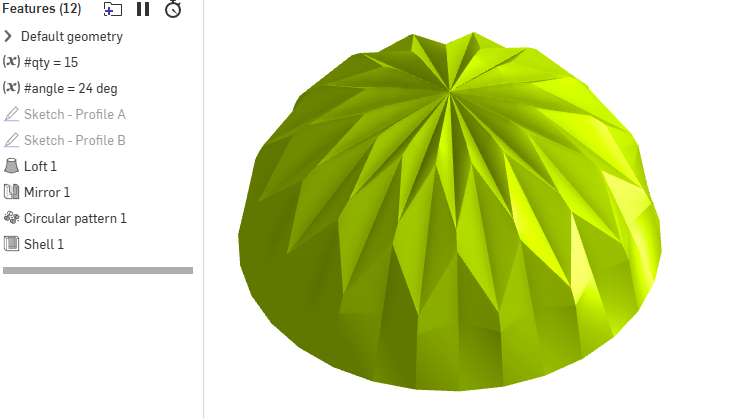
Here, I simplified the steps a bit. There were a few redundant things.
Note that Sketch - Profile B, uses an implicit mate connector to control the angle of the sketch plane.
https://cad.onshape.com/documents/70301bdee67da94c01f314aa/w/faadf4a93585be3342174450/e/525c24c…

Re: Pattern on a sphere
The point with this kind of shapes is to get the brain to accept that they aren't what they look like at first glance. This, for expamlpe is not a sphere at all. It might not even have the tiniest spherical surface in it. Once that is established, things get a lot easier. ;0)
