Welcome to the Onshape forum! Ask questions and join in the discussions about everything Onshape.
First time visiting? Here are some places to start:- Looking for a certain topic? Check out the categories filter or use Search (upper right).
- Need support? Ask a question to our Community Support category.
- Please submit support tickets for bugs but you can request improvements in the Product Feedback category.
- Be respectful, on topic and if you see a problem, Flag it.
If you would like to contact our Community Manager personally, feel free to send a private message or an email.
Best Of
Re: Improvements to Onshape - October 10, 2025
Enterprise to enterprise connections are a good step, but connections with Pro accounts to enterprises is pretty darn important. Collaboration is at the core of Onshape's architecture, so this has always felt like a miss to me. Is it on the roadmap, or is it a planned limitation?

Re: Color blind
This sounds like a better option for colour blindness than trying to get contrasting shades of grey since it is different for each person with colour difficulties.

Re: Color blind
+1
Taught my buddy how to use OnShape as his first CAD Software and he's really struggling because his red/green colorblindness makes it impossible for him to distinguish features with an error in them (red text) from normal features (gray text). Similarly, he was having difficulties distinguishing errored generation in pink (eg a fillet that's too large) from valid generation for the same reason.
Switching to the experimental dark mode helped a bit due to the slightly different contrast values, but something dedicated to make errors stand out more is a critical accessibility feature imo.
My suggestion would be an option to animate errors--for example, when a feature is errored in the feature tree, it pulses red or slowly blinks, and the same happens with errored selections in the 3d workspace (so you can tell which line is causing the error).
More generally, I'd suggest more helpers that reduce reliance on being able to see specific colors.

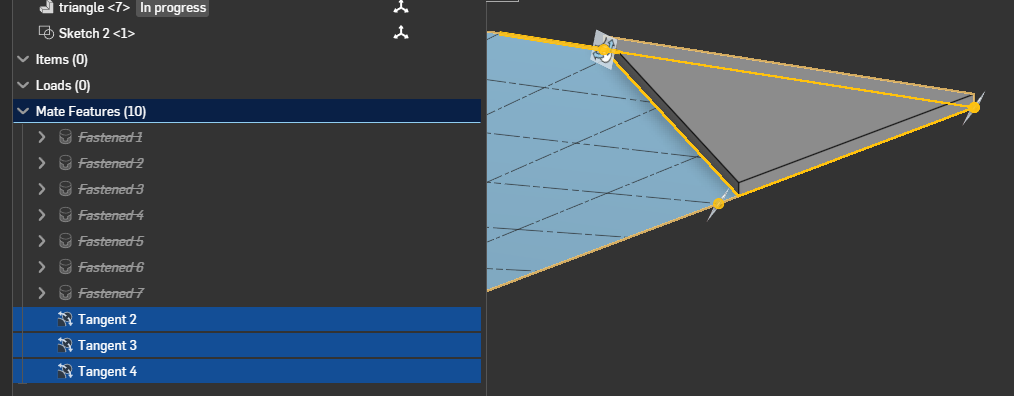
Re: Can you Fasten a vertex to a surface?
Hmm…
I'm not sure why the tangent mates aren't working for this surface…
Actually, I asked in the new "advisor" and got this, which basically says it wont' work for such an "arbitrary" surface unfortunately…
There are several reasons why your tangent mate might not be working:
1. Tangent mates have specific limitations on what surfaces can be used. They only support:
- Swept faces like torus and cones [3]
- Faces, edges, or vertices from two different parts [3]
- They do not support offset surfaces [3]
2. The tangent mate requires careful selection of surfaces. Some key tips include:
- Select continuous sets of edges or faces [4]
- Only swept faces are supported, not generic faces like splines [3]
- The mate does not work with any Relations [3]
3. When selecting surfaces, you need to ensure:
- You're selecting faces, edges, or vertices from two different parts [6]
- The surfaces are truly tangent to each other [7]
- You can optionally use the "Flip primary axis" option to adjust alignment [5]
4. If you're experiencing issues, try:
- Checking that you've selected appropriate surfaces
- Verifying the surfaces are continuous
- Using single path or adding fillets to create smoother connections [4]
If you continue to have problems, it may be best to consult Onshape support directly for specific troubleshooting.
You might be able to get something workable if you split your face with a grid, then you can set tangent relations between the face of your triangle and the "nearest" "point" or "edge" of the face.

Re: Improvements to Onshape - October 10, 2025
I'll be honest I don't see why people don't just use Maps in their Variable studios:
MyValue (Type Any) = {"Value1":1mm,"Value2":2mm,"Value3":3mm}
Then later just use → MyValue.Value2 ← or whatever to get the correct version of that value. I suppose maps aren't for everyone but I find them easier to use then configurable Variable Studios. Hopefully this wasn't hard to implement. Seems like a very niche problem.
However thin part simulation!!!!! OHH BOY!! now I'm Salivating! And AI assistant makes it easier to convince boss to get more licences.

Re: Improvements to Onshape - October 10, 2025
AI Advisor…
My prompts with answers:
what is parametric feature based modeling? blah, blah, blah
who invented parametric solid modeling? PTC
Sorry but Gemini nailed it…
The Problem: In the early 1980s, 3D CAD systems were difficult to modify. If a designer needed to change a dimension on a completed 3D model, they often had to manually rebuild the model from scratch—a tedious and error-prone process.
The Vision: Dr. Geisberg, a brilliant mathematician who had emigrated from the Soviet Union, envisioned a new kind of modeling system. Instead of creating a "dumb" geometric shape, a designer would build a model based on features, parameters, and constraints. This would capture the "design intent" of the object.
The Company: After failing to convince his employer at the time to pursue this radical new idea, Dr. Geisberg left and founded Parametric Technology Corporation (PTC) in 1985.
Is AI Advisor trained on PTC's database?
 billy2