Welcome to the Onshape forum! Ask questions and join in the discussions about everything Onshape.
First time visiting? Here are some places to start:- Looking for a certain topic? Check out the categories filter or use Search (upper right).
- Need support? Ask a question to our Community Support category.
- Please submit support tickets for bugs but you can request improvements in the Product Feedback category.
- Be respectful, on topic and if you see a problem, Flag it.
If you would like to contact our Community Manager personally, feel free to send a private message or an email.
sweep on multiple planes

darren_mason871
Member Posts: 44 ✭✭
I've started a sketch on the front plane, and I'm curious if there's a way to connect its last point to more lines that are parallel to the right plane. Is there a way to do this and sweep it all?
0
Answers
-
Something like this?
https://cad.onshape.com/documents/0323c3489452195483f75329/w/5531a690fba2d3cc77d29e6f/e/b4c47a10e7fc664d23e05b93
Get in touch: contact@alnis.dev | My personal site: https://alnis.dev
@alnis is my personal account. @alnis_ptc is my official PTC account.0 -
In your use case, you might also want to check out the Ortho Lines FeatureScript by Ilya Baran:
https://cad.onshape.com/documents/5a344daad1ec87e14cdb6dc6/v/1e3cdf77f2c028b1f6d2605a/e/7eac87a4fe0feec20c29c97d
Get in touch: contact@alnis.dev | My personal site: https://alnis.dev
@alnis is my personal account. @alnis_ptc is my official PTC account.0 -
alnis_smidchens said:Something like this?
https://cad.onshape.com/documents/0323c3489452195483f75329/w/5531a690fba2d3cc77d29e6f/e/b4c47a10e7fc664d23e05b93Yes exactly like that. How do u connect the multiple planes? I went to the link for the orthoscript and it was all code.
0 -
For the Ortho Lines Document, you can add the Ortho Lines FeatureScript by clicking the "Custom features" button at the top left and clicking on "Ortho lines." There is a PDF tab at the bottom showing how to use it and a Part Studio with some examples.
As for attaching the sketches, I did a screen recording to demonstrate: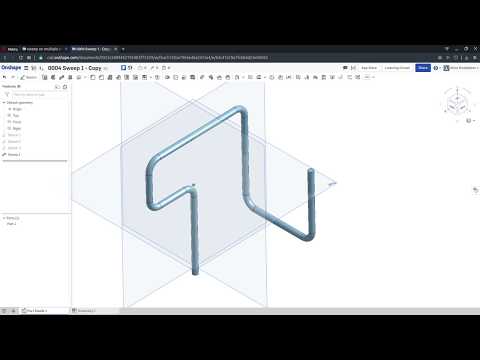 https://youtu.be/zOb9wJVuXzY
I suggest checking out the training (especially the self-paced courses) at learn.onshape.com - it is really helpful!Get in touch: contact@alnis.dev | My personal site: https://alnis.dev
@alnis is my personal account. @alnis_ptc is my official PTC account.0 -
The video was SO SO helpful. I was thrashing trying to understand the mate connector created in the sketch.alnis_smidchens said:For the Ortho Lines Document, you can add the Ortho Lines FeatureScript by clicking the "Custom features" button at the top left and clicking on "Ortho lines." There is a PDF tab at the bottom showing how to use it and a Part Studio with some examples.
As for attaching the sketches, I did a screen recording to demonstrate:https://youtu.be/zOb9wJVuXzY
I suggest checking out the training (especially the self-paced courses) at learn.onshape.com - it is really helpful!0 -
I forgot to mention I'm using android. Also I watched the video a bunch of times and I can only get as far as an error message on the mate connector saying cannot resolve entities and no entities selected
0 -
by alnis_smidchens said:For the Ortho Lines Document, you can add the Ortho Lines FeatureScript by clicking the "Custom features" button at the top left and clicking on "Ortho lines." There is a PDF tab at the bottom showing how to use it and a Part Studio with some examples.
As for attaching the sketches, I did a screen recording to demonstrate:https://youtu.be/zOb9wJVuXzY
I suggest checking out the training (especially the self-paced courses) at learn.onshape.com - it is really helpfulI forgot to mention I'm using android. Also I watched the video a bunch of times and I can only get as far as an error message on the mate connector saying cannot resolve entities and no entities selected
0
