Welcome to the Onshape forum! Ask questions and join in the discussions about everything Onshape.
First time visiting? Here are some places to start:- Looking for a certain topic? Check out the categories filter or use Search (upper right).
- Need support? Ask a question to our Community Support category.
- Please submit support tickets for bugs but you can request improvements in the Product Feedback category.
- Be respectful, on topic and if you see a problem, Flag it.
If you would like to contact our Community Manager personally, feel free to send a private message or an email.
Cut List (New Custom Feature!)
Comments
-
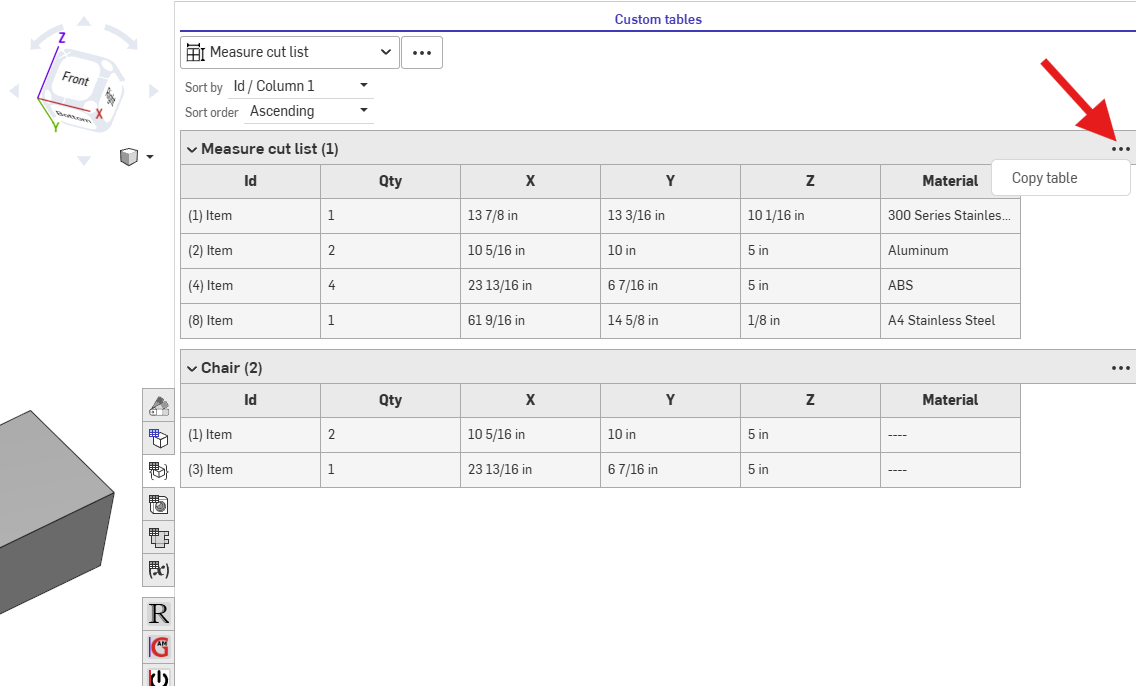
@sacha_holsnyder for now, you can click on the 3 dots and "Copy table" this will let you paste it into excel or google sheets where you can export as csv.
RENDERCAD
rendercad.ai - Photorealistic product rendering.
▚▞▚▞▚▞▚▞▚
________________________________________________________________________0 -
This looks impressive. I am not very experienced with Onshape. I have created a parameter driven model of a base cabinet with configuraion variables for height, width and depth. I can then insert individually sized cabinets in an assembly to get a whole wall view. I had wanted to get a cutlist for whole wall. But it looks like this works within a part studio. Is that correct? I actually don't even go into the part studio while i assemble my wall of cabinets. Am I out of luck? Thanks for any help you might offer. The cabinet model is public, current version is https://cad.onshape.com/documents/5988df0b0e8b5650d3186df9/w/337539fce21c3b9856bfa35b/e/8db6c5ee4e7026243d8778b9
0 -
There are a few ways to do it, but you are correct that custom features are only for part studios sadly.
You can use the
 Property / Attribute feature to set the Description of the part to the dimensions of the part. While inside the property feature, right click the description input and convert to expression. This will let you use equations to in it like (#x ~ " " ~ #y ~ " " ~ #z). And before that, use the
 Variable to string to convert the variables from meters to a readable string. Then finally, in your assembly BOM make sure the description column is visible.
RENDERCAD
rendercad.ai - Photorealistic product rendering.
▚▞▚▞▚▞▚▞▚
________________________________________________________________________0 -
Sorry, I see rounding already exists!
@MichaelPascoe I love this feature. I do seem to get slightly incorrect figures in metric, e.g. 12.0 Z thickness becomes 11.989 in the table. Is it possible to set rounding? https://cad.onshape.com/documents/46579eb00df0aa76f85c4e84/w/56ada518491428db0b5e16cf/e/46dbe19100e1b9cb1176a77a
0 -
@tom_19 while inside the feature, open up Settings, then input a very small value for the Round table values.
Whatever you want it to round by, something like 0.001mm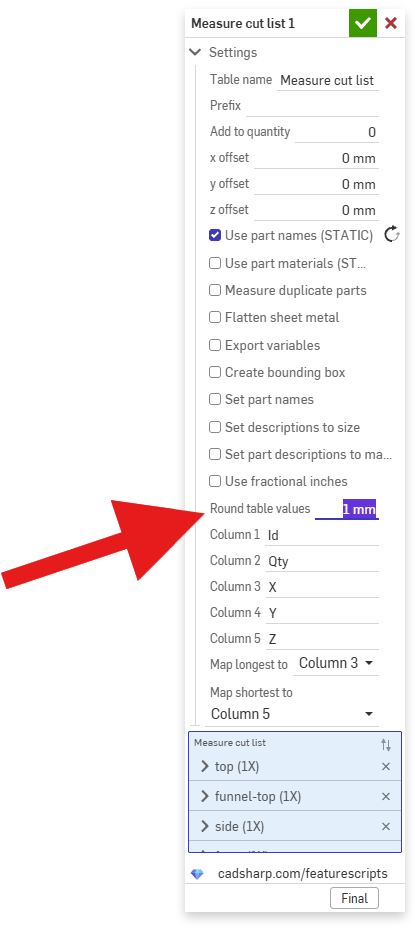
RENDERCAD
rendercad.ai - Photorealistic product rendering.
▚▞▚▞▚▞▚▞▚
________________________________________________________________________0

