Welcome to the Onshape forum! Ask questions and join in the discussions about everything Onshape.
First time visiting? Here are some places to start:- Looking for a certain topic? Check out the categories filter or use Search (upper right).
- Need support? Ask a question to our Community Support category.
- Please submit support tickets for bugs but you can request improvements in the Product Feedback category.
- Be respectful, on topic and if you see a problem, Flag it.
If you would like to contact our Community Manager personally, feel free to send a private message or an email.
Why does this assembly fail when I add one more revolute mate?

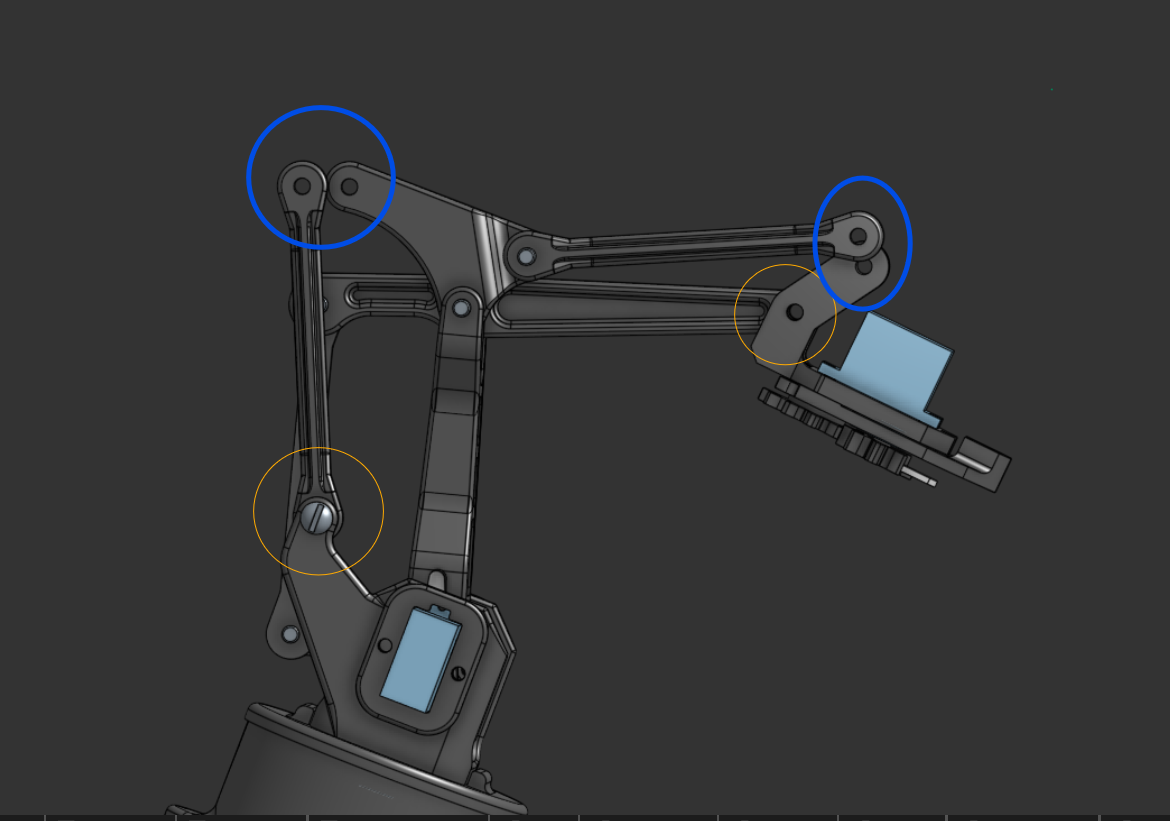
This is a robot arm design I created based on a reference design I found online. However, when I try to connect any two of these blue-colored parts using revolute mates, one of the joints (circled in orange) fails to work properly. They move in a different way, losing the revolute mate-connecting the joint…
Does anyone have an idea why this happens or how I can fix it?
Thank you… I’m still learning and would really appreciate any guidance!
https://cad.onshape.com/documents/42332c986bd06c2f97175de5/w/e243344c5da92a04bde15132/e/fc6f6a86cbdb797a2d70893e?renderMode=0&uiState=690f4fc7c74d15bfb6e2f60d
Answers
-
I would probably change how you approach mates a little. Let the bolts be the last thing you mate. connect the holes to each other first so that you can easier troubleshoot where the problem may lie.
0 -
The revolutes are likely "fighting" each other in the "Z" direction.
Change some of your revolutes to cylindrical to fix the issue
1

