Welcome to the Onshape forum! Ask questions and join in the discussions about everything Onshape.
First time visiting? Here are some places to start:- Looking for a certain topic? Check out the categories filter or use Search (upper right).
- Need support? Ask a question to our Community Support category.
- Please submit support tickets for bugs but you can request improvements in the Product Feedback category.
- Be respectful, on topic and if you see a problem, Flag it.
If you would like to contact our Community Manager personally, feel free to send a private message or an email.
Improvements to Onshape - April 3, 2026


CAD
BEZIER CURVES: SUBDIVISION SPLIT AND TRIM
Bezier curve editing is now more predictable. When splitting or trimming a Bezier curve, the original shape and curvature are preserved while maintaining the same degree of smoothness. Each resulting segment gains its own control points, enabling precise local edits without impacting the rest of the curve.
RULED SURFACE NORMAL TO A REFERENCE FACE
Create ruled surfaces normal to a reference face using curves that don't need to be adjacent edges of that face.
TABLE ACCESS VARIABLES FOR VARIABLE STUDIO
Variable studios now support adding variables from an imported table such as a CSV file. Users are presented with a new From Import variable type, where they will be prompted to provide the source and cell selection criteria similar to the recently introduced Part Studio variable support for imported tables.
Additionally, you can configure fields to extract different table values depending on your Onshape configuration. To further understand the depth of this functionality, we encourage you to review the help documentation. (edited)
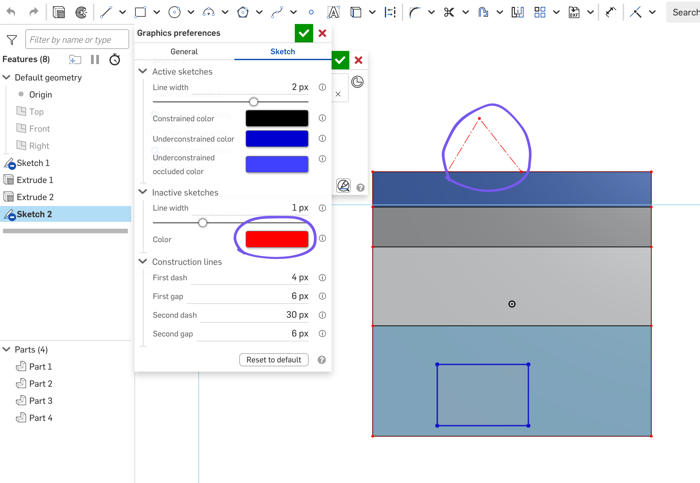
SKETCH GRAPHICS PREFERENCES
Graphics preferences now include sketch display options.
SECTION VIEW ALONG STANDARD PLANES
Section views in support additional options for cutting along standard X, Y, and Z planes, giving you faster access to common cross-section orientations, especially in Assemblies.
COMMENTS WITH MODEL-BASED DEFINITION
Markup works with Model-Based Definition and the Inspection panel, capturing and preserving context within the markup.
DRAWINGS
BETA: REPLICATE ANNOTATIONS
This update sees the Beta release of Replicate annotations for drawings. Replicate annotations uses machine learning and probabilistic matching to automate the transfer of annotations, including dimensions, tolerances, layout, and placement, from one drawing view to another, even in a different drawing. Although it uses machine learning techniques, it only looks at the model at run-time when you invoke the command; It does not train on your data. We’re truly excited about this new beta technology and the possibilities it may unlock in the future. We encourage you to try it out and provide feedback on where it could be improved, what doesn’t work the way you expected, and what you would love to see next.
ADDITIONAL UNITS
Onshape provides four new units to display on your detail drawings. These new units are Centimeters, Meters, Feet (with decimals), and Yards. These are available for the overall units, dual units, and overridden units. When displayed as dual or overridden units, the appropriate abbreviated units suffix will be displayed. Additionally, these four new units can be selected when creating a new drawing in Onshape as well.
DOUBLE NEGATIVE AND POSITIVE TOLERANCE BUTTONS
Onshape now provides buttons on the tolerance controls for double positive or negative deviations on your drawing dimensions and hole callouts. This makes it easier to add tolerances where both deviations must be negative or positive. This subtle improvement streamlines adding complex tolerances to your drawing dimensions.
DATA MANAGEMENT
TAB MANAGER USER PREFERENCES AND DEEP FOLDER NESTING
Tab Manager gains user preference controls and support for folders nested 10 levels deep from the root folder, giving teams more flexibility in organizing document tabs.
RESIZE BOM TEMPLATE IN COMPANY SETTINGS
BOM templates are resizeable directly in Company settings for large column counts.
CUSTOM PROPERTY OVERRIDES FOR PUBLIC DOCUMENTS
When using Public parts and inserting them into documents, you can customize properties like part number and descriptions to match your company standards while preserving the original author's data. The override values are specific to the user or company, automatically carry forward to new versions, and integrate directly into build materials.
CAM STUDIO
SPINDLE DIRECTION DISPLAY IN SIMULATIONS
CAM Studio simulation now includes visualization of spindle direction. By enabling Show spindle direction, users can clearly see clockwise or counterclockwise tool rotation directly in the graphics area.
COMPOSITE PART SUPPORT IN CAM STUDIO
Support for composite parts in CAM Studio has been enhanced to improve reliability. Selections remain stable, toolpaths calculate correctly, and setups behave as expected. Composite parts are ideal for fixtures and workholding, allowing multiple components to be brought in as a single entity for faster, more efficient job setup.
AUTO-SCALING 2D SELECTION ARROWS
Defining 2D contour toolpaths is now clearer and more predictable. Selection arrows for 2D contour operations automatically scale in the graphics area, making them easy to see at any zoom level. This improvement reduces ambiguity when defining cut direction, helping users avoid mistakes and work with greater confidence.
UPDATED JOBS USER INTERFACE
Onshape CAM Studio has updated its Create job interface with new user interface elements that provide better consistency with the overall Onshape user experience.
PCB STUDIO
PCB HOLES TAG
Tag PCB holes or cutouts for metadata used in PCB Studio board exports and imports. Select geometry, define orientation, and add properties. The PCB Studio presents holes from the tree and highlight in the graphics and the Component properties panel.
Please take a moment to try out these new features and leave your comments below. For a detailed list of all the changes in this update, please see the changelog.
Remember: The updates listed here are now live for all users when creating new Documents. Over the next few days, these features will also be available in Documents created before this update. Mobile app interface updates occur via the Apple App Store or Google Play Store and happen in the days following the update.
Comments
-
The updates to the bezier curve sketch tools will be much appreciated by our design department. They were getting sick of wrangling splines.
I personally can't wait to explore the new tagging architecture and PCB studio improvements and find out which non-PCB things they'll be useful for.
1 -
-

typo in the api changelog
API support for Ordinate dimensions!
Its nice seeing update full of spring cleaning items. Shows the platform is constantly improving everywhere and not just focusing on big flashy features.www.smartbenchsoftware.com --- Renaissance --- Kestrel -- SmartLink
Experts in Onshape Automation - Custom Features and Integrated Applications2 -
The ability to properly trim and split Bézier curves is something I've wanted since they were added to sketcher. Thank you!
(The lack of) sections through standard planes in assembly is something I have called one of the most user-hostile things in Onshape. Nice to see this one finally fixed. Hopefully it carries over to the lightweight view as well.
The AI based (beta) drawing "replicate annotations" is exciting to see. I wasn't expecting this so soon from its recent preview.
More units seems like one of those basic things that should have been there a long time ago, but I imagine it was more complicated than we imagined.
The sketcher line-widths and color options are going to be interesting to try. I hope this makes unconstrained points easier to find.
All in all many things that make Onshape a better place to be.
Simon Gatrall | Product Development, Engineering, Design, Onshape | Ex- IDEO, PCH, Unagi, Carbon | LinkedIn
3 -
Great improvements for ruled surfaces and Bezier curves! I'm also very excited about the new CSV-driven workflows as we need to interact with external codes all the time. I'd love to see similar workflows enabled for JSON format files.
2 -
Really excited to test out replicating annotations, this could be a huge time saver in the wheel space. Happy to see quite a few things rolled out that have been wanted for a while!
1 -
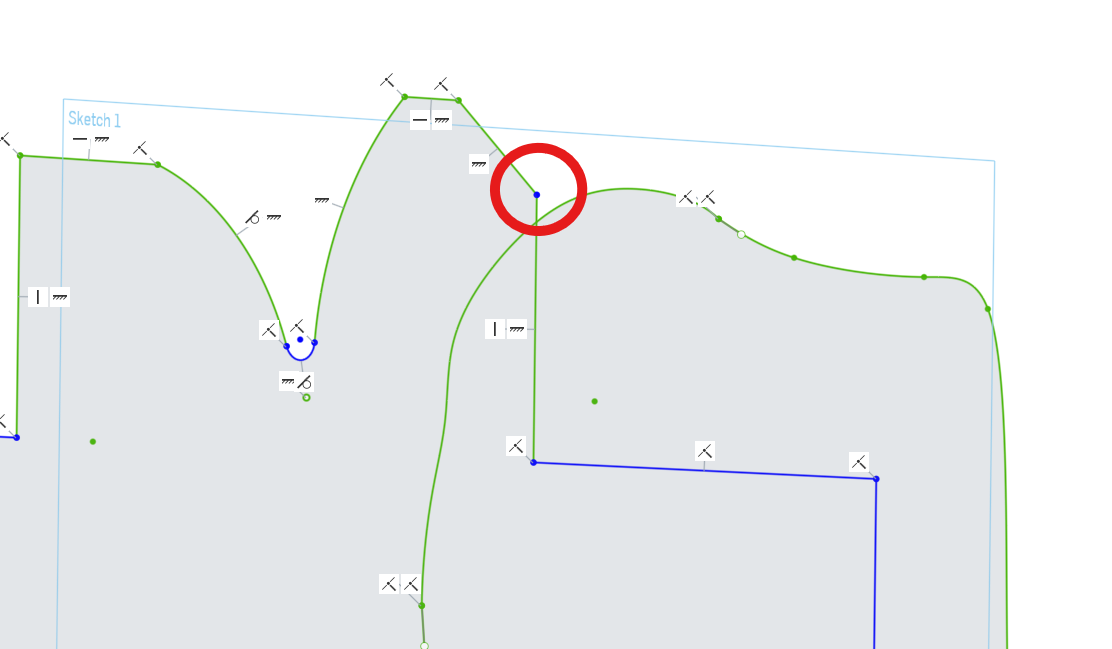
I love the new sketch graphics preferences! I am, however, confused by one thing. What are inactive sketches? If it means the linestyle of sketches that are turned on in the model (outside of sketch mode) it does not work for me. When I change the color of the inactive skethes none of the displayed sketches in the model, i.e. the ones not in sketch mode, change color.
0 -
cm and m!
3 -
It seemed to me during the new x-section default plane demo, Michael was trying to hold back cracking up when he used the word "plane" inside of assemblies. 😂
0 -
-
Replicate annotations is HUGE!🤯 I'm seeing the annotations poorly layed out somtimes but, seems like that will be easy for the AI to continue getting better at.
2 -
For anyone wondering what an 'Underconstrained Occluded Line' was - I finally figured it out.
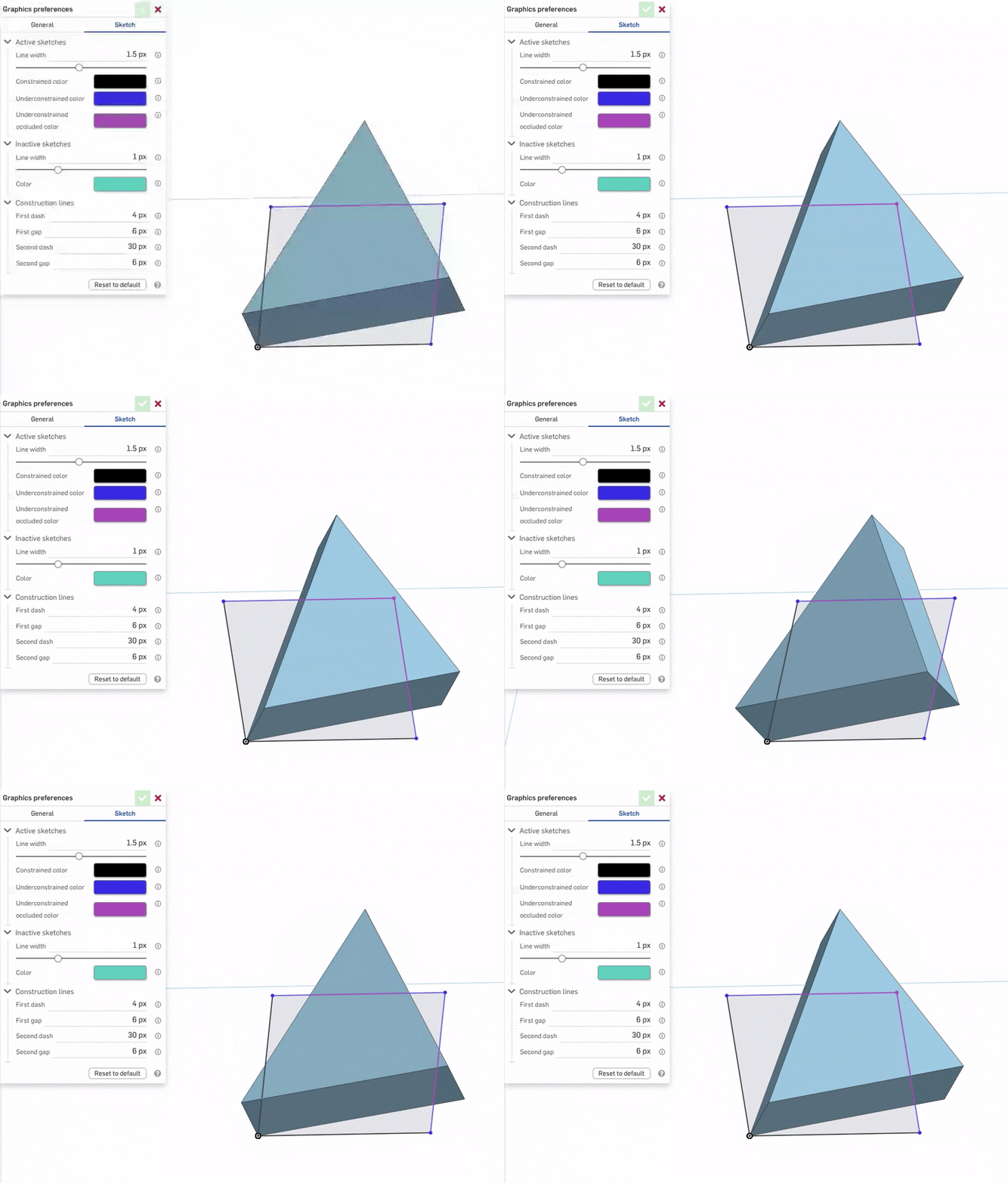
Unemployed Onshaper- Operating on European time - More of me here ➤➤ https://linktr.ee/Liam.G7 -
Typo: “Uses are presented”
0 -
-
Would someone please confirm if the color option is working for Inactive Sketches in the new Graphics Preferences menu? The line width works for me but not the color.
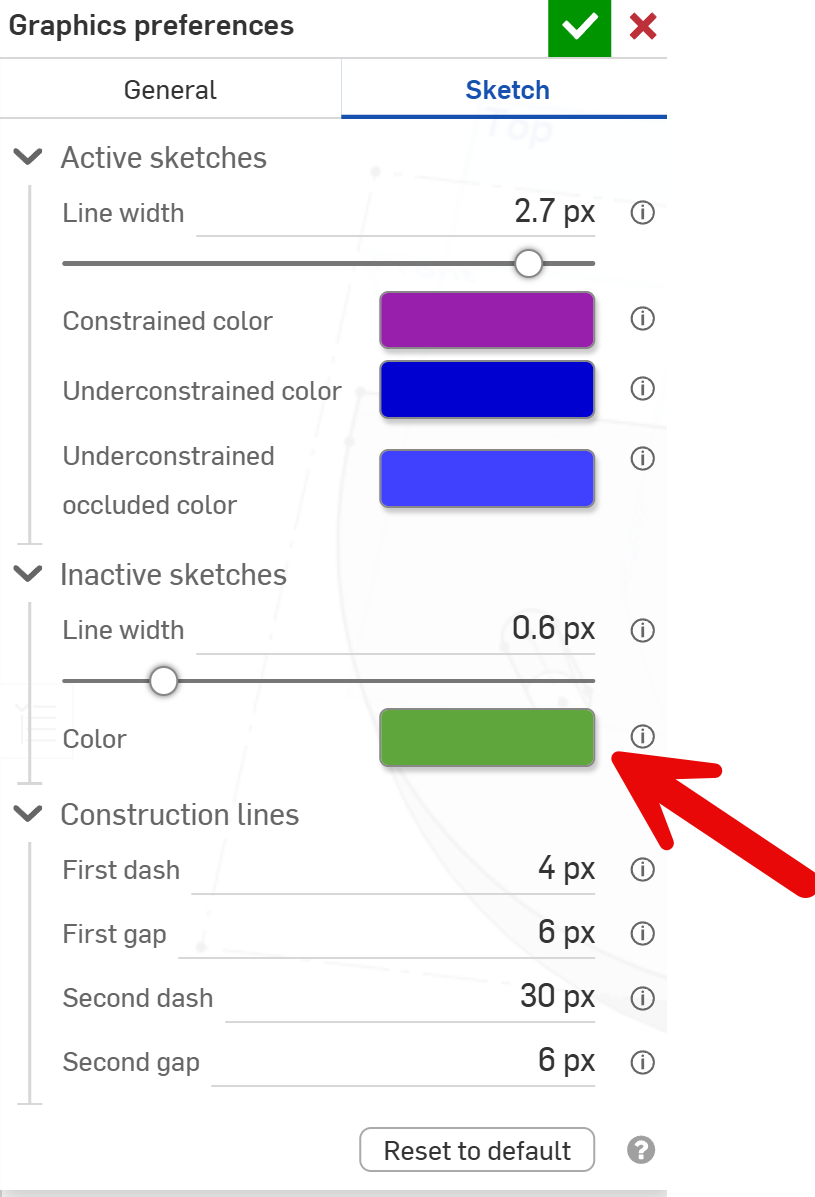 0
0 -
-
"SECTION VIEW ALONG STANDARD PLANES"
Thank you! Now I no longer need to create mate connectors to represent front, right, and top planes for section views.5 -
Thanks. After digging into this a little more, the issue with the inactive sketch color display looks to be part specific. It apears to only happen with an existing part that has a JPEG inserted into the sketch as a tracing image.
0 -
Wow, that is a truckload and many I've been asking for. Any easter eggs anywhere? ;0)
1 -
What an update! Nice work!
0 -
I love this update! 👏
Any improvement that speeds up the drawing creation is more than welcome! 🤩1 -
Oh wow! I can not wait to try that dimension tool!!
0 -
Appreciate also the smaller improvements like
SECTION VIEW ALONG STANDARD PLANES
DOUBLE NEGATIVE AND POSITIVE TOLERANCE BUTTONS
features like these make a CAD System mature. And I don't want to do workarounds for years. So keep improving also the minor topics to make. It is really appreciated a lot. It is much more important than the fancy AI stuff.2 -
Stopping by to say customized occluded sketch color is something I didn't know I needed so bad. Thank you.
0 -
Section view along standard planes in assembly is a great relief! thanks for fixing this!
1 -
With all these new units, please also give us the option to show primary units!
https://forum.onshape.com/discussion/10590/
0 -
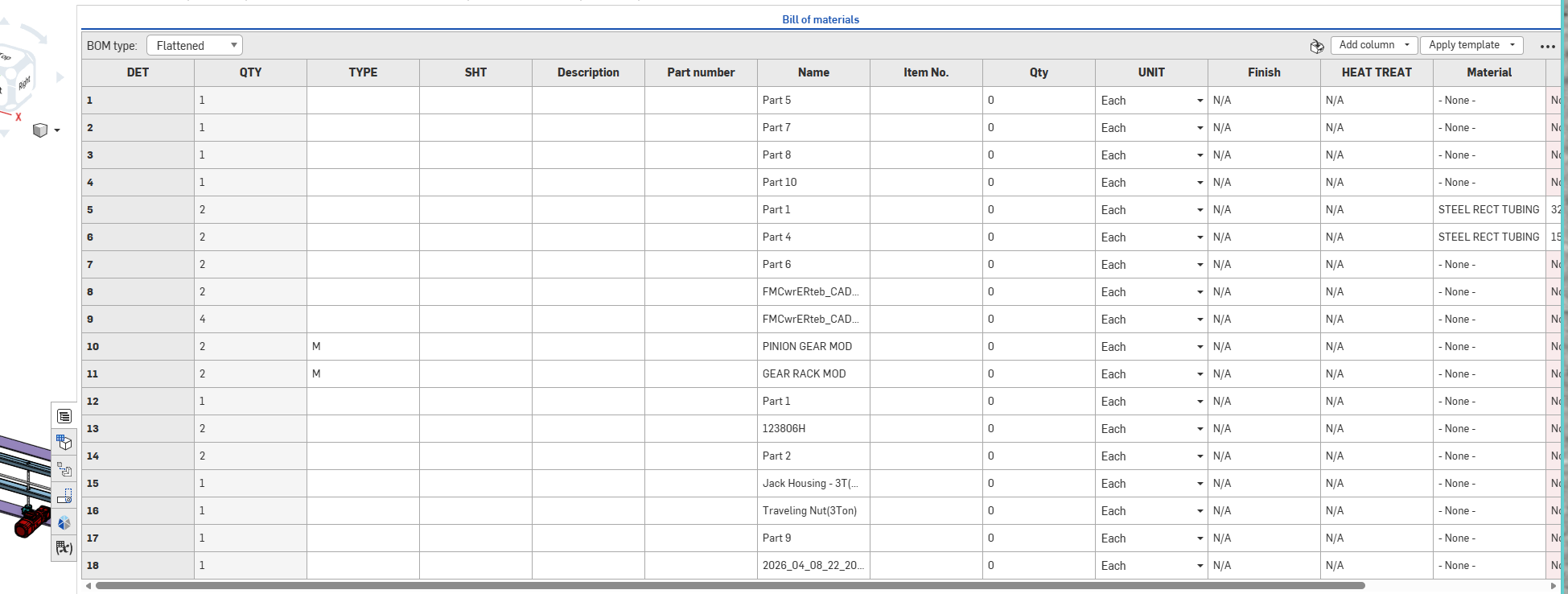
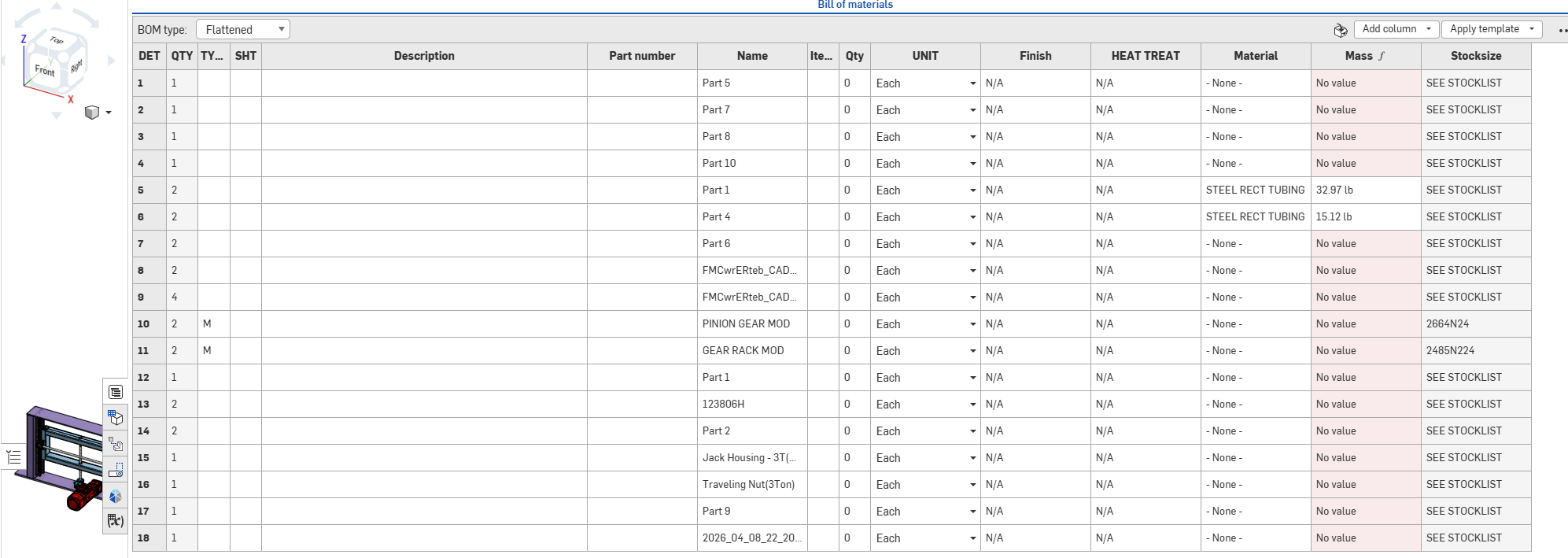
Resize BOM table in company settings teased me for a minute. I assumed you were able to adjust the default width of each column. So, when you use them in an assembly, they will already be a width that makes sense. For example, Det, Qty, etc. don't need to be so wide, just wide enough to read DET, QTY, but Description should be much wider. I use the BOM to examine and fill in all the meta data at the end of a project. it's annoying to have to resize all the columns to see all the info in one view
Onshape Default:
Modified:
The AI view annotations is cool, but still extremely slow. Even with 3 or 4 annotations it still takes a bit. That and it would be nice if ordinates dims were straight instead of having to go back and re-align them. At that point it is much faster to just dimension the features manually. Good start, I can't wait to see this develop. For now, it seems like more work than without it.
Other than that, there were a lot of big ones this time, I kept scrolling down saying, wow, there's still more!
0 -
Another great set of CAMStudio improvements!
0