Welcome to the Onshape forum! Ask questions and join in the discussions about everything Onshape.
First time visiting? Here are some places to start:
- Looking for a certain topic? Check out the categories filter or use Search (upper right).
- Need support? Ask a question to our Community Support category.
- Please submit support tickets for bugs but you can request improvements in the Product Feedback category.
- Be respectful, on topic and if you see a problem, Flag it.
If you would like to contact our Community Manager personally, feel free to send a private message or an email.
New Custom Tool : SVG to Sketch

Hey all — long-time Onshape user, wanted to share something I've been building and using in production.
The problem: Getting vector artwork (logos, cutout profiles, panel designs, icons) into Onshape as real, editable sketch geometry is annoying. DXF import can be inconsistent, and manually retracing SVGs with the sketch tools is a time sink.
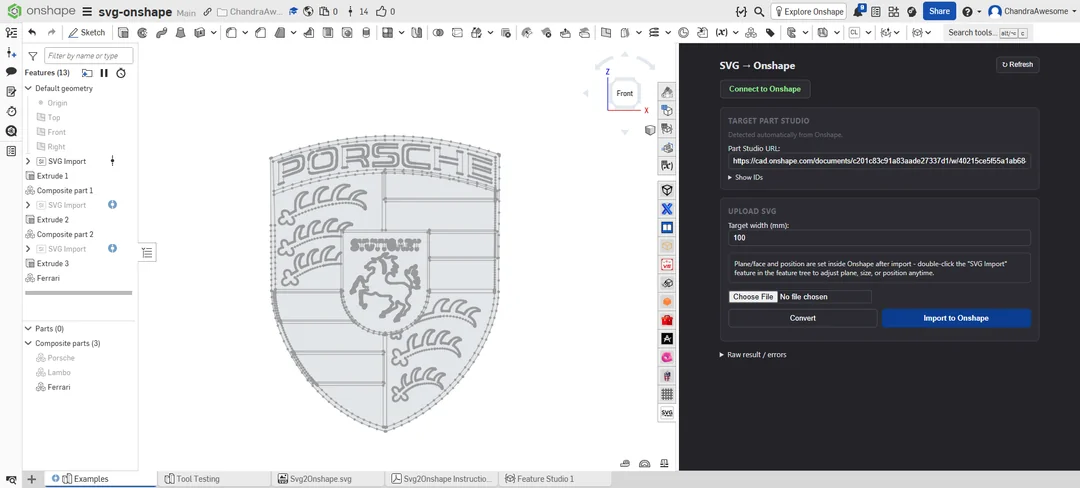
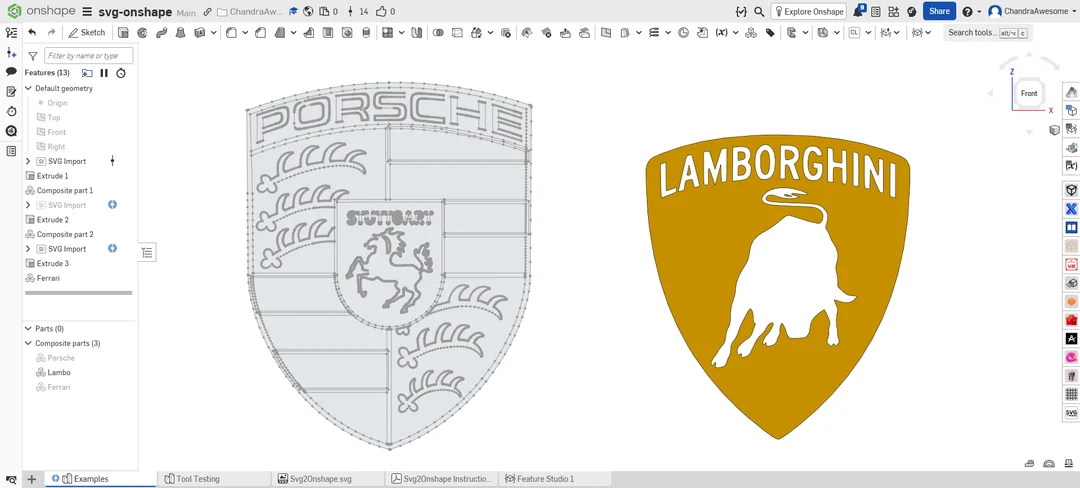
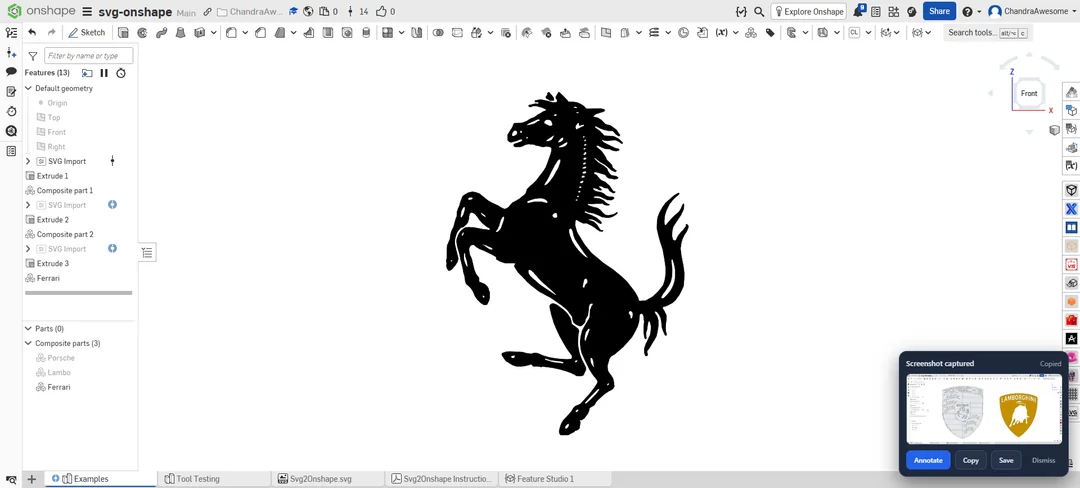
What I built: A web tool that takes an SVG file and converts it into native Onshape sketch entities — proper lines, arcs, and fitted splines — using a custom FeatureScript feature under the hood. It's not a raster/image import or a dumb flattened curve; it comes in as real sketch geometry you can constrain and edit normally.
Features:
- Upload SVG → get native sketch geometry in your Part Studio
- Target width parameter to scale on import
- Drag manipulators for X/Y position, rotation, and scale — right in the sketch, no re-import needed to reposition
- Currently extending it to accept raster images (PNG/JPG) too, via an image-to-vector preprocessing step
Status: It's fully functional and I use it daily, but it hasn't been approved on the Onshape App Store yet. So for now it's a standalone external web app you use alongside Onshape rather than an in-app extension.
Custom Tool need to be added : https://cad.onshape.com/documents/c201c83c91a83aade27337d1/v/fa88b35f1753d1f6f757a891/e/09d98a5bdcf6272e418d3ec2
Link: https://svgto-onshape.vercel.app
You'll need your Onshape document/workspace/element IDs (visible in your document URL) to point the tool at the right place.
Happy to answer questions about the workflow, limitations, or what it can/can't handle geometry-wise. Feedback welcome — especially edge cases that break it.
Comments
-
SVG import is much needed. Looking forward to testing this out.
I'm curious why you need an external App to do this? I had Codex write some SVG import code for my Origami fold feature.
Granted, I have not expanded the SVG import functionality to handle as many entities, but it seems like it's quite possible to do it all with FeatureScript. I may get back to trying to do just that.
Simon Gatrall | Product Development, Engineering, Design, Onshape | Ex- IDEO, PCH, Unagi, Carbon | LinkedIn
0 -
Hi Simon,
Thanks for testing my tool and i love your custom tools much.
Well the external app is added to convert the svg to sketches. I have already contacted the onshape support but no response received to make it work inside onshape document.
For testing purpose, i have kept it external + need a manual connecting to import to onshape.
And onshape do not do the conversion process, i used the external app that helps. At the same time, i do not want to spend tokens just for conversion and not all users know about this conversion.
Everyone wants the work do be done simple and fast. So i introduced it based on frustrated experience in drawing logo's manually.
If you dont mind, do you have any idea of, how often or fast onshape can approve my application ?0 -
Good evening. I'm trying to import an SVG but I get this error. I'm not sure if it's a permission or a resource issue but would love some help:
{"error": "Onshape rejected the feature creation call.",
"detail": {"message": "Resource does not exist, or you do not have permission to access it.",
"moreInfoUrl": "",
"status": 403,
"code": 0
}
}
0 -
Thanks for sharing the error. This error can cause few of the reasons are :
If you have added the feature script to your onshape tool bar ?
If added, does the onshape is connected to the onshape document URL ?
Does the document link you added have permission to make edits ?
check these once and let me know. So i can understand what could be the exact reason.0 -
I don't even know why this feature isn't native if a single person could code it up.
1 -
Hello Everyone. I have updated our tool support from SVG to IMG. Please check the forum here :
0 -
Wow! This is nice. Certainly eliminates some juggling of other means to attain desired results like this tool gets. I was not able to edit the resulting sketch. Is that expected? I ended up copying the sketch to a new one and was the able to edit it. Extruding the fully constrained sketch didn't work. Continually dividing the sketch and trying the extrude again whittled it down to two sketch areas like this.
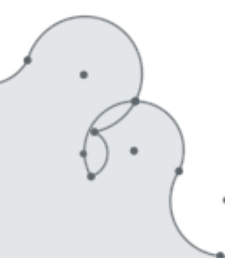
Eliminating the overlaps allowed the extrude to succeed.
Nice job! Thanks for the work. Glad to have this tool. - Scotty
0 -
Actually that's a great point to work on. (I'm actually working on it already).
Currently the sketch is generated from the external tool. By default any sketch that is generated by the feature script, cannot be edited like native sketch.
For better smooth curves, try tuning the images before importing with the slider's available. The result's are totally depends on the input images.
Give a try with the AI Mode, gives more good tuning tools here.0 -
Thanks. - Scotty
0


