Welcome to the Onshape forum! Ask questions and join in the discussions about everything Onshape.
First time visiting? Here are some places to start:- Looking for a certain topic? Check out the categories filter or use Search (upper right).
- Need support? Ask a question to our Community Support category.
- Please submit support tickets for bugs but you can request improvements in the Product Feedback category.
- Be respectful, on topic and if you see a problem, Flag it.
If you would like to contact our Community Manager personally, feel free to send a private message or an email.
Regeneration Error while using an imported CSV Sheet

Hi I am new to using the custom feature for wiring created in OnShape. I have been stumped because I am unsure what I am doing wrong.
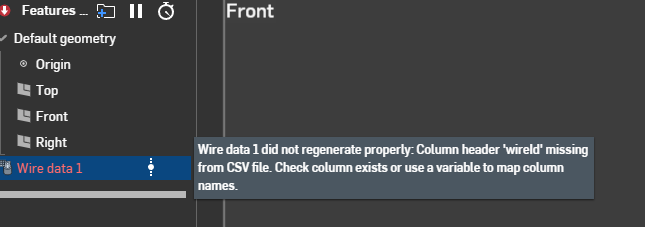
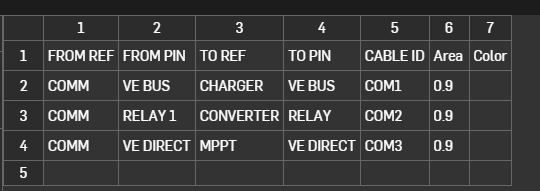
Importing the CSV that I made from Excel works fine, but I keep getting the regeneration error when I try to import Wire Data into the Part Studio.
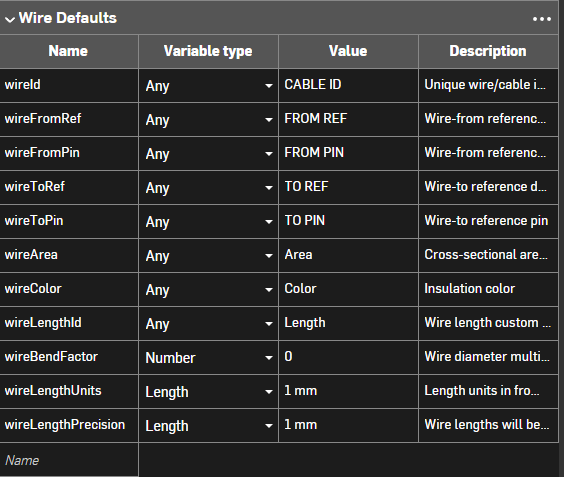
I have already created a Variable Studio that I added to the Part Studio to define my column headers, so I am unsure as to what I am doing wrong.
Error Message:
CSV File:
Variable Studio:
Thanks in advance for taking the time to read this.
Answers
-
Please attach the csv file here so I can take a look - make sure that you exported from Excel as csv and not UTF-8 csv.
Senior Director, Technical Services, EMEA1 -
Hi Neil, thanks so much for your response and advice. Sorry for not seeing this sooner. I was able to get it working by changing the names from for example, "CABLE ID" to "Wire ID". I copied all the names in the tutorial and that seemed to fix it. Not sure about the reason, but it's working. I initially wanted the column headers to be the same names as the ones the electrical team uses in their cable schedules, but I can't seem to get that to work for now hahah Thanks so much for this. The wiring itself is intuitive and very helpful for us.
0

