Welcome to the Onshape forum! Ask questions and join in the discussions about everything Onshape.
First time visiting? Here are some places to start:
- Looking for a certain topic? Check out the categories filter or use Search (upper right).
- Need support? Ask a question to our Community Support category.
- Please submit support tickets for bugs but you can request improvements in the Product Feedback category.
- Be respectful, on topic and if you see a problem, Flag it.
If you would like to contact our Community Manager personally, feel free to send a private message or an email.
Improvements to Onshape - October 30, 2026


This release puts your own standard content at your team’s fingertips with custom standard content libraries. Beyond that, you’ll spend less time on repetitive work, with smoother G3 sketch transitions, faster simulations with rigid parts, and a full set of product renders in a single pass. Bezier sketching, AI Advisor, and more are also coming to Android and iOS.
CAD Improvements
Custom Standard Content Libraries
You can now author your own custom content libraries in Onshape. Create your own catalogs of standard approved parts such as hardware and purchased components. Custom libraries appear in the Standard content dialog alongside the current Onshape Standard content library, so your team can easily find and insert the right parts every time just like Onshape standard content.
There is a lot of flexibility in how you can set up and organize your libraries. Creating additional folder levels can generate additional categorization in the insert dialog. Grouping multiple parts in a single document further populates those elements in the standard content component drop down, etc. For best results, please review the full documentation for all details.
Flow (G3) Constraint in Sketches
Sketches now include a Flow constraint for G3 continuity: position, tangency, curvature, and the rate of change of curvature all match where two curves join. It builds on Tangent (G1) and Curvature (G2) and gives class-A transitions for consumer products, automotive surfaces, and motion paths. Together with G3 bridging curves, the G2 Boundary surface, and G3 in Connection Analysis (1.212), Onshape now covers G3 from the sketch to the surface to the check.
Sorting in the Insert Dialog
The Insert dialog now supports sorting on both the Current document and Other documents tabs. Sort by name or by most recently modified so the part, Part Studio, or assembly you need rises to the top of a long list.
Sticky Headers in More Tables
Sticky headers, first introduced in the Bill of Materials, now extends to other tables across Onshape. As you scroll through a long table, the header row stays in view, so you always know which column you’re looking at.
URDF Export: Merge Fastened Components
URDF export can now merge components that are fastened together into a single link. Static subassemblies export as one rigid body with their combined mass properties, instead of a link and a fixed joint for every part. The result is a simpler kinematic tree that robotics tools and simulators handle more easily.
Drawing Improvements
Edge Symbols Per ISO 13715
Onshape Drawings now include a dedicated Edge symbol annotation for edge conditions per ISO 13715. Call out burr, sharp, or undercut requirements, and passing or removed material at edges, without modeling every small chamfer or relief. Edge symbols behave like other drawing annotations, with leaders, styles, and grip editing.
Simulation
Treat Parts as Rigid in Simulation
Onshape Simulation can now treat selected part instances as rigid bodies. Rigid parts still move and transfer load through the assembly, but their deformation isn't computed. Fasteners, pins, and other parts you're not studying no longer slow down your analysis, and you can reproduce the rigid-body simplifications standard in other simulation tools.
Simulation Legend Improvements
The Simulation results legend now includes extremum and dim color options, like those in Thickness analysis. Set a threshold to keep full color only on the regions above or below a value and dim the rest, so critical areas of stress or displacement stand out right away. These controls sit in the legend alongside the deformation animation, color scheme, and min/max callouts.
Data Management Improvements
Team Task Assignments in the Action Items Dashboard
The Action Items dashboard in Enterprise Analytics now includes tasks assigned to teams, not just to individual users. A new Team column and Team filter show which teams own open tasks, so admins and managers can track ownership and follow-ups across the organization.
AI Advisor Improvements
Cleaner Answers with Citation Chips
AI Advisor answers no longer include numbered citation markers like [1] and [2] in the text. Instead, a small source chip appears at the end of each line that has a reference. Hover over a chip to see its sources and step through them, then click to open the source in a new tab. Answers read naturally, and the sources stay right next to the points they support.
Render Studio Improvements
Multiview Rendering
Render Studio can now render several named views in one go. In the render dialog, choose Multiple, pick the named views you want (or Select all), and Onshape renders each one in turn. New Naming and location options let you set a file name prefix and choose the destination folder, so a full set of product shots lands in your document neatly named and organized.
CAM Studio Improvements
Advanced Spiral Options for 2-Axis Profile
2-axis profile toolpaths that use the spiral option now have advanced controls: add a first contour, add a last contour, and start the spiral at the top of the feature. You get cleaner spiral and boring cuts without manually raising the start height to keep the first pass from plunging into material.
Live Tool Position While Dragging the Backplot Slider
When you drag the slider at the bottom of the Backplot dialog in CAM Studio, the tool position and status line now update continuously while you drag, instead of only jumping to the new position when you release the mouse. This makes it much easier to scrub through a toolpath and stop at exactly the spot you want to inspect.
WinCNC Post-Processor for ShopSabre CNC Routers
A new post-processor for WinCNC controllers on ShopSabre machines lets you post CAM Studio toolpaths directly to ShopSabre CNC routers, with no manual editing of the output.
PCB Studio Improvements
One-Click Re-sync from Onshape
In PCB Studio, you can now re-sync a board with one click. Right-click the board in the tree and choose to sync it from Onshape again. PCB Studio reuses the same source element and configuration, so there's no need to search through the Sync from Onshape dialog to find the right tab.
Mobile Improvements
Bezier Sketch Curves on Android and iOS
The Bezier curve sketch tool is now available in Onshape on Android, iPhone, and iPad. Place control points to create smooth, freeform curves, then raise the curve’s degree for finer control over its shape, just as you can on the web. On iPad, Apple Pencil makes placing and adjusting points especially precise.
Edit Form and Frame Library Selections on Android
When you edit a Form or Frame feature on Android, you can now open the Libraries tab and change the selected profile or form. Browse the User, Company, and Onshape libraries, search them just as you would on the web, preview your change, and apply it from your Android device.
AI Advisor on Android
AI Advisor is now available in Onshape on Android. Ask questions about Onshape features and workflows and get answers right on your phone or tablet, with the same experience you get on the web. You stay signed in, so there’s no extra login.
Please take a moment to try out these new features and improvements, and leave your comments below. For a detailed list of all the changes in this update, please see the changelog.
Remember: The updates listed here are now live for all users when creating new documents. Over the next few days, these features will also be available in documents created before this update. Mobile improvements roll out in the days after the release and are updated via the Apple App Store or Google Play Store.
Comments
-
-
Awesome! Custom Standard Content Libraries!
I still wish the sticky header would include the top row. The one with the configuration label and the 3dot menu…
2 -
Love to see G3! 😊
Insert sorting and Simulation upgrades nice as well.
0 -
Custom Standard Content is a massive leap! G3 Sketch Splines are awesome too.
3 -
<update closing paragraph and change log link is excluded at this time>
<update - added. thx!>
0 -
Amazing release!
One additional I.R. for the Insertion Dialog, can you please add the capability to save the filtering and sorting as a Preset? The new addition of Custom Standard content is a game changer, but there's still a lot of scenarios where we need to find regular components that are not quite Library worthy, like project specific stuff that lives across multiple documentsAdrian V. | Onshape Ambassador
CAD Engineering Manager1 -
Custom standard libraries! A long-awaited feature! I'm also excited about sticky headers and WinCNC support in CAM Studio.
0 -
What a nice treat for Halloween!
0 -
Custom Standard Content is huge.
G3 splines in sketcher is something I've wanted for ages.
Insert dialog sorting is a great quality of life improvement.
Simulation improvements are very welcome.
[edit:]
From the changelog: "New Variable Studio library for external thread specifications"
Please do tell more….
Simon Gatrall | Product Development, Engineering, Design, Onshape | Ex- IDEO, PCH, Unagi, Carbon | LinkedIn
1 -
I literally just gave a lunch and learn at my office on TWO whole days ago saying that Onshape didn't have G3 sketch constraints. Way to make me a liar guys…
Also, love to Custom Standard Content and the Sorting option!Ramon Yip | glassboard.com
1 -
Standard Content Libraries - nice.
I also see a whole bunch of updates for the drawings API, I just hope "Improved Drawings API schema" doesn't break anything.www.smartbenchsoftware.com --- Renaissance --- Kestrel -- SmartLink
Experts in Onshape Automation - Custom Features and Integrated Applications0 -
The change notes say there are schema changes to the drawings API…but I dont see any updates to the actual schema:
www.smartbenchsoftware.com --- Renaissance --- Kestrel -- SmartLink
Experts in Onshape Automation - Custom Features and Integrated Applications0 -
I like all the new additions, The Standard Content Libraries is a big addition for me.
But I also enjoy scrolling to the end of the changelog and seeing all of the "Fixed"
1 -
One more for custom standard content - now I can add my AN/MS library to the standard content. Really big one for me. Thank you Onshape
0 -
Time to go hotrod Amalgamate to plug into the new library definitions.
3 -
"New Variable Studio library for external thread specifications" - Please move along, these are not the droids you are looking for, we're free to go.
Internal work to make way for some future improvements. Won't disrupt existing workflows at all, good snooping!Onshape Senior QA Engineer4 -
Sorting in the Insert Dialog…Finally! I'v been lost in this dialog since 2020. Never once while inserting something have I been expecting to navigate through things based on last modified.
2 -
I have no Set Library option on my right click menu (Classroom). How do I enable it?
0 -
Custom Standard Content is magical, thank you. Rigid bodies in Simulation will help as well. Thank you everyone.
0 -
Custom Standard Content FTW!!!
0 -
My heart leapt when I read "Custom Standard Content Libraries", because I thought it would address the difficulties of the existing standard content - namely:
- you cannot modify or add to the existing list of, say screws (in the UK you cannot buy an M10 screw with the head size of the standard content; and you can buy screw lengths which are not listed)
- you cannot restrict the standards that are available to yourself and your team (so each time you want a given screw, you or your colleagues may choose essentially the same screw from different standards)
- you cannot search within the library for part numbers or names that you and your colleagues have created
1 -
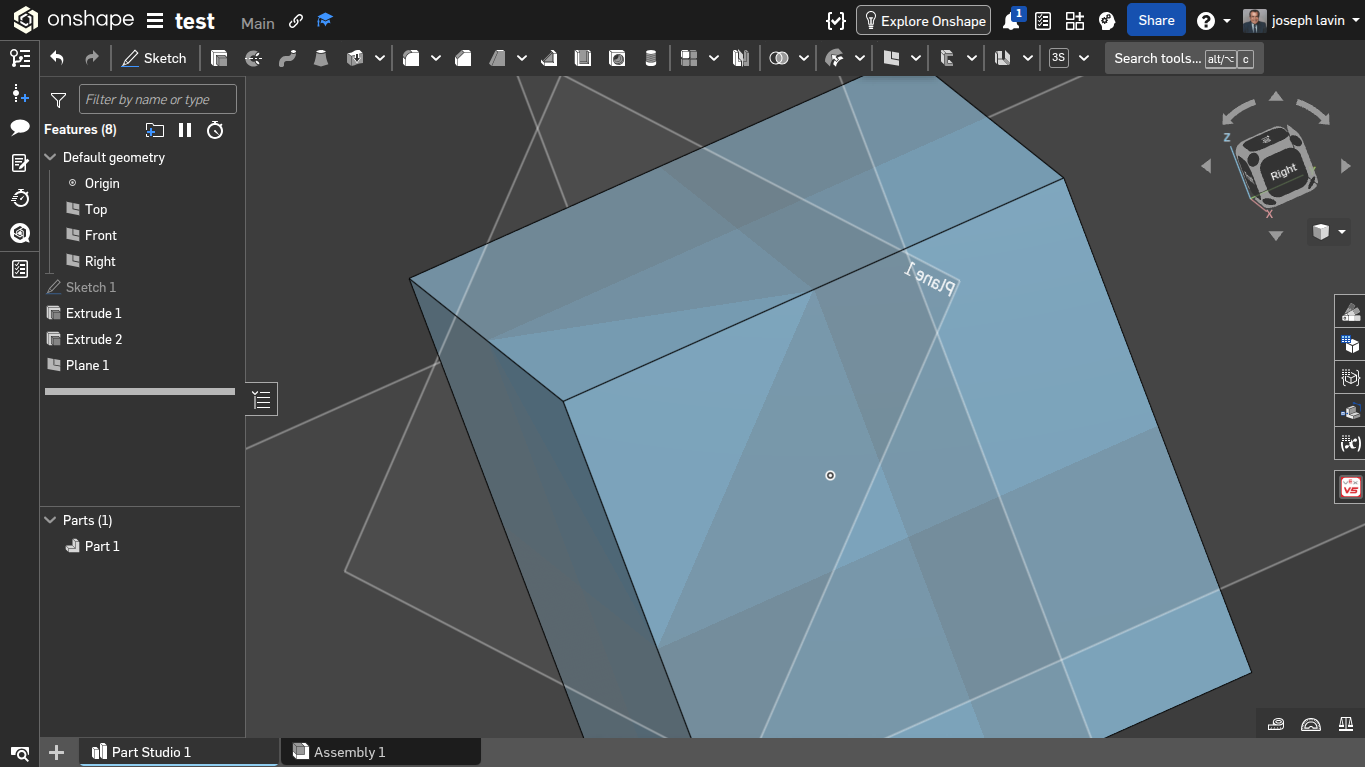
For the next update could you add a three way chamfer. so if you click on a corner, you could move it down to where that plane is, or farther. this probably won't be seen, but I'm hopeful.
 0
-
@joseph_lavin - There are many CustomFeatures available that are significantly improving users productivity.
Here is one you might find useful.
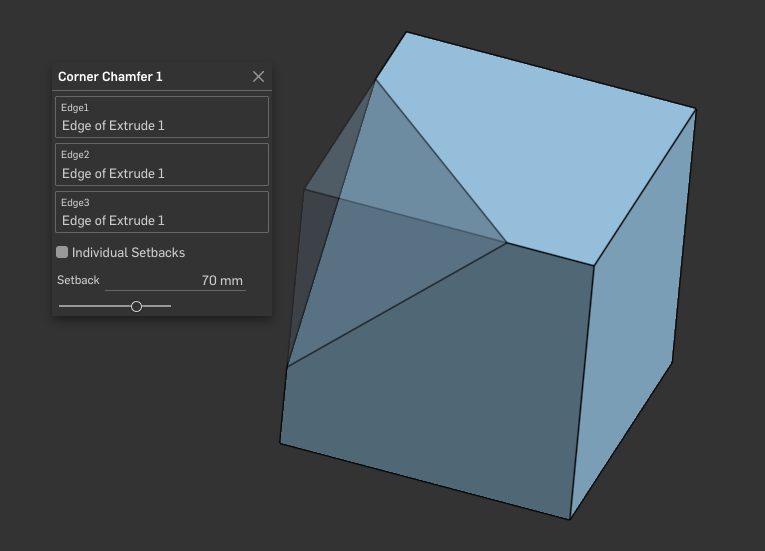
Also, checkout the Onshape MCP FeatrueScript server to see how easy it is to make your own!
0 -
The new sorting in the Insert Dialog is nice, but it would be great if we could drag this down a bit to make it larger, since there are now two sections (folders and part studios).
1 -
Oh boy oh boy! I definitely want to see what this opens up for custom features.
1