Welcome to the Onshape forum! Ask questions and join in the discussions about everything Onshape.
First time visiting? Here are some places to start:
- Looking for a certain topic? Check out the categories filter or use Search (upper right).
- Need support? Ask a question to our Community Support category.
- Please submit support tickets for bugs but you can request improvements in the Product Feedback category.
- Be respectful, on topic and if you see a problem, Flag it.
If you would like to contact our Community Manager personally, feel free to send a private message or an email.
How do I make a perfect sphere?

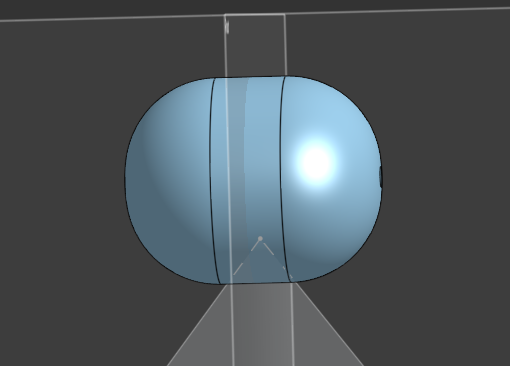
This is my first time using this program and I got off from a very easy program for kids and I have no clue how any of this works. So I'm sorry if this comes off as a stupid question but how do you make a perfect sphere because the best I can do it this so far! I really wanna learn how to use this program because the things I see people making are so cool! Thank you for any help I can get!
Best Answers
-
It looks like you extruded a circle and then added fillets to the ends. Instead, use revolve. Add a vertical line down the center of your circle sketch. Then revolve using that line as the axis, select only 1 half of your circle, and revolve 360° to make a sphere
1 -
I always recommend learn.onshape.com to beginners. It usually the fastest way to get a good handle on a lot of the basics instead of trial error. Get a feel for how the software "thinks" then you can apply the tools in ways that aren't covered in tutorials.
2 -
Revolve as mentioned. Draw a half moon in the sketch.
0

Answers
-
It looks like you extruded a circle and then added fillets to the ends. Instead, use revolve. Add a vertical line down the center of your circle sketch. Then revolve using that line as the axis, select only 1 half of your circle, and revolve 360° to make a sphere
1 -
I always recommend learn.onshape.com to beginners. It usually the fastest way to get a good handle on a lot of the basics instead of trial error. Get a feel for how the software "thinks" then you can apply the tools in ways that aren't covered in tutorials.
2 -
Revolve as mentioned. Draw a half moon in the sketch.
0