Welcome to the Onshape forum! Ask questions and join in the discussions about everything Onshape.
First time visiting? Here are some places to start:
- Looking for a certain topic? Check out the categories filter or use Search (upper right).
- Need support? Ask a question to our Community Support category.
- Please submit support tickets for bugs but you can request improvements in the Product Feedback category.
- Be respectful, on topic and if you see a problem, Flag it.
If you would like to contact our Community Manager personally, feel free to send a private message or an email.
My FeatureScript Development Workflow

Hello all,
I wanted to write up the workflow I’ve built for developing FeatureScripts over the past month and a half. With recent developments in AI, AI is now able to do things I could previously only dream of and allowed me to finally begin powering through my massive FeatureScript backlog, which has been very exciting.
All of my FeatureScripts live in a GitHub repo which serves as the source of truth. The repo contains a copy of std, a custom CLI for pushing FeatureScripts to Onshape, a custom FeatureScript LSP (Language Server Protocol) extension for VS Code, and a number of other tools to help with development.
GItHub Repo:
AI Models
I basically exclusively use Opus 5.5 on High effort backed by Anthropic's $20/month subscription. A good chunk of my usage also goes to the FRCDesignApp rather than solely my FeatureScripts.
Release Management
All of my FeatureScripts are developed in a single backend codebase, which maps to a single document in Onshape. This encourages code reuse and keeps the codebase consistent. It’s much easier to maintain shared standards and make changes, like extracting shared modules, when everything lives in one place.
Backend Document:
https://cad.onshape.com/documents/00dd11dabe44da2db458f898/w/6c20cd994b174cc99668701f/e/f7794b2169fb8ab079275013
I release all of my FeatureScripts through a single frontend document. A single document isn’t strictly necessary, but some of my FeatureScripts make sense to release together, and it’s much easier for users to add a group of FeatureScripts from a single place.
Frontend Document:
https://cad.onshape.com/documents/9cffa92db8b62219498f89af/w/06b332ccabc9d2e0aa0abf88/e/1bf62c7bfc3bc9d745e6f02e
I’ve also recently started distributing FeatureScripts through the FRCDesignApp, which inserts the latest version directly into a Part Studio. It provides a custom experience with search and favorites, and makes it possible to browse the full list of FeatureScripts both in the app and at https://fs.frcdesign.org.
To release a new version of a FeatureScript, the repo:
- Pushes the latest version of all relevant Feature Studios to the backend
- Creates a version in the backend document
- Updates the frontend Feature Studio to point at that backend version
For example, a frontend version named Robot belt - v1.2.0 corresponds to a backend version with the same name. The frontend Feature Studio is just a simple import and re-export of the matching FeatureScript in the backend.
This lets me develop and release FeatureScripts independently. When I release one FeatureScript, all the others stay pinned to their previously released versions. It doesn’t matter if the code has drifted since then, because each released version points at a snapshot taken before the change. So if I extract shared functionality into a new module for a new FeatureScript, existing FeatureScripts aren’t affected until they’re released again. This lets me keep the entire codebase up to date and develop multiple projects in parallel without breaking existing FeatureScripts or needing to retest everything every time I make a release.
LSP (Language Server Protocol)
The LSP is a VSCode extension which gives Claude the tools it needs to parse, query, and edit FeatureScript code efficiently. For example, Claude can query the document tree, look up a symbol’s signature and documentation, find every place it’s used, rename it everywhere, and run the formatter and linter automatically. It can also quickly search the local copy of std for reference.
The linter has been especially valuable because Claude can add new rules as issues come up. Early on, pushes to Onshape often failed because of issues like:
- Enums used in the UI that weren’t exported
- Invalid imports
- Incorrect syntax for editing logic and parameter groups
Each time one of these came up, Claude added a lint rule for it. Rules with only one right answer also get an automatic fix. As a result, Claude now produces working FeatureScript on the first try basically every time.
I’ve also extended the linter to enforce my own standards. For example, one rule only allows horizontal enums at the top of a feature, and another generates code documentation that stays automatically synchronized with the parameter declarations.
I’ve also been able to add features to the LSP that Onshape doesn’t offer today:
- Linting and autocomplete for the definition map
- Syncing parameter documentation with generated functions
- Autocomplete and go-to-definition for UI hints in annotations
Linting also supports working around Onshape’s UI ordering and lookup table restrictions by using editing logic to drive a hidden parameter which can then control UI visibility. The LSP supports a custom annotation for this pattern, which in turn facilitates linting and it lets the pattern work in the local UI preview, where editing logic isn’t otherwise available.
Having std locally also makes it easy to use as a reference. I can say “model this on std revolve” or “set hole attributes the way the std hole feature does,” and Claude will look up the std implementation and follow it.
Review Artifacts
Claude can also generate artifacts and send them to my phone for review. For each FeatureScript, I have Claude produce one audit page with:
- A fully interactive UI preview, including dropdowns, checkboxes, tabs, lookup tables, and conditional visibility
- Every lookup table the feature uses, listed option by option
- A technical write-up: execution order and what each option does
- A list of all user-facing strings: the feature name and description, part names, parameter descriptions, and every error, warning, and info message
- Any lint problems
To help reduce AI slop, I also have Claude check each user-facing string against Onshape’s standard error messages in std, and reuse the standard wording where one fits. The UI preview is especially useful because it makes iterating on the UI fast and easy.
Testing and Code Generation
The repo includes a FeatureScript interpreter written in Python. It parses FeatureScript and runs it locally, including std’s own code for units, vectors, transforms, and lookup tables, on top of reimplementations of Onshape’s built-ins. That means anything that computes values can be unit tested without touching Onshape: math, lookup tables, editing logic, manipulator change functions, and even sketches.
Some examples of what’s tested today:
- Editing logic. Picking a tapped hole starts the diameter at the tap drill for that thread, changing the thread updates it, and a diameter the user typed is kept.
- Manipulators. Dragging the point manipulator on a gear sets the right index, and dragging a rack’s stop sets the right distance.
- Error handling. A bevel gear too thin for its teeth, or a pulley with too few teeth, throws the right user-facing error.
- Geometry from math. Spur gear mates are exactly the pitch radii apart, with a tooth meshing into a gap. Bevel pair cones add up to the shaft angle. Herringbone racks meet in the middle.
- Sketches. Sketch calls are recorded rather than solved, so tests can check the geometry of a profile instead of a picture of it. Every pulley and sprocket profile is a single closed loop, consecutive curves meet tangent, and the teeth stay between the groove and the land.
- Generated code. Every generated Feature Studio is checked in up to date, and every generated profile is closed.
- Library parts. Every configuration has exactly one record, washers and nuts fit their screws, and every configuration follows Onshape’s visibility rules (more on that below).
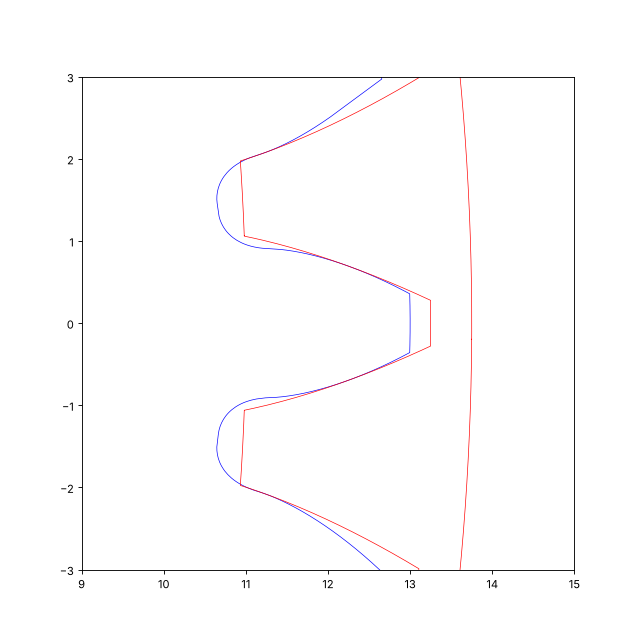
Claude can also generate FeatureScript code with Python. This is great for standard profiles and large data structures like lookup tables. Claude defines them in Python and exports them into generated Feature Studios automatically. It’s been particularly useful for complex profiles: Claude generates the profile in Python, converts it to hard-coded FeatureScript definitions, and checks the results against the real profiles for accuracy. This let it build accurate spline approximations of gear and pulley teeth without relying on constraints.
FeatureScript-Backed Library Parts
We’ve also recently started writing one-off FeatureScripts to drive library parts. This works well for parts with many permutations, like screws, nuts, washers, and bearings. Backing a library Part Studio with a FeatureScript lets us store information that isn’t otherwise available, such as per-configuration metadata. We then use the Onshape API to generate the matching Part Studio, including the parameter visibility conditions needed to expose the FeatureScript cleanly.
Example document:
https://cad.onshape.com/documents/b82fec8aded5d7a705a3d658/w/17365a290cc6a8d9db1fcc6b/e/95d604c9dbcb55bf85cbf082
The same Python definition generates both the FeatureScript’s lookup tables and the Part Studio’s configuration so they can’t drift apart.
Because Claude has internet access, it can also review screenshots and documentation, pull vendor metadata, and download STEP files for reference, and turn all of that into working lookup table selections and models that carry the relevant metadata.
What About the Onshape FeatureScript MCP?
I don’t really use the MCP for development. The MCP forces Claude to work solely with raw text in its context window, which is both slow and expensive.
That being said, I do think there’s real potential in giving AI easier access to an Onshape environment for testing, although I've only used the existing functionality a handful of times due to concerns around API limits and because I haven’t felt that much need for it given how reliably Claude produces working features on the first try.
Suggested Improvements
There's a couple things that would be great for Onshape to fix/improve in order to make these types of workflows easier and faster in the future.
API
- An endpoint for organizing tabs and folders in a document. This would make syncing with Onshape easier, and it would also let apps like the FRCDesignApp organize users’ documents for them.
- Endpoints for running/checking performance profiling and the static analyzer.
- A bulk push endpoint.
- Being able to sync multiple Feature Studios at once would save a lot of API calls.
- Testing against arbitrary documents.
- This may already be technically possible, but dedicated tooling would help.
- Better microversion handling.
- Right now I have to push to Onshape and then read back the computed microversions to keep everything in sync.
- An official GitHub mirror of std and the FeatureScript documentation, so it can easily be referenced outside Onshape.
- Allow inserted FeatureScripts to follow UIHint.REMEMBER_PREVIOUS_VALUE.
- This is the biggest downside to inserting a FeatureScript directly into a Part Studio via the Onshape API today.
- A way to Publish FeatureScript via the API.
- If a new version isn't published, it doesn't become available to users, which is annoying since it means I have to take manual action in Onshape desktop every time I release a change.
Libraries and Assemblies
These features would make it easier to generate FeatureScript-backed library parts in Onshape.
- Allow visibility conditions for Boolean parameters to work like List options.
- A List’s options can each be controlled by several visibility rules, and an option shows when any of its rules holds, so you get an OR of ANDs. A Boolean configuration input only gets a single visibility condition, which has to be an AND of earlier inputs’ values. As a result, there’s no way to show a checkbox for “metric screws OR McMaster-Carr screws.” Today we work around it by turning the Boolean into a two option List, which works but is clunkier for users.
- Allow setting instance configurations in assemblies.
- As far as I can tell, there isn’t currently a way to propagate assembly configurations down to the instances inside an assembly via the API, which is a pretty big limitation.
Thanks for reading! I know this is a lot, so feel free to let me know if you have any questions.
Comments
-
I'm curious how your VSCode LSP support differs from what I did back in April. I haven't touched it much since then.
The MCP approach can work better than managing things through GitHub etc, but it does burn through tokens at an insane rate. With the improvements to browser use (especially with ChatGPT) it's amazing what testing and other interactive things my agents were able to do along side the MCP path. A lot of automated creation of tests and checking them visually which I found amazing.Simon Gatrall | Product Development, Engineering, Design, Onshape | Ex- IDEO, PCH, Unagi, Carbon | LinkedIn
0 -
-
@Alex_Kempen This is a fantastic writeup! Thanks for taking the time to do it. I'm also really glad you're still finding time to do FRC and FeatureScript stuff. I'm always grateful for your community contributions.
0 -
@S1mon thanks for the response. I actually should've given you credit in the post since the FeatureScript LSP did start of a fork of your repo, which definitely saved a lot of time getting the basic MVP up and running, so thank you a ton for putting together that excellent project.
In comparison to the original repo, the original repo is a TypeScript VS Code extension built mainly for highlighting rather than a full LSP. Navigation only works within the current file, completions only cover enum members and definition-map keys, and it has no diagnostics, formatting or refactoring. It also only runs inside VS Code, so an AI agent can’t use any of it.In comparison, we've rewritten the language server to Python (about 8.9k lines vs. the original 3.2k) and allowed the
fsCLI to use the same code. The CLI lets AI runfs check,fs doc,fs refsand so on, which in turn allows AI to quickly inspect code and find and fix problems.From a code perspective, having a built in linter helps Claude quickly and cheaply check a multitude of issues that would otherwise only be found after pushing to Onshape. For example, here's a list of issues we ran into only after pushing to Onshape. All of these are now encoded as lint rules, meaning we won't run into them again:
- Annotation not right before defineFeature: a const between a feature’s annotation and its defineFeature takes the annotation, and Onshape rejects the feature (“Nonconforming feature function”).
- Non-ASCII characters in annotation strings: degree signs in a parameter’s description were rejected.
- Std calls with the wrong number of arguments: for example, planeToWorld3D called with arguments it doesn’t take.
- Std functions used as values: passing norm directly instead of calling it in a lambda.
- Variables named like their function’s parameters: a local list re-declared the ends parameter.
- Std names from modules the file can’t see: ModifyFilletType is declared in modifyFillet.fs, which common.fs doesn’t export, so Onshape couldn’t find it.
- Array-item parameters named like other parameters in the precondition: Onshape rejects the duplicate names.
- Keywords as map keys: a "type" key read as bound.type can’t be parsed, because type is a keyword.
- Enum parameter types the feature’s file doesn’t export: Onshape requires the feature’s file to export an enum used as a parameter’s type.
- Reading parts of parameters in a precondition: reading a lookup table’s levels gives “Could not identify parameter id”.
- An id’s operations split up: “Parent Id ... used at two non-contiguous points in operation history”.
Bugs Onshape didn’t report, where the feature just behaved wrong, that fs check now catches:
- Misspelled annotation keys: Onshape ignores keys it doesn’t know. "Driving query" (for "Driven query") meant arrays weren’t driven by their queries, and "UIHInt" meant a reference didn’t remember its value.
- Conditions reading parameters declared after them: a parameter was shown or hidden by an option declared below it.
- Precondition conditions reading constants: only parameters, enum values, literals, and predicates work there.
A lot of these rules also caught other existing errors when they went in. For example, the annotation key check highlighted cases in existing released FeatureScripts that had misspelled keys and made those places trivial to clean up as well.
Being able to quickly check for issues like these saves a lot of tokens since a lot of the behaviors are non-obvious. For example, FeatureScript is unique in that definition.type is not valid syntax, something which AI would likely trip over again and again but which is trivial to flag and fix using a linter.
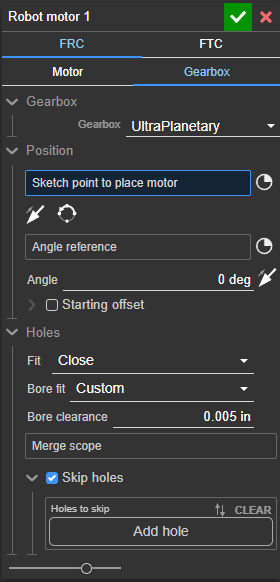
The UI preview is also particularly useful. Here's an example of the UI preview running in a Claude artifact and/or preview window in VSCode. (I would send the full artifact, but Anthropic says they're all too large to share publicly, likely due to the embedded CSS and JavaScript).
Beyond the linter and UI preview artifacts, there's also a set of tools to allow AI to understand code and make edits quickly and cheaply:fs doc NAME. It prints a symbol’s signature and doc comments, laid out like Onshape’s FsDoc, for std and project symbols, including std’s @internal ones. The agent doesn’t have to grep throughstd/or fetch the web docs.fs refs NAME. It finds uses across files, including where the repo uses a std symbol, which doubles as a quick search for usage examples. Upstream’s Find References is current-file only.fs rename OLD NEW. It renames a symbol in every file in one step and refuses to rename a released feature’s constant, which would break saved documents.fs format. It formats deterministically, like std, so the agent doesn’t spend effort on whitespace and diffs stay clean.- Groundwork for the evaluator and dialog renderer.
fs_eval’s parser (fs evaland the FeatureScript tests) andfs uiare built on the language server’s scanner and project model. That lets an agent check math, lookup tables and editing logic, and render a feature’s dialog without touching Onshape.
The repo also has set of skills to help AI write better, more performant FeatureScript code. There's a guide on making reasonable UI, including setting remember previous value, disabling field tolerancing, setting reasonable length bounds, and so on and so forth.
There's also skills covering topics like:
- Useful std functions. This helps Claude use TOLERANCE.zeroLength rather than writing arbitrarily small values like 0.1 mm in the code and know about other useful std functions that frequently come up.
- Explaining how IDs work: This prevents Claude from passing ids around unnecessarily and helps Claude take advantage of id nesting and avoid getting tripped up by the contiguous id rules.
- Queries: This lets Claude prioritize cheaper options like qCreatedBy and qCapEntity over expensive queries like qContainsPoint, and makes Claude aware of utilities like startTracking and qDependency.
- Error Handling: This lets Claude understand features like regenErrors, featureInfo/featureWarning, callSubfeatureAndProcessStatus, and addDebugEntities, which in turn makes it possible for Claude to build useful error displays like this one.
-
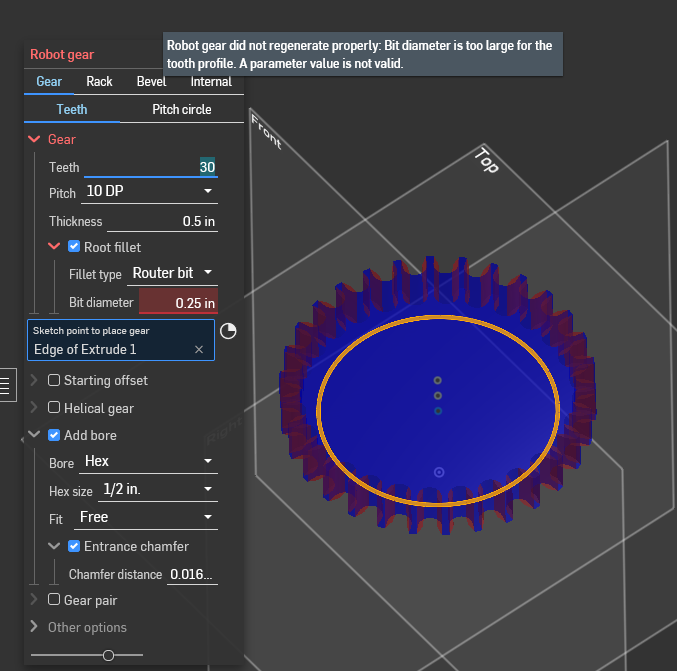
These skills were added after I inspected Claude's first attempts at generating FeatureScripts and have all helped Claude get significantly better at making working code the first time around rather than having to go back and forth to Onshape.
Software Developer at Epic SystemsFRC Design Mentor - Team 10553 Orange Overdrive0 -
Wow. I wanted to build some sort of UI preview/editor and I spent a bunch of time with ChatGPT trying to figure out how and didn’t get anywhere. This all sounds amazing. I look forward to trying this out.
The skills sound very promising as well. Queries and IDs are two of the most challenging things for LLMs to learn and use well.
Simon Gatrall | Product Development, Engineering, Design, Onshape | Ex- IDEO, PCH, Unagi, Carbon | LinkedIn
0


