Welcome to the Onshape forum! Ask questions and join in the discussions about everything Onshape.
First time visiting? Here are some places to start:- Looking for a certain topic? Check out the categories filter or use Search (upper right).
- Need support? Ask a question to our Community Support category.
- Please submit support tickets for bugs but you can request improvements in the Product Feedback category.
- Be respectful, on topic and if you see a problem, Flag it.
If you would like to contact our Community Manager personally, feel free to send a private message or an email.
Unable to create document, Onshape not connected.
don_howe
Posts: 136 ✭✭✭
I'm having some trouble this morning creating documents and opening documents. First I am unable to create a new part studio but onshape recording that new documents are being added. Second, Onshape is not connected?
Anyone else experiencing these problems this morning?

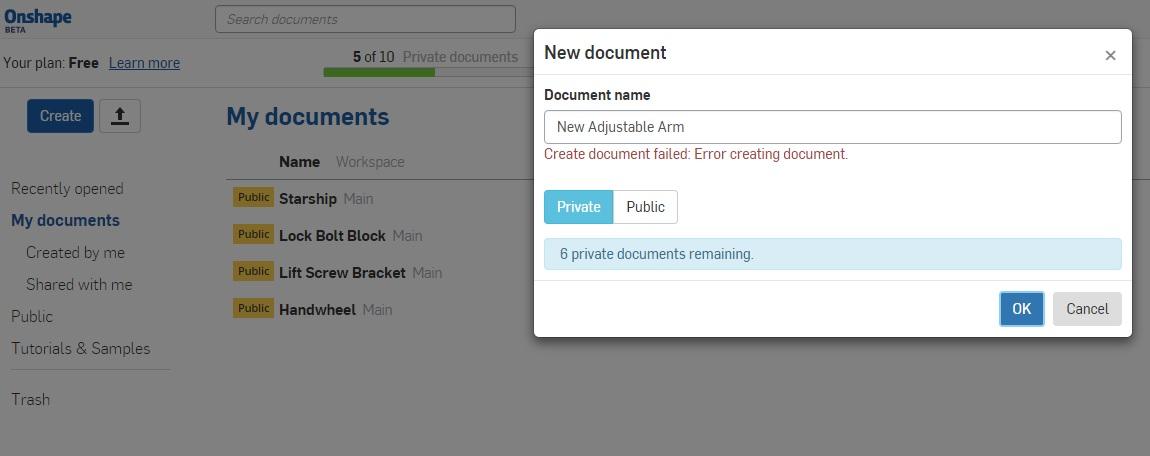
Anyone else experiencing these problems this morning?
Tagged:
0
Best Answers
-
We have identified the problem and have resolved it. I will post additional information here when we determine a root cause. My apologies for the delay in resolving the issue.John Rousseau / VP, Technical Operations / Onshape Inc.6
-
@don_howe, we have identified an issue where the private document count for some users is incorrect. Developers are working on the issue now and we will roll out a fix as soon as possible.John Rousseau / VP, Technical Operations / Onshape Inc.6


Answers
-
Unable to create document; Onshape not connected
0 -
@don_howe Creating a document is working fine here. Maybe there was a temp problem.
0 -
Thanks. I rebooted and I'm still not able to create documents or open documents. Everything was working fine last night.
0 -
I am unable to open any document.
http://www.keystonecollections.com/ - Handcrafted Furniture http://www.newswangerpen.com/ - Fine, handcrafted writing instruments0 -
@don_howe , Refresh your browser (Shortcut=press F5) and try again to create new document. Yes it is a temporary problem as suggested by @peter_hall, sometimes it is happening due to user may be away from that onshape working window and session may be time out and expired when he again use.
0 -
@don_howe
And if a refresh alone doesn't help, try holding down Shift while invoking a refresh.
0 -
We have identified the problem and have resolved it. I will post additional information here when we determine a root cause. My apologies for the delay in resolving the issue.John Rousseau / VP, Technical Operations / Onshape Inc.6
-
I would reccomend that everyone has a number of internet browsers on their computers. I had a lot of problems with getting onto the internet with google chrome unloaded it and now cannot download chrome again? Internet explorer doesnt work with Onshape, Opera seems to grab hold of models when I manipulate them, have to RMC to get it to let go of the model. Firefox working fine at the moment....
0 -
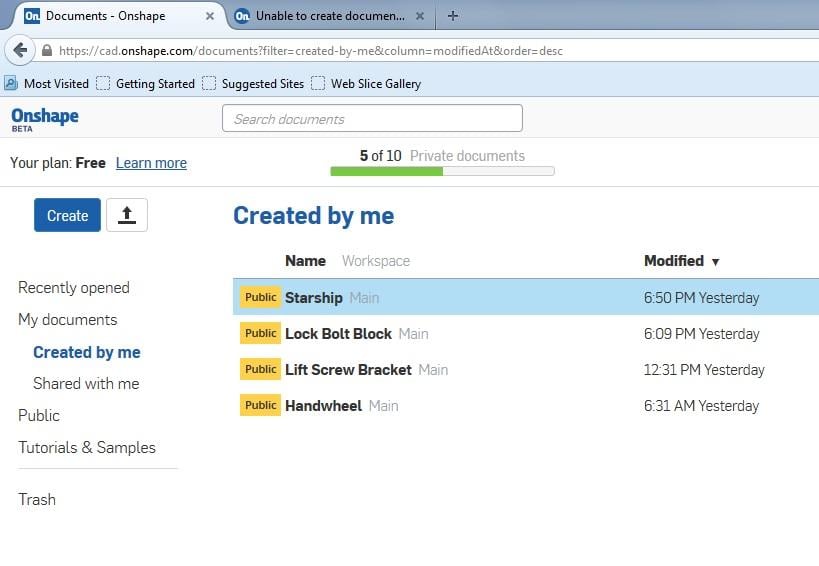
OK, I just checked and I was able to create and document as well as open an existing document. However, it says I have 5 private documents but I am not able to see those documents listed. I have rebooted my system again and I have logged into my account using FF and Chrome and the results are the same.
.
0 -
@don_howe, we have identified an issue where the private document count for some users is incorrect. Developers are working on the issue now and we will roll out a fix as soon as possible.John Rousseau / VP, Technical Operations / Onshape Inc.6