Deleting an imported stl deletes all of my sketches and extrudes

I've imported an STL and am aware I can't edit it in Onshape so I have begun to recreate it using my own sketches and extrudes. I now want to delete the original stl import, leaving just my work but as soon as I do this, everything disappears as it seems my sketches are dependants of the imported stl.
The file is: https://cad.onshape.com/documents/a98c67ba3808e2382c3127b4/w/032e756798941e8c816b5a6e/e/65218f1f3c45e80105f40360?renderMode=0&uiState=65e379f914538c0bec80087d
I've tried to work out how to resolve this and searched but no luck so far.
Thanks,
Best Answer
-
Simon Gatrall | Product Development, Engineering, Design, Onshape | Ex- IDEO, PCH, Unagi, Carbon | LinkedIn
0

Answers
-
Hello Hedley. The link provided takes me to the Documents page. - Scotty0
-
If you've referenced a sketch plane to the imported STL, then based your model on it, the sketches will break when you delete the referenced STL, and all things created on these sketches will disappear. That is the logic of a history-based model.
0 -
Hi, I think I must have deleted the original sketch. Sorry about that.robert_scott_jr_ said:Hello Hedley. The link provided takes me to the Documents page. - Scotty0 -
Hi Martin,martin_kopplow said:If you've referenced a sketch plane to the imported STL, then based your model on it, the sketches will break when you delete the referenced STL, and all things created on these sketches will disappear. That is the logic of a history-based model.
That's what I did. What is the work around? Do I not reference the plane?0 -
There is no need to delete it - either just hide it or use the Delete part feature.Senior Director, Technical Services, EMEA1
-
I couldn't hide it, suppress it or do anything without my work disappearing.NeilCooke said:There is no need to delete it - either just hide it or use the Delete part feature.
think I need to go and read the docs again to properly get my head around things.0 -
Simon Gatrall | Product Development, Engineering, Design, Onshape | Ex- IDEO, PCH, Unagi, Carbon | LinkedIn
0 -
I've recreated the issue and worked out that when I deleted or supressed the imported stl, my extrudes disappeared but not my sketches.
Had a play and I found that when I was extruding, I was adding rather creating new.
Now when I deleted the stl, I don't see all my extrudes disappear. This is great, but going forward when I want to add a new extrude to my previous extrude but not the imported stl. How do I acheive this?
So basically. Import stl. Create a sketch and extrude it using New so it doesn't become part of the stl. But my second extude I want it to be added to the firsdt but not the stl.
Thanks,0 -
When you click on "add" in the extrude window, there is an option to select the part/parts to merge with.0
-
So, the problem is when you use delete part its still in your document history, and can cause things to slow down or hit the complexity limit.
There is a way to break the links in the sketch, but still leave the points as they are. You then need to/can dimension/constrain the sketch as normal.
sketch dialong box>magnifying glass+pencil button>external references option>delete all. You need to do this for all sketches that reference the original stl. Then just go back in your history, and delete your import.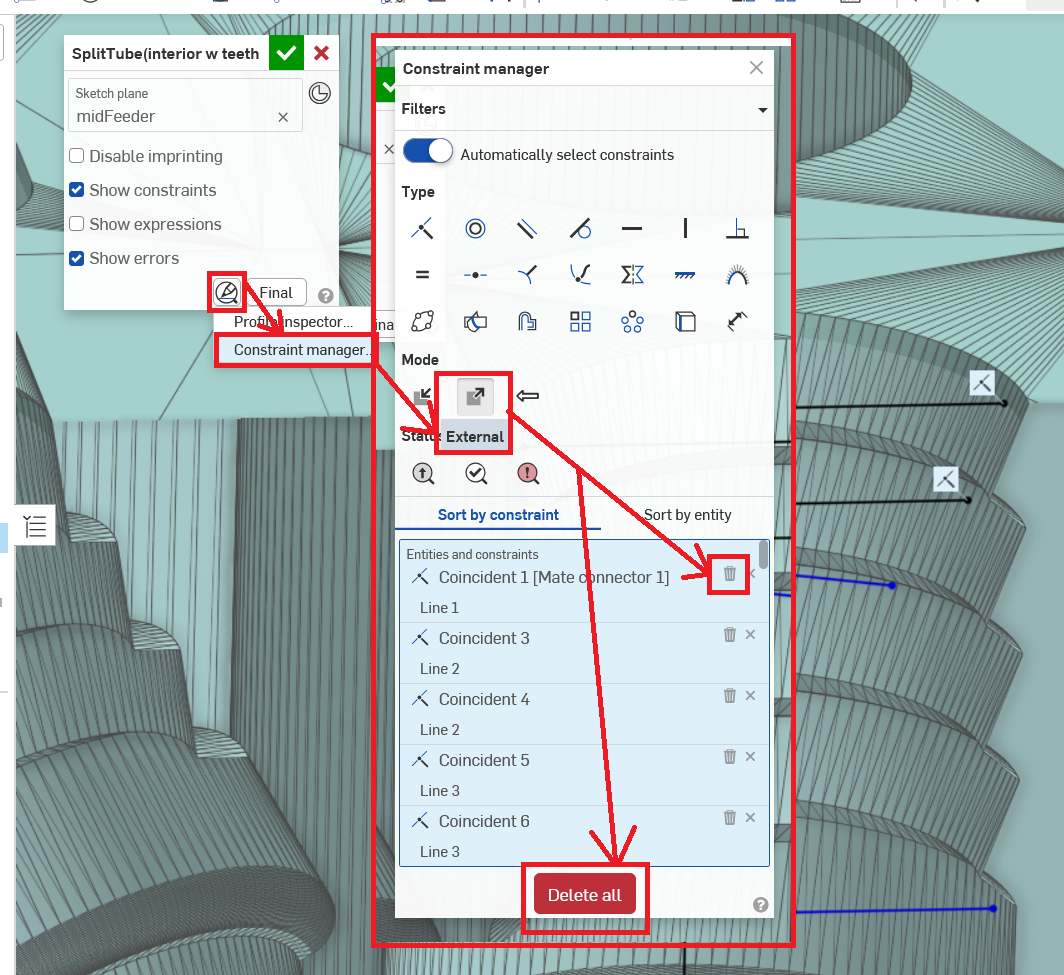
(Sorry, I am aware that this is an old post, but there is (now?) a better way of doing this, and it'd be good to have for future users searching, or possibly even op.)0