Is there a way to customize part names within an exported zip file?

skybrian
Member Posts: 25 ✭✭
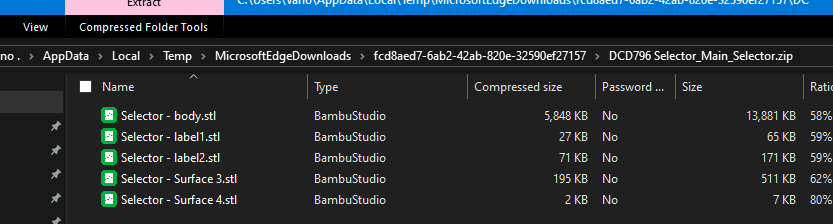
When I export a zip file for a document with "export unique parts as individual files" checked, typically the filename is "${document.name}.zip" and the files within it are "${document.name} - ${part_name}.stl". I'm wondering if there's some way to get rid of the document name portion of the filenames within the zip file?
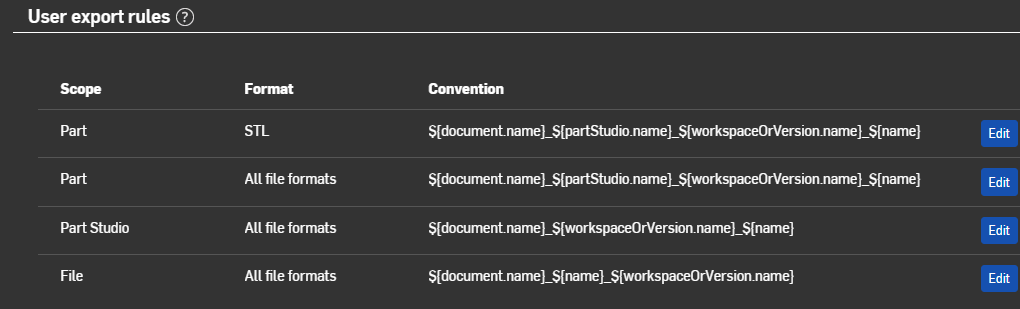
I tried making an export rule with "Part" scope in preferences, but it had no apparent effect on filenames within the zip file. I'm not sure if I understand how these scopes work.
(I also noticed what seems to be a bug: the timestamps for filenames within a zip file are seven hours in future, perhaps due to a timezone difference.)
I tried making an export rule with "Part" scope in preferences, but it had no apparent effect on filenames within the zip file. I'm not sure if I understand how these scopes work.
(I also noticed what seems to be a bug: the timestamps for filenames within a zip file are seven hours in future, perhaps due to a timezone difference.)
Tagged:
3
Answers
-
Have you tried to set up an export rule in the settings ?
You can select any PropertyName..
0 -
I did, but as I said, it had no apparent affect. But maybe I'm misunderstanding something. Did it work for you?1
-
So am I!!0
-
I am facing the same problem. The only way I can get my export rules to apply to individual parts is if I export each part in a separate action.
0 -
3 years later part export rule is ignored in part studio/assembly export:
The result:
 1