Welcome to the Onshape forum! Ask questions and join in the discussions about everything Onshape.
First time visiting? Here are some places to start:- Looking for a certain topic? Check out the categories filter or use Search (upper right).
- Need support? Ask a question to our Community Support category.
- Please submit support tickets for bugs but you can request improvements in the Product Feedback category.
- Be respectful, on topic and if you see a problem, Flag it.
If you would like to contact our Community Manager personally, feel free to send a private message or an email.
Simple cutlist with measurements

Hello, im relatively new to onshape and i have a modeled bench in the part studio, now i want to have a cutlist where there are:
- Number of part
- How many of this part
- Measurements
- and maybe material or so
when i go on cut list theres only object and how many of it
maybe im too stupid and its really obvious but how can i add more attributes to the cut list?
thanks for helping
cheers
Answers
-
Interesting, just to confirm, you did use the Frame tool as well as the Cutlist too along with the Frame trim tool? If you used these to make the bench, the cut list should also show the measurements.
Yes, you can modify the cutlist feature to add whichever properties you like. Here is the Cut list+ feature which lets you name the parts based on their profile, length, and cut measurements.
If you get really serious about it, you can copy the feature an modify it yourself. If you follow the CADSharp FeatureScript video lessons, they will show you how to modify the cutlist feature.
RENDERCAD
rendercad.ai - Photorealistic product rendering.
▚▞▚▞▚▞▚▞▚
________________________________________________________________________0 -
I am having the same problem. all i get in the cut list is item and quantity . you didnt answer the question HOW do i add the extra columns or why are they not there?
0 -
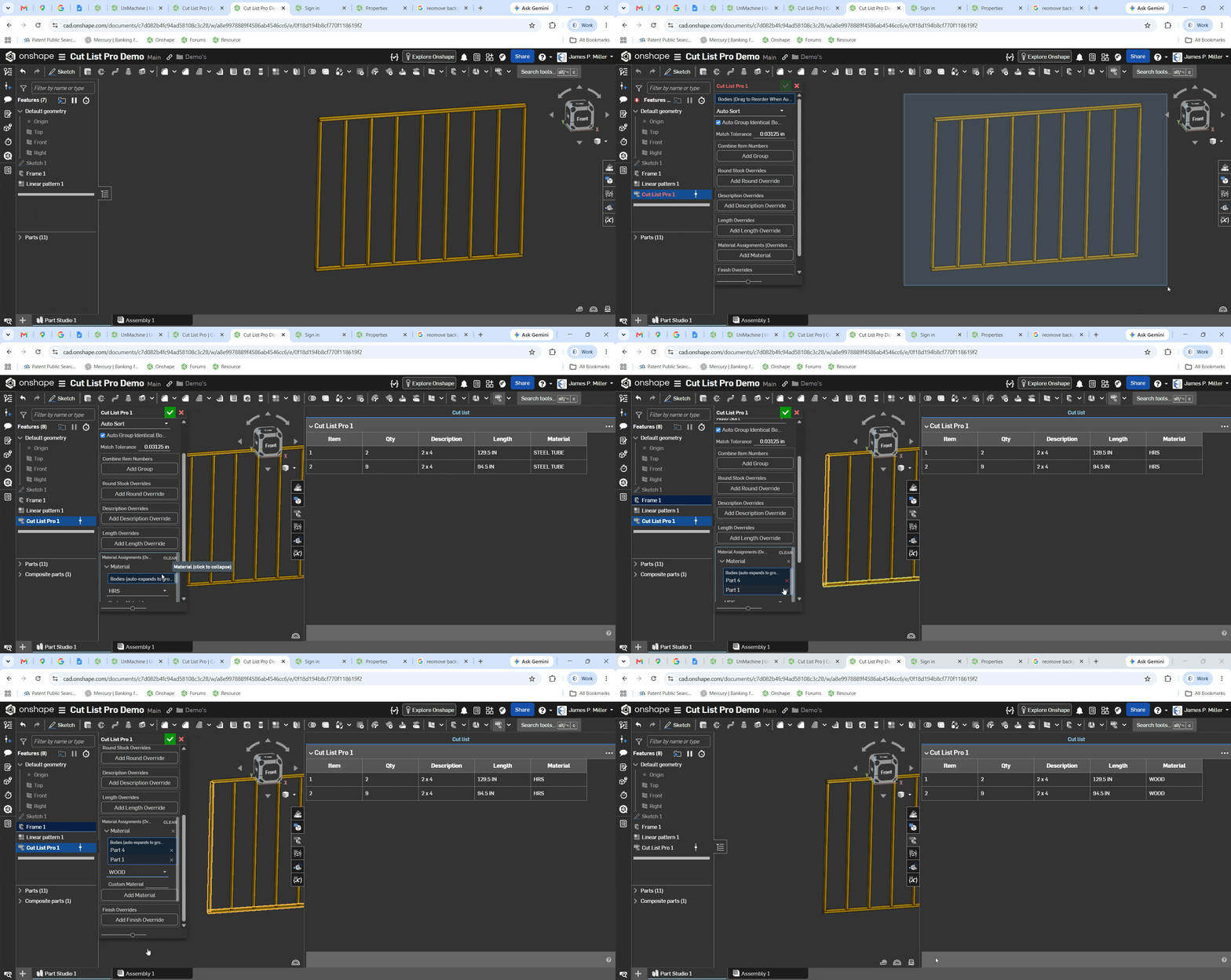
tim_hunter145 The native cut list tool is pretty cumbersome so I've been working on a feature script for my design needs that might be close to what you're looking for. I'm still working on it but was thinking of putting it up on the www.fs.place site for sale. I added a "WOOD" material for the demo.
James P. Miller
Mechanical Design | Custom Automation | Onshape CAD
https://millerdesignservices.net0 -
@tim_hunter145 quentin wasn't even using the cutlist feature, so that had to be addressed first. If you ARE using the cutlist feature rather than just a default assembly bom list, then use the Tag feature when making the cutlist profiles in a part studio. This lets you add additional items to the cutlist. Then, in the cutlist table, click the three dots at the top right to show or hide columns that exist.
RENDERCAD
rendercad.ai - Photorealistic product rendering.
▚▞▚▞▚▞▚▞▚
________________________________________________________________________0

