Welcome to the Onshape forum! Ask questions and join in the discussions about everything Onshape.
First time visiting? Here are some places to start:- Looking for a certain topic? Check out the categories filter or use Search (upper right).
- Need support? Ask a question to our Community Support category.
- Please submit support tickets for bugs but you can request improvements in the Product Feedback category.
- Be respectful, on topic and if you see a problem, Flag it.
If you would like to contact our Community Manager personally, feel free to send a private message or an email.
Can I hide construction lines, or dimensions, while viewing a sketch?

Answers
-
No.0
-
@paul_1 - Ryan is correct, you cannot do what you are asking for. However, if construction lines and dimensions are making it difficult to see your sketch you may be trying to add too many sketch entities into one sketch? Try to keep sketches as simple as possible and create multiple sketches if you need to. You can create an improvement request for your idea in the category on the right (and if enough people vote for it, it will get implemented) --->Senior Director, Technical Services, EMEA1
-
this is something people have been requesting for a long time, maybe instead of saying "you're doing it wrong" you should listen to what so many people are requesting and add that option. You sound like Apple telling people "we made it perfect and if you want to change something it is you that needs to change instead". Hiding dimensions and editing dimension styles has been a tool available to CAD drafters for decades, it's one of the most frustrating things in OnShape that the dimension styles are so bad but also dimensions are so necessary to sketch.
0 -
Not sure what you are reading…I got 'best practice, keep sketches simple, use several sketches, raise an improvement request and that could be implemented'
Sounds like you have broader issues with dimensions. What's wrong with the sketch dimension styles, what could be improved?
Engineering textbook: https://hwh.stephenteacher.com/txtbook.html2 -
It seems like you could put your construction lines on a sketch by themselves and then display or hide them by clicking on the eyeball next to the sketch name.
0 -
It might be worth considering to make the sketches easier to read by adding differentiating properties to sketch items. I cannot see why it should be necessary to have dimensions, construction lines and 'real' lines all appear in black. If construction was a lighter colour, for example, and dimensions another, the 'working' geometry sketched would stand out much clearer. That should be easy and is basically already an industry standard. That has nothing to do with best practise on the user side, but with best GUI design.
Ah! And by the way: Make the difference between unconstrained and constrained more contrasting! I have been searching for a tiny unconstrained blue dot in one of my today's sketches for half an hour, again. Dark blue vs. black is not the kind of sufficient contrast required here. Why can't underconstrained not be bright orange or whatever?
2 -
@martin_kopplow
Agree more contrast would be good, I find dark-mode is better for that (same blue for underdefined but fully constrained is white so the blue stands out a lot more) so try switching to dark mode temporarily next time!
The new "profile inspector" should add some way to highlight underdefined entities instead of just "loose ends". Or maybe a filter in the constraint manager for "underdefined" would be an option? 2
2 -
The use less entities (simple sketches)/you're doing it wrong is not absolutely correct. There's a toggle for viewing constraints why not for dimensions? For instance: I want to draw a marble maze… a really simple one ok fine. A really complex one is going to be a PITA to look at or refine with dimensions everywhere. While most of you won't be designing marble mazes, labyrinth silencers, valve bodies, etc the reality of a complex sketch being a best practice does indeed exist in plenty of situations.
0 -
The 2D CAD I've been using for a long time (LibreCAD) allows layers to be created in a sketch, which can be toggled on and off. So I put dimensions, reference lines, different components of the sketch into separate layers. It would be nice to be able to do the same here. Michael's suggestion of separate sketches for construction lines might be useful, I'll try that. Still would be nice to be able to blank out the dimensions sometimes.
Also, the recently added ability to choose the color and thickness of active, inactive, and construction lines in sketches could maybe be expanded to include a category for dimensions? Setting them to a lighter color / thinner line would be helpful.
That said, I'm 3 months into using/learning Onshape and I'm enjoying it immensely 👍
0 -
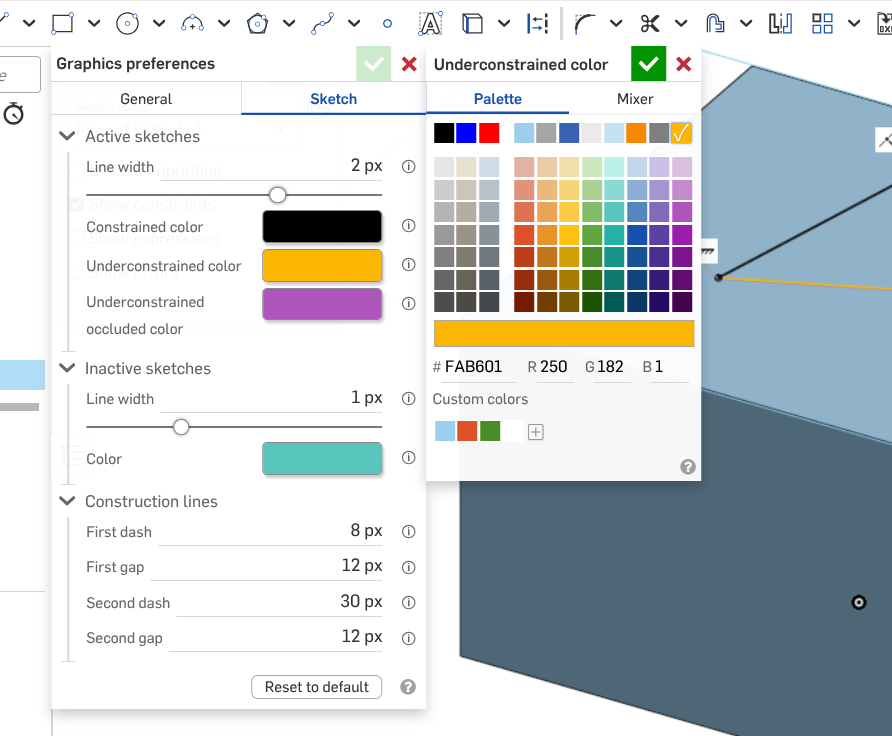
You can choose your own 'underconstrained' color now (recent enhancement) . . .
Unemployed Onshaper- Operating on European time - More of me here ➤➤ https://linktr.ee/Liam.G0 -
I agree with adding the ability to change the color and maybe also the lineweight of sketch dimensions. Even just changing them from full-black to a dark-grey would help.
Unemployed Onshaper- Operating on European time - More of me here ➤➤ https://linktr.ee/Liam.G2 -
I would also appreciate this function. Sometimes I want to make a simple 2d sketch for a floor plan as an example. Being able to hide just construction lines, even just in the drawing window would be great. This is also a 10 minute job to add as a function, so why not….
0