Improvements to Onshape - June 27th, 2025
Comments
-
@GregBrown thanks for the explanation link

I like simulation a lot and beat it up all the time. Last year I tried something that shouldn't have worked and I reduced the constraints on my simulation. There are a lot of things turned on in simulation that help you get your analysis work done. Simulation has had some kind of mesh stabilization working because I got answers last year that seemed real. Maybe it was "soft spring" or better "inertia relief". I did a sudo validation by cutting the bracket in half and fixing the cut making the problem into a simple beam problem. The results matched the mesh stabilized results and I had some confidence.
I've always wondered how initial relief stabilized the mesh and I now have a better idea. I'm supposing they use the 1st modal shape to figure out how the part is going to deform and give us a shape. But without material damping, I'm not sure how they predict the magnitude of the shape. It must be some kind of worse case scenario.
I do have a prototype part and I'm validating my analysis as I go. I'm doing a differential analysis allowing me to make changes to the model and determining if the design is getting better or worse. I can easily do this in the computer with confidence.
The prototype was printed and now my molder is bitch'n at me about draft & sink. I've made the changes to the model and want to determine if the bracket is weaker or stronger. This is how I use analysis saving on building prototypes.
Anyway, I need to analyze may design changes now that I've got "inertial relief" dialed in and recommend others do the same.
0 -
Great update!
Onshape feels so much faster, was the performance improved when opening large assemblies?0 -
SUPPRESS FROM THIS BOM & CALLOUT HIGHLIGHTING are two useful improvements. Thank you!
0 -
How can I ensure that the last layout of the new document page is displayed on a fresh start?
0 -
I really liked the grid view of the old documents page. I find myself visually scanning the thumbnails to find the right document and that's harder with the change to a linear list with only 6-10 showing at a time instead of 20+.
7 -
I liked the previous document page better. But if the current one stays in this form - which I hope not - I would like to have the Label visible in the document list. So like before.
1 -
What I mean by that is that the setting - for example the 'Last opened by me' and the 'Folders' panels collapsed - is remembered.
0 -
Yeah, I'm not a fan of the new layout.
The lower list of documents takes up too much room, and since 95% of the documents I use are in folders, that is a spot I never go to for documents.
I much preferred seeing more folders. I know you can drag the slider down, but you have to do that every time; it doesn't just stay down.2 -
First time I'm really disapointed by an update. The new layout of the documents pages is a lost in efficiency and clarity for me. I want the old layout back please.
3 -
 4
-
I prefer the old Documents page at the top level only. Once I select a Project (we use Projects in our Enterprise) or Folder, I like the "content-forward" presentation of the new documents page. It's that top-level page of Project and miscellaneous documents (that really belong in Projects or Folders) that is the problem.
0 -
Yes having labels in the document line was really useful. Collapsing the folders tab every time is a pain and everything seems less clear somehow
1 -
Grid view not being available for searching Documents is a big minus. Both while browsing through folders or using search. Hopefully that can be added to the UI.
Head of Technical Design @ www.yeswecan.lv
2 -
All, just a quick note to say:
Thank you for the feedback on the new document page redesign. We are continuing to work on improving what was a large change that lays the groundwork for more functionality and better performance in the documents page, some of which you have already seen (default column sorting, column resizing, pinning/add/removing columns, filtering, etc.).
As a side note: the documents page has to serve the needs of students with a handful of documents all the way to our Enterprise users who have large folder / projects / document / product structure hierarchies as well as external users. Some of issues brought up could be considered edge cases, but we're taking all those into account as we work on improvements regardless.
SVP, Onshape Product and R&D
15 -
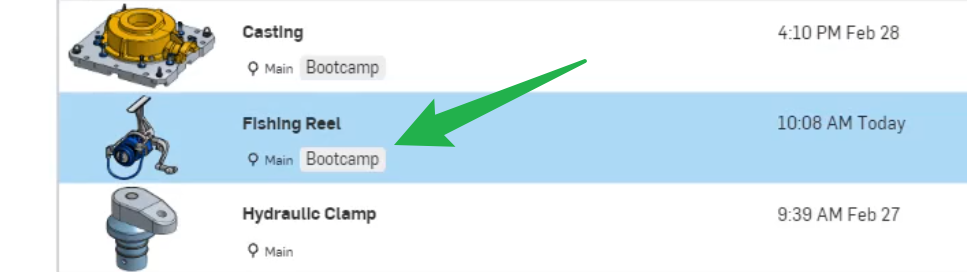
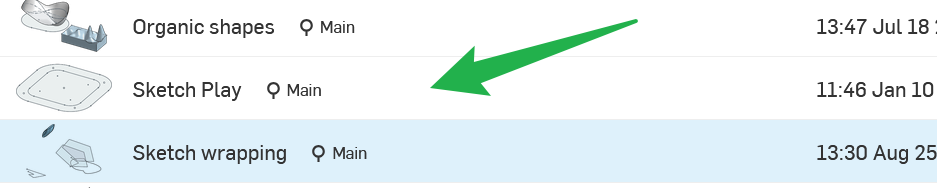
Am I missing something or are the Lables also not available in the document view anymore?
Thanks for considering the comments for future updates.Head of Technical Design @ www.yeswecan.lv
1 -
-
-
@bryan_lagrange Haha, yes! Where is sheet metal loft 😀
0 -
Was trying to drag and drop documents into folders today… I have to say, the new menu system is completely unintuitive. I would like the option to keep a standard folder view like in Windows or Mac.
▚▞▚▞▚▞▚▞▚3