Welcome to the Onshape forum! Ask questions and join in the discussions about everything Onshape.
First time visiting? Here are some places to start:- Looking for a certain topic? Check out the categories filter or use Search (upper right).
- Need support? Ask a question to our Community Support category.
- Please submit support tickets for bugs but you can request improvements in the Product Feedback category.
- Be respectful, on topic and if you see a problem, Flag it.
If you would like to contact our Community Manager personally, feel free to send a private message or an email.
Modified off-the-shelf parts

In OS, I can use a "Derived" feature in a part studio to bring in the components, but I see no easy way to generate a BOM on a drawing of the part studio that shows the source of the derived features.
I'm looking for other ways to handle this. How do you create drawings of parts that are modifications of other parts, and indicate the components that are used?
Answers
-
@eric_poulson - Its not clear to what you want to show up in the BOM. Can you provide an example?To use a simple example, it sounds like you're taking something like an off-the-shelf pulley and are machining a hub in it to match your equipment. So, you want a BOM on your drawing to include a single line with the name and PN of the off-the-shelf pulley. Is that right?I think you could maybe do this in a round-about way.
- import the off-the-shelf part and make your modifications in the part studio.
- Select the modified part, and give it the name, PN, description of the off-the-shelf part.
- Insert the modified part into an assembly by itself.
- Assign the name, PN, and description of the modified part to the assembly.
- Create a drawing of the assembly, and when you insert a BOM, it should have a single line that shows the name, PN, and description of the off-the-shelf part.
0 - import the off-the-shelf part and make your modifications in the part studio.
-
Your example is a good one, and I think your work-around is a good option. I can also just manually create the table in the drawing.
I'm hoping there's a better way that doesn't require manually typing in the metadata from the off the shelf part, so it's still populated from the linked document used in the "derived" feature
Here's another example from SW: 0
0 -
Thanks to @tim_hess427 comments in this thread and @owen_sparks comments in another thread: https://forum.onshape.com/discussion/11309/why-is-it-not-possible-to-derive-a-part-from-standard-content
Here's a method that I think I like enough that I'll give it a try with real parts:- create an assembly
- insert existing components that will be modified
- create a new in-context part studio
- transform, copy-in-place the component
- edit properties of the new part or parts, and mark as exclude from BOM
- Note in the part description something like "this part not to be inserted in assemblies, use assembly tab in this document instead"
- make the modifications
- insert-and-go-to-assembly
- hide the un-modified instance
- make a drawing of the assembly, complete with full BOM functionality
In contrast to the "derived" method, this approach also includes the needed components in higher level structured BOMs, and works with standard content.2 -
Another similar approach which we are using and like pretty well:
- create a part studio
- create a derived part from the off-the-shelf part that will be modified
- make the modifications
- mark the "exclude from BOM" property
- note in the part description something like "this part not to be inserted in assemblies, use assembly tab in this document instead"
- create an assembly in the same document
- insert the modified part
- insert the unmodified off-the-shelf part
- hide the unmodified instance
- make a drawing of the assembly, complete with full BOM functionality
2 -
We also arrived at this last 10- step approach. But it has one (fatal?) flaw: at some point, someone will eventually execute a "show all" in a some assembly higher up and then the un-modified part will re-materialize. Have you found a way to deal with this?
0 -
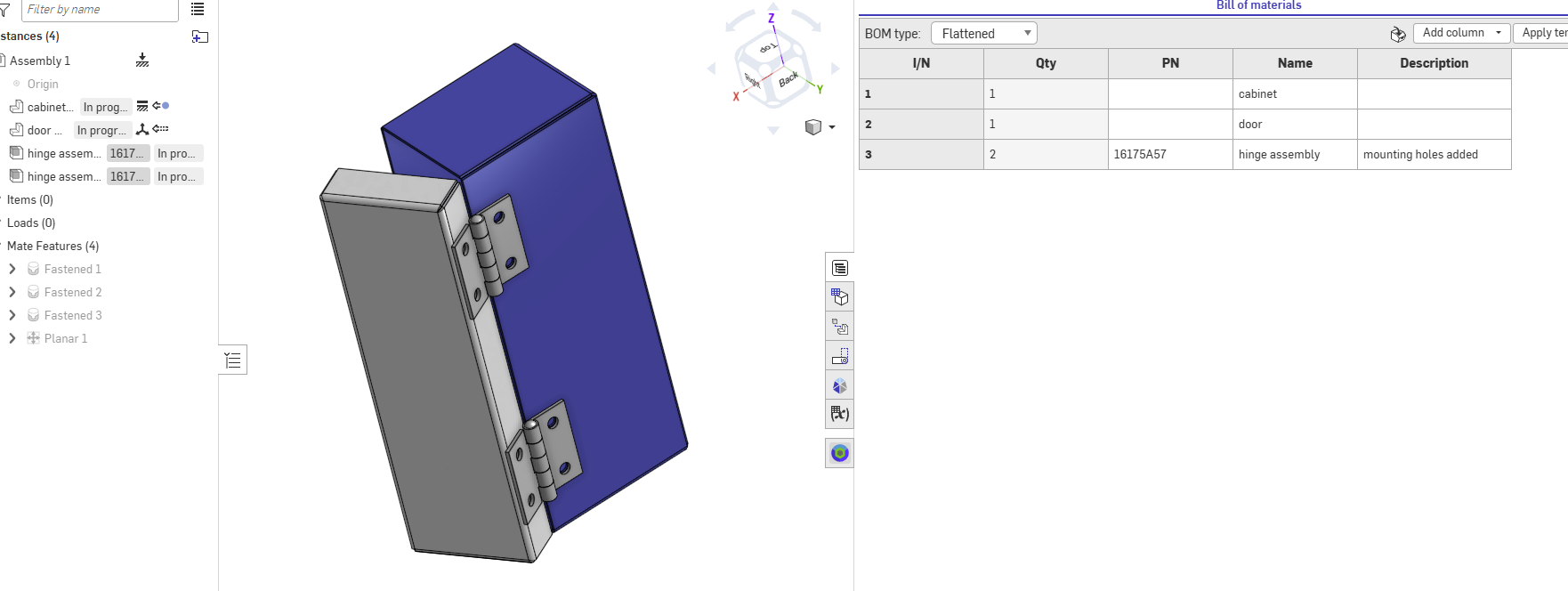
Here is a sample that uses and assembly to make a working off the shelf part. All the parts in the assembly are excluded and will not show unless you're in the BOM and pick show excluded/suppressed but there will be no item number applied. Parts don't show in levels above. Vendor and part number are applied to the assembly as though it's one part.
 0
0


