Fill pattern Question

Hello, Everyone.
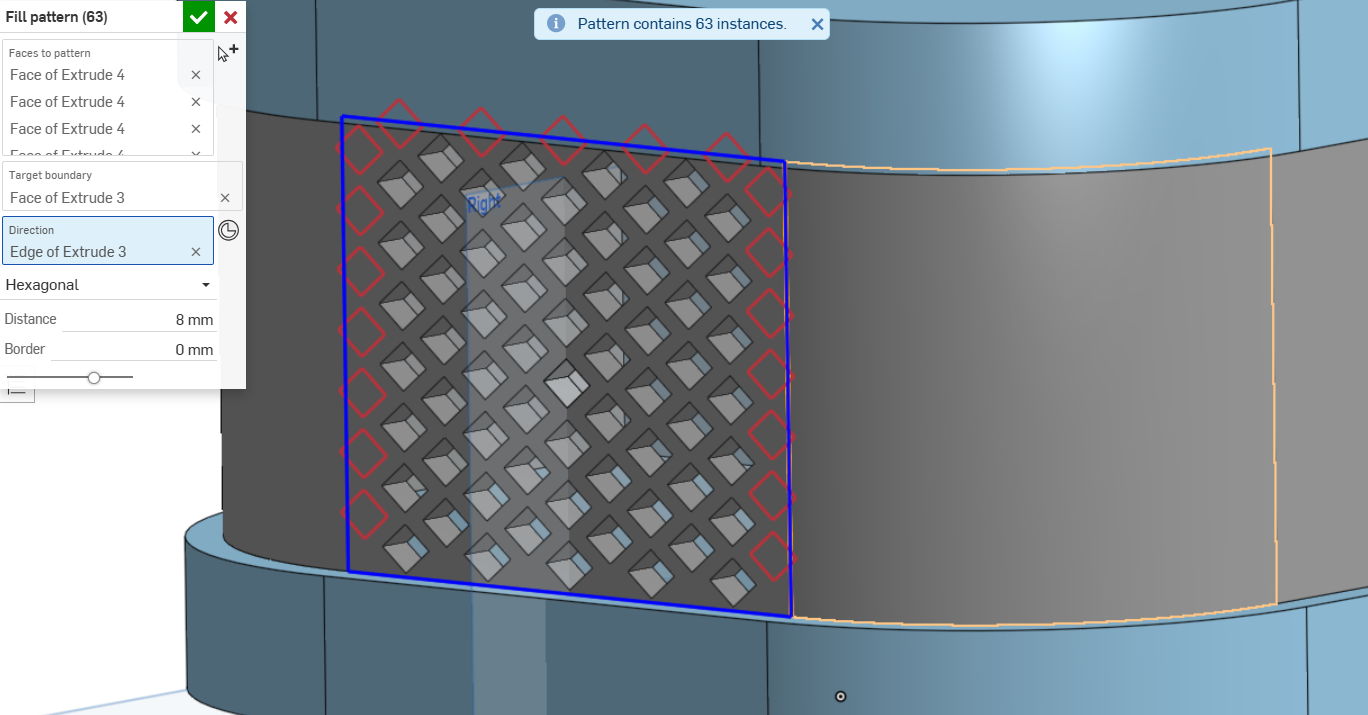
Does someone know how to use the "Fill pattern" custom feature on curved surfaces, in a way that follows the original fill order?
Is there a different custom feature that can do this?
Answers
-
You will have to use something like Approximate Face to "merge" the separated faces into one face then use fill pattern on the one large face.
.
▚▞▚▞▚▞▚▞▚0 -
This brings back some PTSD from doing this the hard way in Solidworks many years ago. The holes all needed to be drafted for injection molding. This also involved a font that the designer created to do the Morse code, which was then set up so we could use the text feature to write out the patterns. Oh and those are curvature continuous-ish corners done with crappy fitsplines.

Simon Gatrall | Product Development, Engineering, Design, Onshape | Ex- IDEO, PCH, Unagi, Carbon | LinkedIn
0 -
Very cool design. But….What does it say?
0 -
I've tried, It "became" one large face yet it just doesn't "allow" it to be selected…Do you know other ways?
0 -
Hmmm "citation needed".
https://en.wikipedia.org/wiki/Western_Digital_My_BookThe Morse code message written into the drive case is made up of a selection of the words "personal", "reliable", "innovative", "simple", and "design".
Those were the "brand principles" that we helped define at IDEO for WD.
Simon Gatrall | Product Development, Engineering, Design, Onshape | Ex- IDEO, PCH, Unagi, Carbon | LinkedIn
0 -